
Livraison le jour même ou le lendemain

Qualité garantie

Débloquez vos offres de bienvenue: Livraison GRATUITE | Jusqu'à -80 % | 30 jours d'essai gratuits à JoyPlus
Téléchargez l'application
Whether you're a graphic designer, video editor, or photographer, finding a laptop that ticks all the boxes—power, colour fidelity, and mobility—can be a daunting task. A machine for creative work must meet a demanding set of requirements: running resource-hungry software without breaking a sweat, guaranteeing perfect colours with a calibrated screen, and being portable enough to go wherever you do.
This guide is here to break down the criteria that truly matter and present our selection of the best models for 2026. Our goal is to help you make the right choice, cutting through the marketing jargon.
Before diving into our top picks, it's essential to understand the components that make all the difference for creative use.
For a laptop for graphic designers or photographers, screen quality is non-negotiable. It's the number-one criterion. OLED technology stands out here with its abyssal blacks and near-infinite contrast, revealing every last detail in your work. Beyond simple resolution, look closely at the colour gamut coverage (DCI-P3 is typically 100% covered on high-quality OLED panels) and the precision of the factory calibration. A 14-inch touchscreen laptop with an OLED screen often represents the ideal compromise between working comfort and portability.
Creative software is truly resource-hungry. A modern processor, like an Intel Core Ultra 7 laptop, is built to handle intensive multitasking and heavy computations. These new chips include a Neural Processing Unit (NPU), a powerful ally for the AI-powered features proliferating throughout creative suites, turning your machine into a true AI laptop.
For 3D rendering, special effects, or 4K video editing on a dedicated laptop, a discrete graphics card is non-negotiable. A model like an RTX 5050 laptop, equipped with its own video memory, will drastically reduce your export times and ensure perfectly smooth previews.
The perfect equation? A lightweight and powerful laptop. It's the holy grail for any nomadic creative. Aim for at least 16 GB of RAM to juggle your applications without slowdowns. For storage, a laptop with a 1 TB SSD has become the standard for installing your software and projects while enjoying near-instant loading times. Finally, never underestimate the importance of connectivity (Thunderbolt/USB4 ports, Wi-Fi 7) and the machine's weight, especially if your office is your backpack.
Let's get down to business. Here are three machines that cater to very different needs and budgets.
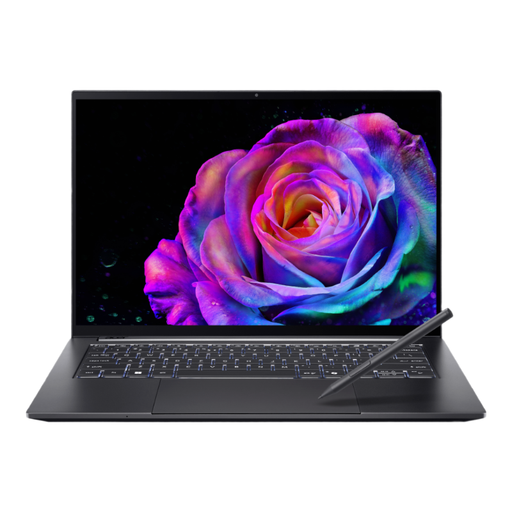
Why It Stands Out
The Acer Swift X 14 (model SFX14-73G) embodies the near-perfect balance for the nomadic creative. Its aluminium chassis houses a powerful configuration, built around a superb 14.5-inch touchscreen OLED display with a 120 Hz refresh rate. This panel offers stunning fluidity and colour accuracy, ideal for photo editing and video work. The combination of an Intel Core Ultra 7 processor and an NVIDIA GeForce RTX 5050 graphics card delivers all the power required for the most demanding tasks, including those that leverage AI.
Key Strengths
Who Is It For? For all-rounder creatives (photographers, videographers, designers) looking for a high-performance, portable OLED creator laptop that makes no compromises on display quality or raw power.
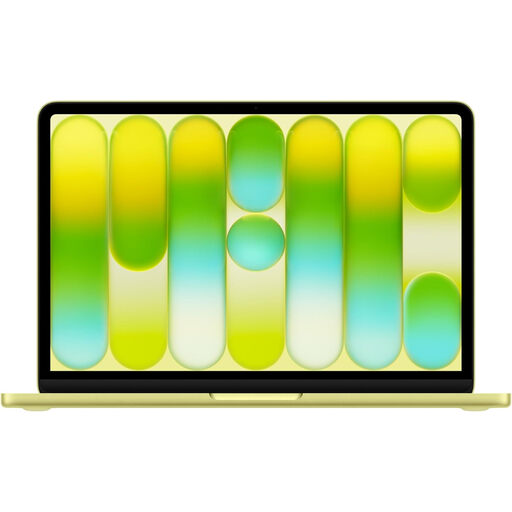
Why It Stands Out
For die-hard macOS fans, the 13-inch MacBook Neo remains a solid choice. It leverages the formidable efficiency of the Apple A18 Pro chip and its meticulously tuned software integration. Its 16-core Neural Engine is built for Apple Intelligence features. While it skips OLED, its Liquid Retina display is nonetheless excellent, with high brightness and a wide colour gamut. Its true strengths are its record-breaking battery life and featherlight weight, making it a champion of mobility.
Key Strengths
Who Is It For? For creatives already well-established in the Apple ecosystem, who rely on software optimised for macOS and for whom portability and battery life take priority over raw power, for light to moderate creative workloads.
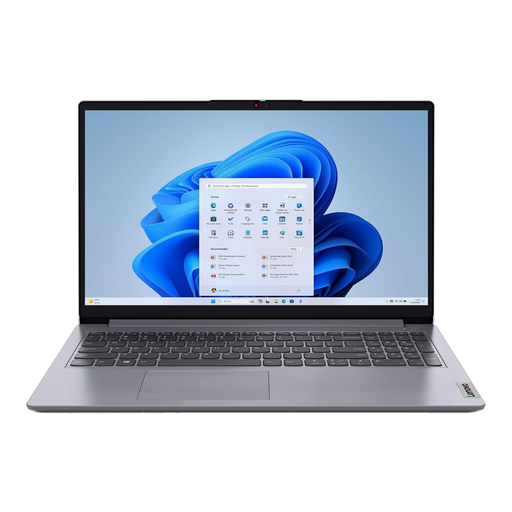
Why It's on This List
Let's be clear: this Lenovo model is an entry-level machine. With its Intel Celeron N4500 processor, 4 GB of RAM, and eMMC storage, it is designed for simple office tasks, web browsing, and video streaming. Its 15.6-inch Full HD screen is decent for these tasks, but it completely lacks the colour accuracy essential for serious graphic work.
Key Strengths
Who Is It For? The IdeaPad 1 is aimed at students or users with very basic needs. It is by no means a creative machine, but its inclusion here helps to highlight the technical and price gap that separates it from laptops designed for professionals.
If versatility is king and you dream of drawing directly on your screen, then hybrid models are made for you. Feel free to take a look at our selection of 2-in-1 laptops to find models that combine the power of a PC with the flexibility of a tablet.
Essential? No. A decisive advantage? Yes. An OLED screen offers infinitely superior contrast compared to LCDs (even the best IPS panels), allowing you to distinguish subtle nuances in shadows and highlights. Most importantly, its near-perfect coverage of the DCI-P3 colour space ensures richer, more true-to-life colours—a critical point before sending a file to print or publishing it online.
To edit 4K video without pulling your hair out, you need a powerful configuration. Aim for a recent processor (like an Intel Core Ultra 7 or equivalent), a minimum of 16 GB of RAM (32 GB is ideal for large projects), a fast SSD of at least 1 TB for your raw footage, and a dedicated graphics card with 6 GB of video memory at a minimum (like an NVIDIA GeForce RTX 5050 or higher).
Intel Core Ultra processors introduce a new architecture that adds a third chip to the classic CPU (Central Processing Unit) and GPU (Graphics Processing Unit) duo: the NPU (Neural Processing Unit). This unit is entirely dedicated to accelerating AI-related tasks while consuming very little power. In practical terms for a creative, this translates to a significant performance boost for AI-based features, such as audio noise reduction, automatic subject cutouts, or visual effects generation.