Spending long hours sitting down—whether for remote work, studying, or an intense gaming session—can put a real strain on your body. The result: poor posture, and tension in your back, neck, and shoulders. Investing in a suitable office chair is therefore not a luxury, but a necessity for preserving your well-being and productivity.
Faced with a plethora of options, it's often difficult to know where to start. The expectations for a gaming chair packed with features are not the same as for an ergonomic office chair with a sleek design. This guide is here to help you see things more clearly by breaking down the key criteria and presenting our top picks to help you make the right choice.
How to Choose the Right Office Chair?
Before you take the plunge, let's review the key points to check to find the chair that's perfectly suited to your needs and body type.
1. Ergonomics: The Cornerstone of Your Comfort
A good chair should adapt to you, not the other way around. This is the number one criterion if you spend more than two hours a day sitting. Here are the adjustments and features to look for:
- Lumbar support: Essential for maintaining the natural curve of your lower back and preventing pain. Some models offer adjustable or even adaptive lumbar support for a tailored fit.
- Multiple adjustments: Seat height is the most basic adjustment, but a quality chair will go much further, offering a reclining backrest, adjustable armrests (in height, depth, and even angle, known as "4D"), and ideally, a synchronous tilt mechanism.
- Seat depth and width: You should be able to sit comfortably back against the backrest while leaving a gap of about three fingers between the edge of the seat and the back of your knees.
2. Materials: A Matter of Durability and Feel
The upholstery of your office chair does more than just define its look; it also determines comfort, breathability, and ease of maintenance.
- Faux leather (PU): Very common on gaming chairs, it can be wiped clean with a sponge and offers a modern look. Its main drawback: it tends to get warm during long sessions.
- Fabric (mesh, linen, etc.): More breathable, it's often more comfortable in warm weather. Mesh is particularly popular for its optimal back ventilation.
- Foam: Opt for high-density foam (often called "cold foam"), which will retain its shape and support for much longer than basic foam.
3. Design and Extra Features
Let's not forget that your chair is an integral part of your home decor. A stylish, minimalist model will blend better into a living room, while a gaming chair will naturally find its place in a gaming setup. Features like a retractable footrest or a deeply reclining backrest can turn your chair into a true relaxation seat. For small spaces or vanity tables, an armless model is often the most practical solution, allowing it to be tucked completely under the desk.
Our Recommended Office Chairs
To help you take action, we've scrutinised three models that cater to very different user profiles.
1. GTPLAYER Gaming and Office Chair
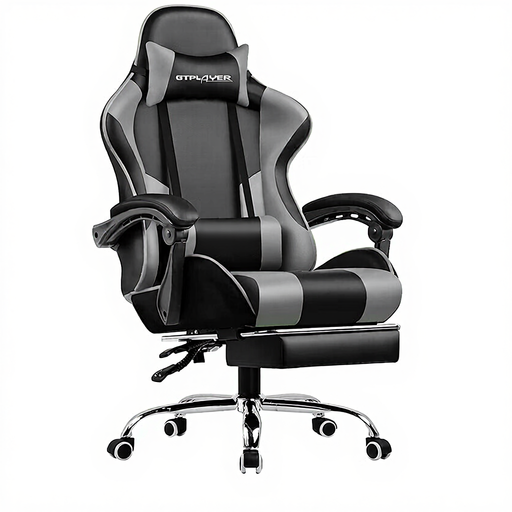
- Why it stands out: This GTPLAYER model merges the DNA of a gaming chair with comfort features designed for those who spend long hours at their desk. Its key feature? A USB-powered massaging lumbar cushion to relieve back tension.
- Advantages:
- Lumbar support with a massage function.
- Retractable footrest for breaks.
- Reclining backrest from 90° to 150°.
- Easy-to-clean PU faux leather upholstery.
- High-density cold foam for durable support.
- Who is it for?: For gamers and remote workers who want the complete package: an immersive experience and a maximum of features. It's the ideal chair for switching from an intense work posture to relaxation mode without leaving your desk.
2. SYMINO Gaming Chair with Breathable Backrest
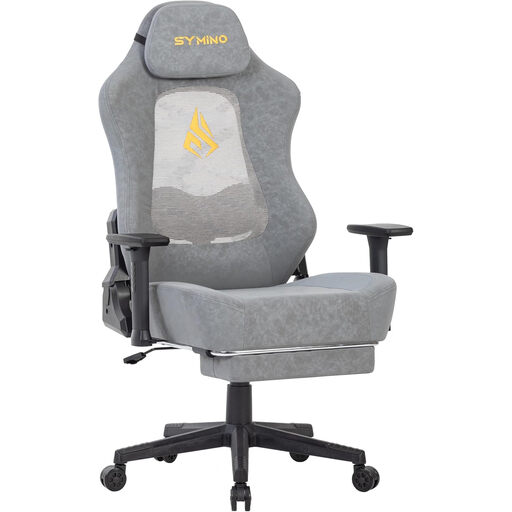
- Why it stands out: The SYMINO chair stands out from the crowd with its cut-out backrest that incorporates a technical mesh for optimal air circulation. Paired with a 3D elastic lumbar support, this design offers an excellent balance between support and breathability.
- Advantages:
- Technical mesh backrest for maximum breathability.
- Adaptive 3D lumbar support that follows the movements of your back.
- Reclining backrest from 90° to 155° with a 12° tilt function.
- Seat without side bolsters (wingless design) for greater freedom of movement.
- PU faux leather upholstery with a vintage look.
- Who is it for?: For anyone who tends to overheat after several hours in front of the screen. It's aimed at users who prioritise ventilation and dynamic back support over gadgets like a footrest.
3. Ochama Office and Makeup Chair
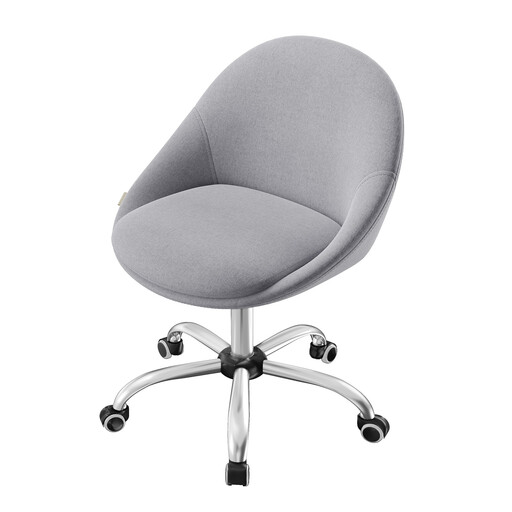
- Why it stands out: With its modern design and geometric lines, this Ochama chair focuses on versatility and elegance. Its compact size and armless design make it the perfect solution for small spaces.
- Advantages:
- Compact and armless design, easy to slide under a desk.
- Versatile style that fits well in a bedroom, office, or at a vanity table.
- Breathable and soft-to-the-touch cotton-linen blend fabric.
- Comfortable seat with 28?kg/m? foam.
- Simple and quick assembly.
- Who is it for?: For students, small workspaces, or those looking for a stylish secondary chair. Its versatility makes it an excellent choice for a side office, a bedroom, or a vanity table.
Looking for a Different Style?
If the feel of the fabric and the minimalist design of the Ochama chair appealed to you, other options might catch your eye. Linen, in particular, is a safe bet for combining natural elegance and comfort.
? Discover our selection of grey linen armchairs to find the model that will enhance your decor.
Frequently Asked Questions
What's the difference between an office chair and a gaming chair?
Although both are used for sitting at a desk, their philosophy is quite different. A classic ergonomic office chair focuses on a minimalist aesthetic, neutral postural support, and fine-tuned adjustments, designed for a professional setting. The gaming chair, on the other hand, is inspired by racing car bucket seats. It offers more enveloping support, a high backrest that supports the head, and relaxation-oriented options (deeply reclining backrest, footrest...).
How do you properly adjust an ergonomic office chair?
For an optimal setup, follow these few steps:
- Adjust the seat height so your feet rest flat on the floor, with your knees at a 90° angle.
- Adjust the seat depth: you should be able to fit 2 to 3 fingers between the edge of the seat and the back of your knees.
- Position the lumbar support to perfectly match the curve of your lower back.
- Adjust the armrests so your forearms rest on them naturally, with your elbows at a 90° angle, without your shoulders shrugging up.
How long does an office chair last?
The lifespan of an office chair depends on the quality of its materials, how often it's used, and how it's maintained. An entry-level model will show signs of wear after only 2 to 3 years. Conversely, a quality chair (steel frame, high-density foam, durable upholstery) can last for 5 to 10 years, or even longer. It's an investment in your daily comfort and health that quickly pays for itself.


