
Livraison le jour même ou le lendemain

Qualité garantie

Débloquez vos offres de bienvenue: Livraison GRATUITE | Jusqu'à -80 % | 30 jours d'essai gratuits à JoyPlus
Téléchargez l'application
The arrival of the Nintendo Switch 2 opens a new chapter for gamers, especially when it comes to social interaction. With it, the promise of features like video chat on Switch 2 becomes a reality, transforming the way you play with friends and family. As discerning consumers, we pay close attention to both the quality and relevance of our purchases. Choosing a Nintendo Switch 2 accessory is no exception. It's about finding a reliable, durable product that is perfectly integrated into the Nintendo ecosystem.
This guide is designed to walk you through the available options, focusing on official products that guarantee flawless compatibility and a seamless user experience.
Before you decide, here are a few practical tips to help you make an informed choice that meets high standards of quality and safety.
The Nintendo Switch 2, like many modern devices, has adopted the USB-C port. Opting for an official USB-C camera for Switch 2 ensures a simple, stable, and fast connection. There's no need for complex adapters or unreliable configurations: you plug it in, and it just works. This is a guarantee of simplicity and reliability.
The accessory market is vast, but only officially licensed Nintendo products guarantee 100% compatibility with your console and its software. This prevents unpleasant surprises during system updates and ensures that features like GameChat will work as intended. Furthermore, these products adhere to strict manufacturing standards.
Think about how you play. Do you primarily play on your TV, in handheld mode, or both? Some cameras are designed to be versatile, offering stands for the TV and clips for the console itself. Others are more compact and discreet, ideal for those who prefer a minimalist setup.
Based on manufacturer information and market feedback, here are two options that stand out for their design and integration into the Nintendo universe.
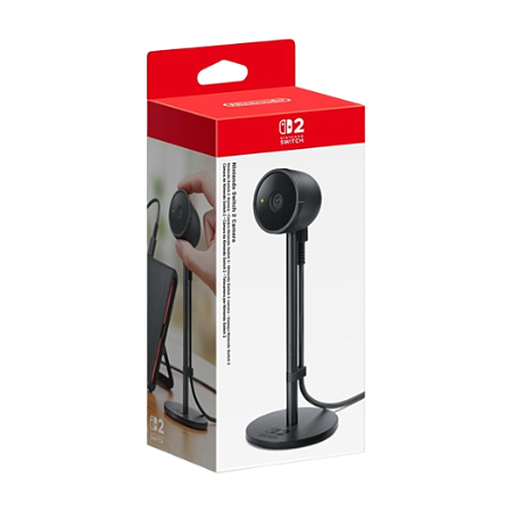
Why we recommend it: This model is Nintendo's direct offering to accompany its new console. Its strength lies in its simplicity and efficiency. Designed specifically for the Switch 2, this Switch 2 webcam integrates seamlessly with the console's interface and is the designated entry point for the GameChat feature. Its understated and compact design allows it to blend into any gaming setup without adding clutter.
Pros:
Who is this product for? For gamers looking for a simple, reliable, and effective solution to enable video chat features on their Switch 2. It's the go-to choice for families and users who want a smooth experience without worrying about technical details.
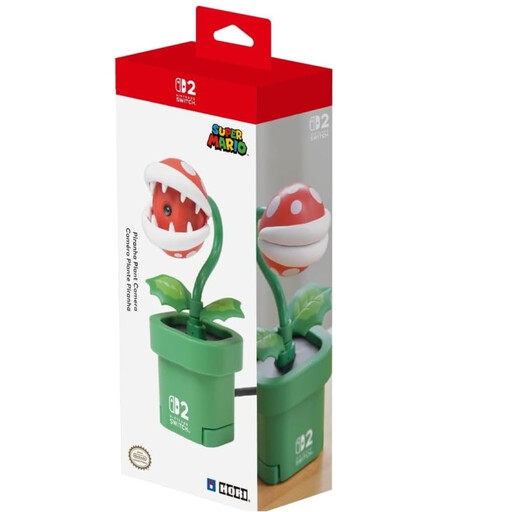
Why we recommend it: The Piranha Plant camera is much more than just an accessory; it's a true collector's item that combines functionality with a passion for the Super Mario universe. Officially licensed by Nintendo and manufactured by HORI, it stands out with its playful design and dual mounting functionality. It can be placed on the TV in its pipe-shaped pot or clipped directly onto the console for handheld play. The lens cover integrated into the plant's mouth is a clever detail for privacy.
Pros:
Who is this product for? For Nintendo fans, collectors, and anyone looking to add a unique touch of personality to their gaming setup. It's the ideal choice for players who appreciate accessories that stand out from the crowd while remaining perfectly functional.
If your needs go beyond simple video chat and you're considering a more comprehensive setup for streaming on Switch 2, it might be worth exploring other equipment. From capture cards to dedicated microphones, many solutions exist to improve the quality of your broadcasts.
To discover a wider range of equipment, you can browse our category dedicated to streaming devices.
1. Can a standard USB-C camera work with the Nintendo Switch 2? While technically possible with some models, using a non-official camera can lead to compatibility issues, especially with specific software like GameChat. For a guaranteed and secure experience, it is always advisable to opt for officially licensed Nintendo accessories.
2. Is a subscription required to use video chat on the Switch 2? Yes, using online features, including video chat via GameChat, requires a Nintendo Account, an internet connection, and an active subscription to the Nintendo Switch Online service. These requirements are standard for most online gaming services on consoles.
3. How do you install the Piranha Plant camera on a TV? The setup is very simple. The camera comes with a base shaped like a Mario pipe. Just place this base on the top edge of your TV, insert the camera unit into it, and then connect the USB cable to your Nintendo Switch 2's dock. The base is designed to be stable and fit most flat-screen TVs.