
Livraison le jour même ou le lendemain

Qualité garantie

Débloquez vos offres de bienvenue: Livraison GRATUITE | Jusqu'à -80 % | 30 jours d'essai gratuits à JoyPlus
Téléchargez l'application
The Nintendo Switch 2 has finally arrived, ushering in a new generation of gaming with richer graphics and more expansive worlds. The downside?: just like its predecessor, its internal storage fills up very quickly. Between game installations, updates, and DLC, a storage expansion for the Switch 2 quickly becomes a necessity.
Navigating the vast array of available models to choose the right memory card for the Switch 2 can be a headache. Should you prioritise capacity, speed, or a specific brand?? This guide is here to help you cut through the noise and find the perfect microSD card for your gaming habits, without getting bogged down in technical jargon.
Before diving into our top picks, let's review the key factors to ensure you make the right choice.
Game sizes are constantly increasing. While a 128 GB card might suffice for casual gamers, a 256 GB microSD for the Switch 2 stands out as the best compromise for most users. It allows you to easily store a dozen AAA titles, a healthy collection of indie games, and your screenshots, without constantly having to juggle installations and deletions. For dedicated digital-only collectors, 512 GB or 1 TB models offer complete peace of mind.
The big new feature of the Nintendo Switch 2 is its compatibility with the microSD Express standard. These cards leverage newer technology (NVMe) to deliver read and write speeds far superior to those of traditional UHS-I cards. In practical terms, this translates to significantly reduced loading times on the most demanding games. Although the console remains compatible with older cards, choosing a Nintendo microSD Express card is the only way to take full advantage of the Switch 2's performance.
Officially licensed Nintendo memory cards are your guarantee of perfect compatibility. Developed in partnership with the brand, they ensure flawless operation. Of course, other cards from reputable brands (SanDisk, Samsung, etc.) also work very well, but an officially licensed product provides guaranteed peace of mind.
Here are our picks for the best microSD cards to equip your Nintendo Switch 2.
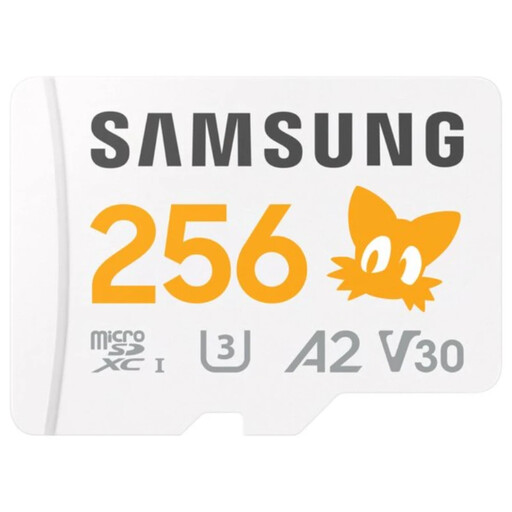
Why It Stands Out
It combines Samsung's renowned reliability with an official Sonic the Hedgehog design that will delight fans of the blue hedgehog. Even though it uses the UHS-I interface, its performance remains excellent for the vast majority of Switch 2 games.
Key Features
Who Is It For??
For gamers who want a reliable and stylish card from a top brand. It's an excellent choice for those who switch between digital games and cartridges and aren't seeking absolute top-tier performance at all costs.
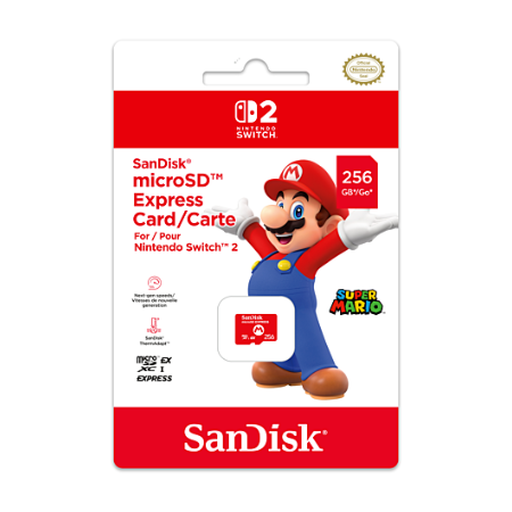
Why It Stands Out
Tailor-made for the Nintendo Switch 2, this SanDisk card is one of the first to feature microSD Express technology. It's aimed at those who want to cut loading times to an absolute minimum and enjoy an uncompromising gaming experience.
Key Features
Who Is It For??
For demanding gamers who make performance an absolute priority. If you're a digital-only enthusiast and every second spent on a loading screen is a second too long, this card is for you.
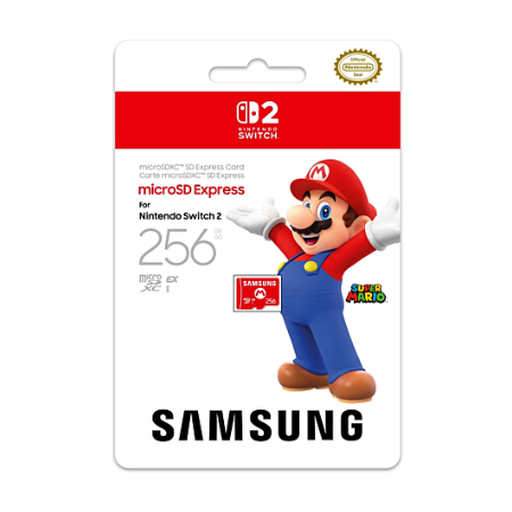
Why It Stands Out
Samsung is also entering the race with its own officially licensed Nintendo microSD Express card. It directly competes with the SanDisk model, leveraging the Korean brand's solid reputation in flash memory.
Key Features
Who Is It For??
For Samsung brand loyalists who want to equip their Nintendo Switch 2 with a cutting-edge, fast, and officially Nintendo-validated storage solution.
Our selection highlights the 256 GB size, which currently represents the best capacity-to-price ratio. Your needs may differ?: if you're looking for a higher capacity, another brand, or simply more choice, many other options are available to you.
Discover our full range of Micro SD cards to find the perfect model.
For a regular gamer, a 256 GB card is an excellent starting point. It's enough to store several major titles and a multitude of indie games. If you're a digital-only enthusiast, we recommend jumping straight to 512 GB or 1 TB for long-term peace of mind.
Yes, the Nintendo Switch 2 is backward compatible with microSD UHS-I cards, the standard used by the original Switch. You can therefore reuse your old card without any issues. However, to enjoy the fastest possible loading times on new games, a microSD Express standard card is highly recommended.
The simplest and safest method is to use a computer. Completely power off your console, then remove the old card and insert it into your PC or Mac's card reader. Copy the entire folder named "Nintendo" to your desktop. Next, insert your new microSD card into the computer (format it as exFAT if it isn't already), then copy and paste the "Nintendo" folder from your desktop to the new card. For a detailed step-by-step guide, be sure to consult the official Nintendo support website.