
Livraison le jour même ou le lendemain

Qualité garantie

Débloquez vos offres de bienvenue: Livraison GRATUITE | Jusqu'à -80 % | 30 jours d'essai gratuits à JoyPlus
Téléchargez l'application
Diving into the world of mechanical keyboards can quickly become overwhelming: compact layouts, switch types, connectivity, gasket mounting... Faced with a plethora of options, it's hard to know where to start. Whether you're a gamer seeking ultimate responsiveness, a developer glued to your screen, or simply a connoisseur of the perfect setup, choosing the right keyboard is a crucial step.
This guide is here to decode the technical jargon and present a selection of models tailored for specific uses. The goal: to give you all the keys to making the right choice, with full confidence.
Before diving into our selection, let's review the essential criteria for finding the keyboard that's truly right for you.
The keyboard's format, or form factor, directly impacts your ergonomics and the space available on your desk.
The heart of a mechanical keyboard is its switches. They define the typing feel, sound, and responsiveness of the keyboard. The three main types are:
The hot-swap feature is a real game-changer: it allows you to change switches on the fly, without any soldering. This opens the door to the ultimate customisation of your typing feel!
Connectivity is a matter of priorities:
Let's get down to specifics with a few models that caught our eye, each with its own strengths.

Why it stands out This model is a true Swiss Army knife in an ultra-compact format. Its triple connectivity (wired, Bluetooth, and 2.4 GHz) makes it the ideal companion for those who constantly switch between multiple devices. Its 60% keyboard format frees up maximum desk space, a decisive advantage for gamers who like to make wide mouse sweeps.
Advantages
Who is it for? Perfect for digital nomads, fans of minimalist setups, and gamers looking for a gaming keyboard that is both portable and responsive. Its QWERTY layout can be configured to your local layout (like AZERTY or QWERTZ) in a flash within your operating system's settings.
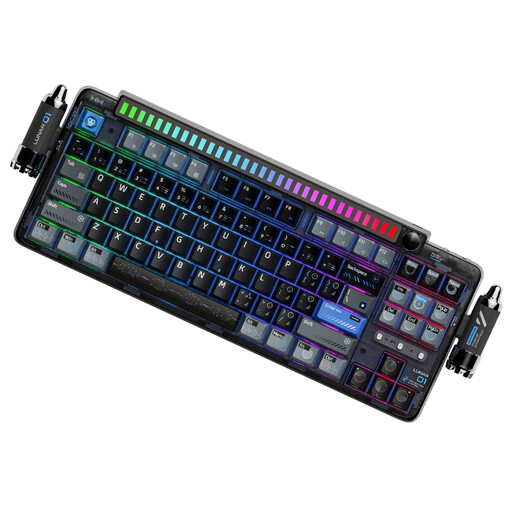
Why it stands out The KEYSME Lunar 01 is aimed at enthusiasts for whom the typing experience and acoustics are paramount. Its Gasket-Mount structure, combined with multiple layers of silicone dampening, delivers a deep, muted sound—the famous "thock" so sought-after by connoisseurs. It also stands out with its unique touches, like its sound-reactive light bar and magnetic accessories.
Advantages
Who is it for? For connoisseurs, content creators, and professionals who value their desk aesthetics as much as their typing quality. A keyboard that blends performance, acoustics, and design.
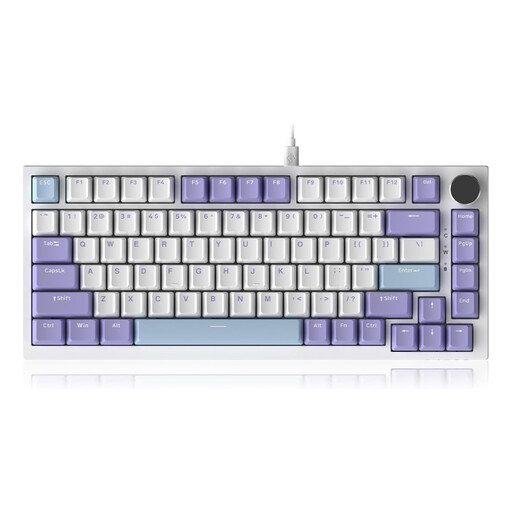
Why it stands out The AJAZZ AK820 embodies the perfect balance between compactness and functionality. Its 75% keyboard format keeps the essential keys while minimising its footprint. Its CNC-machined metal volume knob is an addition that is as practical as it is elegant, allowing you to manage audio on the fly. Its purely wired connection makes it a safe bet for gaming.
Advantages
Who is it for? An excellent choice for gamers who swear by wired connections and for professionals seeking a compact TKL keyboard with media controls within easy reach. It's an excellent entry point into the world of gasket-mounted keyboards.
Our selection already covers a wide range of needs, but the perfect keyboard remains a very personal matter. If you're looking for a more understated aesthetic and wireless connectivity for a pristine desk, other models might catch your eye.
? Discover our complete collection of Black Wireless Keyboards to find other alternatives.
The fundamental difference lies in the technology beneath each key. A mechanical keyboard uses an individual mechanical switch for every key. The result: better responsiveness, increased durability, and a much crisper typing feel. In contrast, a membrane keyboard relies on a rubber dome sheet shared across all keys. It's quieter and cheaper, but often less precise and more "mushy" to type on.
A QWERTY keyboard refers to the key arrangement used in English-speaking countries, as opposed to layouts like AZERTY or QWERTZ used elsewhere. The keyboards presented here are US QWERTY. But don't worry, this is not a deal-breaker at all. Operating systems (Windows, macOS, Linux) allow you to switch the layout to your local preference in just a few clicks. Your typing will then be perfectly normal, even if the letters printed on the keycaps don't match. You get used to it very quickly!
The appeal of an RGB keyboard is twofold. On one hand, it's purely aesthetic: it allows you to personalise your desk and harmonise it with the rest of your setup. On the other hand, it's functional: the backlighting is essential for seeing clearly in low light. Some software even allows you to assign colours to groups of keys (for example, shortcuts for a game or application), which can be a real boost in efficiency.