
Livraison le jour même ou le lendemain

Qualité garantie

Débloquez vos offres de bienvenue: Livraison GRATUITE | Jusqu'à -80 % | 30 jours d'essai gratuits à JoyPlus
Téléchargez l'application
Choosing a mechanical gaming keyboard can often be a daunting task. Faced with a jungle of layouts, switches, and connectivity options, it's easy to get lost. Yet, a good keyboard does more than just improve your typing comfort?— its responsiveness can give you a decisive edge in-game. This guide is here to cut through the noise, introduce the criteria that truly matter, and help you find that perfect keyboard, whether you're an esports pro or an enthusiast with a passion for beautiful setups.
Before diving into our top picks, let's review the key criteria that will make all the difference in your daily use.
The keyboard's layout dictates the entire ergonomics of your desk, for both gaming and work.
The switch is the heart of the keyboard. This small mechanism under each keycap defines your entire typing feel.
The eternal dilemma: wired or wireless? The answer depends entirely on your priorities.
Enough theory, let's get practical! Here are a few models that have caught our eye and will suit different types of gamers.
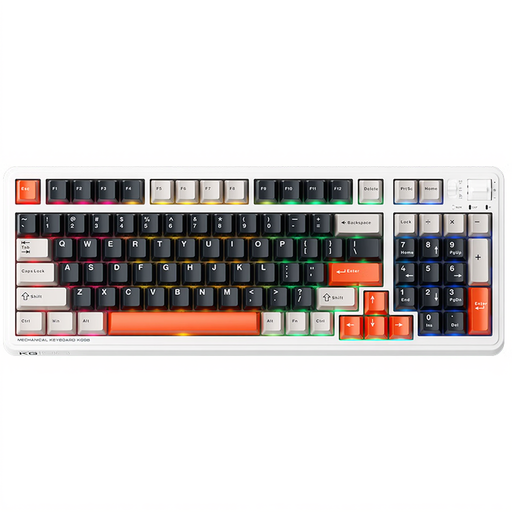
Why It Stands Out
The Machenike KG98 shines with its particularly clever 96?% layout. It manages to fit 98 keys, including a number pad, into a frame that's barely wider than a TKL. Its triple connectivity (wired, 2.4 GHz, Bluetooth) makes it ultra-versatile, while its pre-lubed linear Ice Cream Pro Max switches ensure a smooth and responsive typing experience right out of the box.
Pros
Who Is It For??
For users who want the best of both worlds: a keyboard that's equally at home in gaming and office work. If you need a number pad but every centimetre on your desk counts, this is for you. Its ability to juggle multiple devices makes it a prime companion for hybrid use.
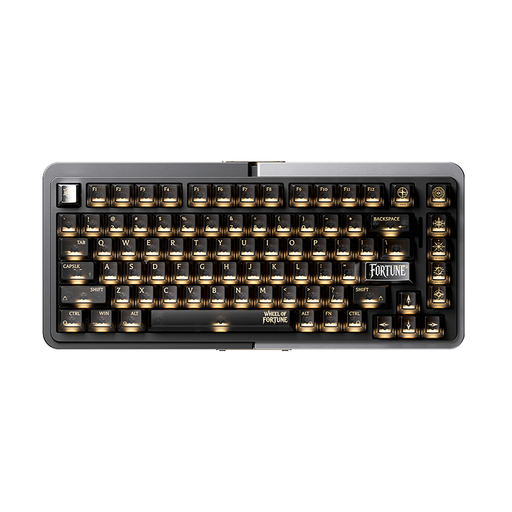
Why It Stands Out
The Royalaxe E75 is a powerhouse, built for pure performance. Its secret weapon: magnetic Hall Effect switches (TTC Magnetic Switches). This technology delivers lightning-fast responsiveness, with features like Rapid Trigger and an adjustable actuation point, making it a formidable weapon in FPS games. Its full CNC aluminium case ensures rock-solid durability and an exceptionally stable typing experience.
Pros
Who Is It For??
For die-hard competitors, especially in titles like Valorant or CS2 where every millisecond makes a difference. It's a significant investment, but a justified one for those who demand absolute responsiveness and uncompromising build quality.

Why It Stands Out
This model plays the minimalism and mobility card. Its 60% keyboard layout frees up considerable desk space, a dream for low-DPI mouse players. Just like the Machenike, it features triple-mode connectivity (wired, 2.4 GHz, Bluetooth), making it as practical on the go as it is at home. Its Blue Clicky switches deliver a very distinct tactile and audible feedback, which has its fans for writing.
Pros
Who Is It For??
For gamers on the go, fans of clean setups, and anyone who needs maximum room for their mousepad. It's also an excellent entry point into the world of compact keyboards without breaking the bank.
Of course, this selection is just a taste of what the market has to offer. If you're looking for more exotic layouts, premium materials, or even deeper customisation options, the possibilities are nearly endless.
To discover a wider range and find unique models, check out our Fully Custom Mechanical Keyboard category.
A standard linear switch activates the key when it reaches a fixed point in its travel. It's a simple on/off contact. A Hall Effect keyboard, on the other hand, uses a magnetic sensor to continuously measure the exact position of the key. This not only allows you to customise the actuation point but also to use features like "Rapid Trigger," where the key resets the moment you start to release it. The result: blazing-fast repeated keystrokes.
A 60% keyboard requires a short adjustment period; that's undeniable. The absence of dedicated arrow and function keys forces you to form new habits, especially with the "Fn" key. Once you get the hang of it, many users can't go back. Its key advantage remains the massive amount of space it frees up for your mouse, in addition to its portability. It's a favourite among FPS players and apostles of minimalism.
A hot-swappable keyboard allows you to change the mechanical switches without pulling out a soldering iron. The benefit is twofold: on one hand, customisation (you can test and mix different types of switches to find your perfect typing feel), and on the other, maintenance (a faulty switch? You can replace it in seconds, instead of having to throw the keyboard away).