Compact layouts, TKL, linear switches, tactile, hot-swappable... Choosing a mechanical gaming keyboard can be overwhelming. Whether you're a pro gamer seeking absolute responsiveness, a remote worker looking for typing comfort, or a customisation enthusiast, finding the ideal keyboard is crucial.
Our mission? To help you make sense of it all. This guide breaks down the technical features that truly matter and presents our selection of the must-have models for 2026. The goal: to help you make an informed choice without drowning in marketing jargon.
Buyer's Guide?: Key Factors for Choosing Your Mechanical Keyboard
Before diving into our top picks, let's review the three pillars of a great mechanical keyboard: its layout, its switches, and its features.
Size Matters?: From Compact to TKL Layouts
The keyboard's format, or layout, has a direct impact on your ergonomics and the amount of space on your desk.
- Compact Format (60% - 65%): Say goodbye to the number pad, the function keys (F1-F12), and sometimes even the arrow keys. These keyboards are all about a minimal footprint. The compact mechanical keyboard is therefore the best friend of FPS gamers who love wide mouse movements and fans of minimalist desk setups.
- TKL Format (Tenkeyless, 75% - 80%): The TKL keyboard is arguably the most popular compromise on the market. It keeps the function keys and arrows but omits the number pad. It offers an excellent balance between functionality and space-saving, making it equally at home in gaming and office work.
- 98% or 1800-Compact Format: A clever alternative that reintegrates the number pad into a chassis that is only slightly wider than a TKL. Ideal for those who can't live without the numpad but still want to optimise their space.
The Heart of the Keyboard?: Understanding Switches
Mechanical switches are the core of the keyboard. They define the typing feel, the sound, and the responsiveness of your board.
- Linear Switches (e.g., Reds): They offer a smooth and quiet keystroke, with no tactile bump or audible click. The red switch keyboard is a gamer's favorite for its activation speed, which is ideal for spamming actions.
- Tactile Switches (e.g., Browns): They feature a slight, perceptible bump halfway through the keypress, which confirms the key's activation without producing a loud "click". This is the ultimate all-rounder switch, equally good for writing lines of code and landing headshots.
- Clicky Switches (e.g., Blues): Similar to tactile switches, but they add a distinct, audible "click". While satisfying for typing, they should be avoided if you work in an open-plan office or if your teammates are sensitive to noise.
More and more models are now hot-swappable. This feature allows you to change switches on the fly, without any soldering. A major plus for customising your keyboard or replacing a faulty switch.
Connectivity and Customisation?: Wired, RGB, and More
- Connectivity: The wired gaming keyboard remains the gold standard for its reliability and near-zero latency, a non-negotiable criterion in competitive play. Detachable cables (usually USB-C) add a modern touch and make transport easier.
- Backlighting: The RGB mechanical keyboard is more than just a gimmick. It allows for per-key lighting customisation with millions of colours, but it can also be useful for highlighting key zones (like WASD) for a specific game.
Top Mechanical Keyboard Recommendations
Let's get down to business with a few models that have caught our eye and cater to distinct user profiles.
AKUMA GAMING MEKA T01?: The Compact Choice
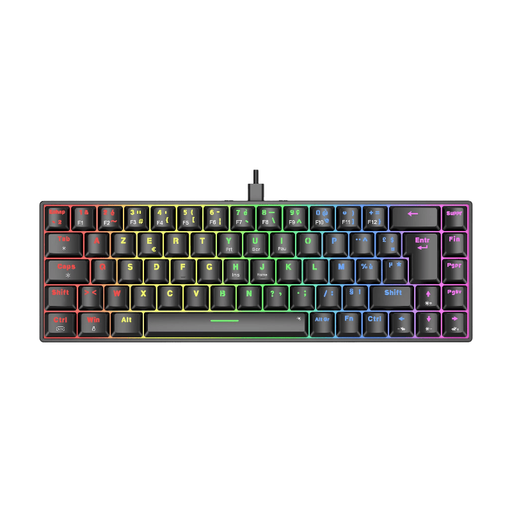
Why we love it: With its ultra-compact 69-key layout (an unofficial 65%), the MEKA T01 frees up maximum desk space. This is a major asset for gamers who make wide mouse movements.
Advantages:
- Format: Compact 69-key layout for maximum space-saving.
- Switches: Equipped with linear red switches, it ensures a smooth and responsive typing experience, perfect for intense gaming sessions.
- Customisation: Customisable RGB backlighting with multiple lighting effects.
- Performance: Full anti-ghosting to ensure no keystroke is lost in the heat of the moment.
- Convenience: Detachable USB cable makes storage and transport easy.
Who is it for?PC, PlayStation, or Xbox gamers looking for a minimalist and high-performance keyboard, as well as digital nomads or those with limited workspace.
AJAZZ AK820?: The Balance of Performance and Features
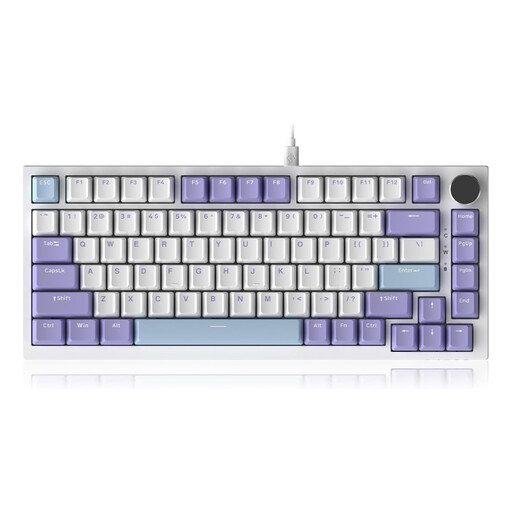
Why we love it: The AK820 combines a TKL (75%) format with high-end features like a gasket mount structure and a CNC volume knob. It targets enthusiasts looking for a premium typing experience without breaking the bank.
Advantages:
- Typing Comfort: Its Gasket Mount structure, combined with five layers of foam (PORON, IXPE...), offers a cushioned, quiet, and incredibly pleasant typing experience.
- Advanced Customisation: It's a hot-swappable mechanical keyboard, compatible with both 3-pin and 5-pin switches for deep customisation.
- Practical Features: Its CNC-machined metal volume knob is a real plus for adjusting sound on the fly without leaving your game.
- Durability: PBT keycaps, a material far more resistant to wear and shine than traditional ABS.
- Compatibility: Works with Windows and macOS, and can be connected to consoles via an adapter (not included).
Who is it for? For customisation fans, professionals, and gamers who want a high-end typing feel, a refined design, and the freedom to modify everything.
AJAZZ AK980?: The Numpad Without the Bulk
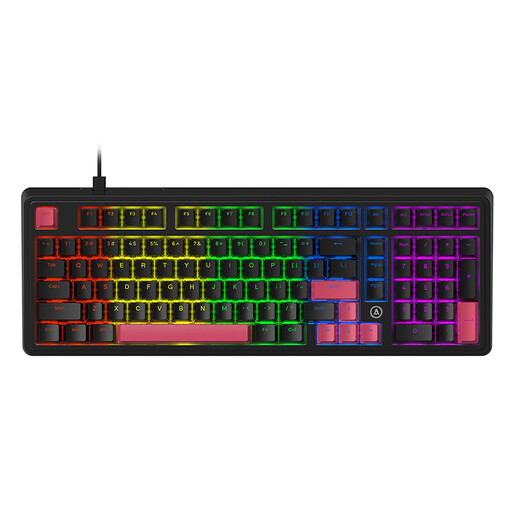
Why we love it: The AK980 succeeds in keeping the number pad while being much more compact than a classic 100% keyboard. It also incorporates comfort-focused technologies, such as the gasket mount.
Advantages:
- Smart Layout: Its 98% format is the ideal compromise for those who juggle spreadsheets by day and games by night.
- Ready Out of the Box: Equipped with factory pre-lubed linear red switches, it offers a perfectly smooth glide right from the start.
- Typing Quality: Just like the AK820, it benefits from a Gasket Mount structure and multiple sound-dampening layers for a muted sound and a soft typing feel.
- Customisable: Hot-swappable support allows you to easily change switches to tailor the keyboard to your preferences.
- Durable Materials: Double-shot PBT keycaps ensure excellent resistance to wear.
Who is it for? For professionals, students, and gamers who can't do without a number pad but want a more modern and streamlined setup than a 104-key keyboard provides.
Want to Explore Other Options??
Our selection is just a glimpse. If the smooth and quiet performance of red switches has won you over (an excellent choice for both gaming and office work), we have put together a much larger collection for you.
Discover our full range of red switch keyboards
Frequently Asked Questions (FAQ)
What is the real advantage of a mechanical keyboard for gaming?
Their main asset is responsiveness and reliability. Since each key has its own switch, activation is faster, more precise, and more consistent than with a classic membrane keyboard. Their durability is also far superior, with switches often rated for tens of millions of keystrokes.
Are red switches good for typing?
Absolutely. Their linear travel and quiet operation make them very pleasant for long typing sessions. However, the lack of tactile feedback can be off-putting for some users who are used to "feeling" the key activate. Ultimately, it's a matter of taste and habit.
What does "hot-swappable" mean?
A hot-swappable keyboard allows you to change the switches without needing a soldering iron. This is ideal for experimenting with different types of switches or for easily replacing a faulty key.
Joybuy Product Recommendation Officer


