
Livraison le jour même ou le lendemain

Qualité garantie

Débloquez vos offres de bienvenue: Livraison GRATUITE | Jusqu'à -80 % | 30 jours d'essai gratuits à JoyPlus
Téléchargez l'application
In the competitive gaming arena, every millisecond and every gram counts. Latency, equipment weight, and freedom of movement are all details that can decide the outcome of a match. In this context, the lightweight wireless gaming mouse has established itself as the weapon of choice for gamers seeking absolute responsiveness and long-term comfort.
Our mission: to guide you through the jungle of options to find the model that will lead you to victory. We've analysed and selected the mice that truly make a difference.
Before diving into our selection, let's review the essential technical criteria for finding the perfect mouse for you.
In fast-paced games like FPS, an ultra-lightweight gaming mouse is a strategic advantage. A model weighing under 60g reduces wrist fatigue and frees up your movements, making them quicker and more precise. This lightness, combined with an ergonomic shape suited to your grip style (palm, claw, or fingertip), multiplies comfort and control.
Wireless technologies have taken a giant leap forward. Today, a 2.4 GHz connection offers near-zero latency, easily competing with wired models. It has become the essential standard for any self-respecting esports mouse. A Bluetooth gaming mouse shines with its versatility, connecting to any device without needing a dongle. Finally, tri-mode mice (wired, 2.4 GHz, Bluetooth) are the ultimate Swiss Army knife, perfect for switching from intense gaming to mobile office use.
A high-performance gaming mouse is defined by the quality of its sensor. Three key indicators to watch for:
Here are three models that stand out for their design, technical specs, and performance-driven DNA.
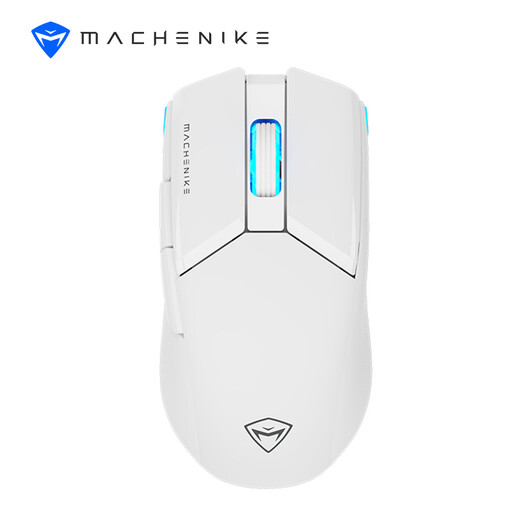
Why It Stands Out The Machenike L9X1 achieves the feat of combining a featherlight 53g weight with a solid, non-perforated shell. A real plus for grip and maintenance. Its tri-mode connectivity (wired, 2.4G/Bluetooth) makes it an extremely versatile choice.
Pros
Who Is It For? For gamers and mobile professionals looking for a high-performance, lightweight white gaming mouse that can effortlessly switch between a gaming setup and a multi-device work environment.
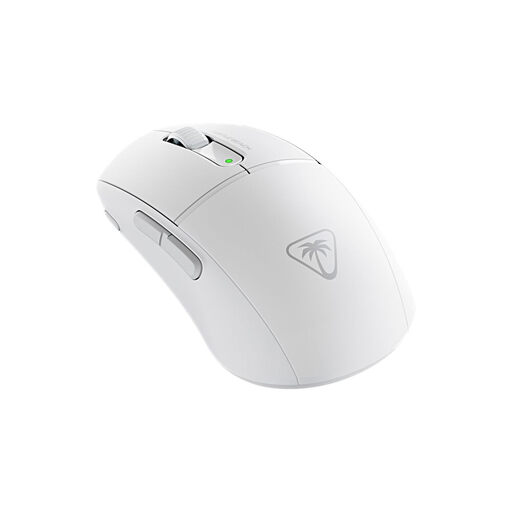
Why It Stands Out Weighing in at 47g, the Turtle Beach Burst II Air is one of the lightest wireless mice on the market. It's tailor-made for gamers who prioritise raw speed and responsiveness above all else, especially in FPS games.
Pros
Who Is It For? Ideal for esports competitors who demand an ultra-lightweight gaming mouse for explosive, unrestricted movements and who seek the absolute responsiveness of optical switches.
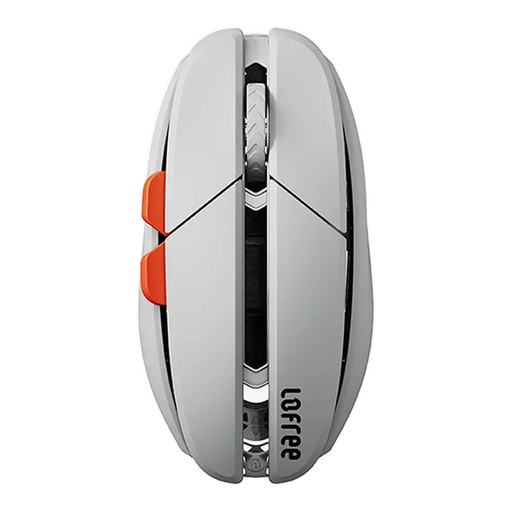
Why It Stands Out The Lofree Hypace OE923 plays in the big leagues with its magnesium alloy chassis, which provides premium rigidity and feel at a record-breaking 47g. Equipped with a PAW3950 sensor, it packs cutting-edge performance into a sleek, stylish frame.
Pros
Who Is It For? For aesthetes, tech enthusiasts, and gamers who make no compromises between refined design, premium materials, and a high-performance gaming mouse.
Choosing a mouse is a very personal decision. If you're a die-hard fan of wired stability or simply want to explore other designs, our selection of wired gaming mice is packed with alternatives for every type of gamer.
Weight directly impacts agility and fatigue. An ultra-lightweight gaming mouse (typically under 60-65g) requires less effort to move, resulting in faster, more precise movements—a decisive advantage in first-person shooters (FPS). It also reduces wrist strain during long gaming sessions.
Absolutely, provided you choose the right technology. Modern mice with a 2.4 GHz connection via a USB dongle offer latency so low (often 1 ms) that it's imperceptible and fully comparable to a wired mouse. This technology has become the standard for professional esports gear.
For gaming, a 2.4 GHz connection is a must. It's designed to guarantee low latency and a rock-solid connection—two crucial points for performance. Bluetooth, on the other hand, is more convenient for office work and mobile use (no dongle, better battery life), but its higher latency disqualifies it for competitive gaming. A tri-mode mouse offers you the best of both worlds.