
Livraison le jour même ou le lendemain

Qualité garantie

Débloquez vos offres de bienvenue: Livraison GRATUITE | Jusqu'à -80 % | 30 jours d'essai gratuits à JoyPlus
Téléchargez l'application
Choosing a new laptop can quickly become a daunting task. Between complex spec sheets and marketing jargon, it's often hard to separate what's essential from what's not. As a Product Recommendation Officer at Joybuy, my role is to help you cut through the noise. The goal isn't to steer you towards the most expensive model, but to the one that truly fits your daily needs while offering excellent long-term value.
This guide focuses on objective criteria to help you make an informed decision, whether you're a student, a professional on the go, or a gaming enthusiast.
Before diving into our selection, here are a few key points to help you analyse any offer on the market.
Mandatory in France, the repairability score is a rating out of 10 that assesses how easy a product is to disassemble and repair. A high score (above 7) suggests the device is built to last and that its components, like the battery or storage, can be replaced more easily. It's an excellent indicator of a laptop's durability and a crucial factor for a long-lasting investment.
Rather than relying on marketing names for technologies, focus on three fundamental elements:
A professional laptop, or even one for family use, should integrate seamlessly into your environment. Ensure it has the ports you need daily: USB-C ports (ideally with Thunderbolt support for fast transfers and display connectivity), an HDMI port, and possibly an SD card reader. Also, consider the software ecosystem (macOS or Windows) and its compatibility with your other devices (smartphone, tablet).
Here are a few options that stand out for their balanced specifications and clear market positioning, suited for different user profiles.

Why We Recommend It
The MacBook Pro with the M5 chip is a prime choice for users seeking seamless integration within the Apple ecosystem. Its M5 chip offers a remarkable balance of performance and power efficiency, resulting in excellent battery life. The Liquid Retina XDR display is a benchmark for visual quality, a major asset for creative professionals.
Pros
Who Is This Product For?
This model is particularly recommended for content creators (photographers, videographers, designers) and developers already working within the Apple ecosystem. It's a powerful and versatile professional laptop, whose price is justified by its build quality, display, and software optimisation.
Why We Recommend It
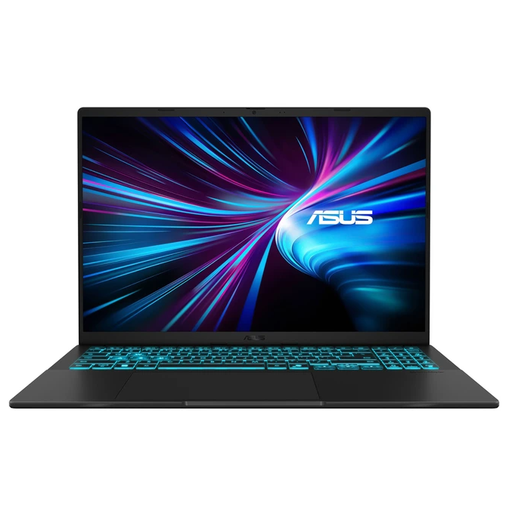
This ASUS Vivobook represents a very compelling compromise between raw performance and versatility. It features a dedicated NVIDIA GeForce RTX graphics card, making it suitable not only for daily tasks but also for gaming and 3D creation. Its 144Hz screen is a real bonus for fluidity, whether in-game or just browsing.
Pros
Who Is This Product For?
This is the ideal laptop for versatile users: students in technical or creative fields, casual gamers looking for a discreet machine, or professionals who need occasional graphics power. It offers gaming laptop features in a more understated chassis.
Why We Recommend It
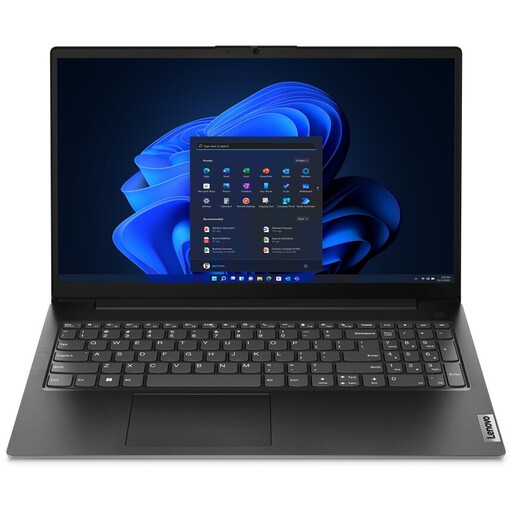
The Lenovo V15 G4 is a pragmatic and accessible solution for essential needs. It doesn't aim for extreme performance but focuses on efficiency for office work, web browsing, and multimedia. Its configuration, while modest, is consistent with its price point and is more than sufficient for smooth daily use.
Pros
Who Is This Product For?
This laptop is a very relevant option for students on a tight budget, families looking for a second device for the home, or professionals whose work is limited to the Office suite, emails, and web browsing. It's a sensible, reliable, and no-frills choice.
The models presented cover a wide range of needs, but design and colour remain personal choices. For those who prefer a sleek and timeless aesthetic, a wide selection of devices is available. Discover our full range if you're looking for a black laptop.
1. How much RAM is enough for a laptop in 2026?
For standard use (office work, web, streaming), 8GB of RAM is still sufficient. However, for greater comfort and to anticipate the future needs of software, we recommend opting for 16GB of RAM. This capacity is becoming the standard for a smooth multitasking experience, especially if you open many browser tabs or use creative applications.
2. How to choose between a MacBook and a Windows laptop?
The choice mainly depends on your ecosystem and your use cases. A MacBook Pro is often favoured for its seamless integration with other Apple products (iPhone, iPad), its operating system (macOS) known for its stability and simplicity, and its high-quality materials. A Windows laptop offers a wider variety of models at all price points, broader software compatibility (especially for gaming), and more flexibility in terms of customisation and repairs.
3. What type of laptop is best for a student?
A good student laptop should be lightweight, have long battery life, and be durable. A model with a 13 to 15-inch screen, a weight under 1.8 kg, and at least 8 hours of real-world battery life is a good starting point. The Lenovo V15 is a budget-friendly option for note-taking and research, while the ASUS Vivobook is better suited for fields requiring more demanding software (engineering, design).