
Livraison le jour même ou le lendemain

Qualité garantie

Débloquez vos offres de bienvenue: Livraison GRATUITE | Jusqu'à -80 % | 30 jours d'essai gratuits à JoyPlus
Téléchargez l'application
In today's mobile world, staying productive away from a power outlet has become a major challenge. Whether you're a mobile professional juggling meetings, a student studying at the library, or an avid traveler, a dead battery is everyone's worst nightmare. In this context, a high-performance laptop power bank is no longer just a gadget, but an essential everyday tool.
But with an overwhelming market and often-opaque technical jargon, how do you make the right choice? This guide is here to break down the essential features and present our selection of the best models, with full transparency and no marketing fluff.
Before diving into our selection, let's review the key points that will ensure you make a smart purchase.
Note: not all power banks can charge a laptop. The secret is the power output, expressed in watts (W). To be effective, a fast-charging power bank must deliver sufficient power through its USB-C port.
A good rule of thumb: check the wattage of your laptop's original charger. It's the best indicator for finding a compatible and powerful portable charger.
Expressed in milliampere-hours (mAh), capacity defines the battery's energy reserve. A 20,000 mAh power bank is often the sweet spot. It offers enough energy to fully recharge most laptops at least once, or a smartphone several times, while still complying with airline carry-on regulations (the limit is typically set at 100 Wh).
A larger capacity naturally means more power, but also more weight and bulk. Ask yourself the right question: are you looking for a backup laptop battery to get you through the day, or to survive several days off the grid?
Today, nearly all high-performance models rely on USB-C and its Power Delivery (PD) technology to charge laptops. Make sure the power bank has at least one USB-C PD port capable of delivering the wattage you need. Additional ports (USB-A, or a second USB-C) are a real bonus for simultaneously charging your smartphone, headphones, and tablet.
Don't overlook the recharging speed of the power bank itself. A model that supports fast input charging (65W or 100W) will save you long waits between trips.
We've selected a few models that stand out from the crowd, each tailored to a specific type of mobile user.
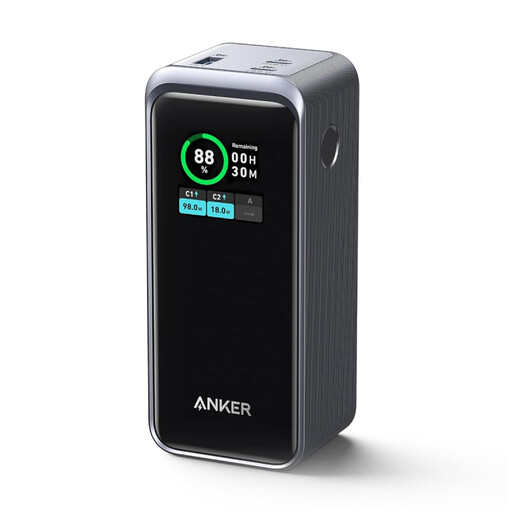
Why it stands out: With a massive 200W of power distributed across its ports, this powerhouse is aimed at the most demanding users. It can simultaneously power two laptops at 100W each—an impressive feat for such a compact device.
Highlights:
Who is it for? For pros and creatives who juggle multiple power-hungry devices (like a MacBook Pro and a graphics tablet) and need a centralized, ultra-powerful, and portable charging station.
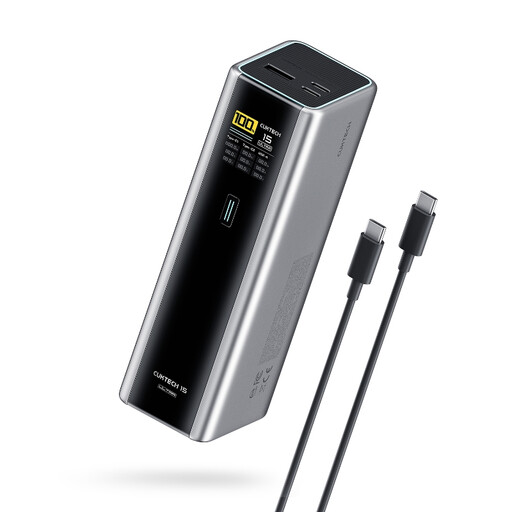
Why it stands out: This model is one of the few to integrate the latest PD 3.1 standard, allowing it to deliver up to 140W from a single USB-C port. It's the top choice for owners of the latest and most powerful laptops that support this ultra-fast charging.
Highlights:
Who is it for? For the tech enthusiast with a PD 3.1-compatible laptop who wants the maximum charging speed in a compact portable PC charger format.
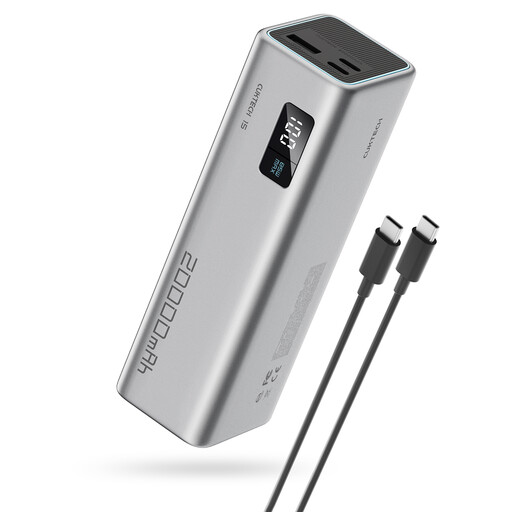
Why it stands out: This model is the champion of performance, portability, and price. Its 65W output is perfect for the vast majority of ultraportables on the market, all in a cylindrical form factor that's easy to slip into a bag.
Highlights:
Who is it for? For the student or mobile professional with an ultraportable. It's the ultimate all-around solution for daily use, without the bulk.
Our selection highlights models that meet specific needs. The power bank market is immense. If these three options don't check all your boxes, don't worry: there are countless other models with a wide variety of capacities, wattages, and form factors.
Feel free to explore our complete collection to find the perfect match that fits your devices and lifestyle.
Discover More Portable Batteries and Chargers on Joybuy.fr
1. What wattage is needed for a laptop power bank? A minimum of 45W is recommended. Ideally, you should aim for a wattage equal to or greater than that of your laptop's original charger. For an ultraportable, 65W is an excellent sweet spot. For more power-hungry machines, you'll need to look for 100W or more.
2. Is a 20,000 mAh power bank allowed on an airplane? Yes, in most cases, it's perfectly fine. Airline regulations limit lithium batteries to 100 watt-hours (Wh) in carry-on luggage. A 20,000 mAh battery (at 3.7V) is equivalent to about 74 Wh, which is well below the threshold. Note that it must be carried in your cabin baggage, not in your checked luggage. As a precaution, always check the specific rules of your airline before you fly.
3. Can a power bank damage my laptop? No, not if you choose a quality model. A certified power bank from a reputable brand, equipped with modern safety features (like the Power Delivery standard), is designed to be completely safe. PD technology allows the power bank and the laptop to "negotiate" the exact power needed, preventing any risk of overvoltage. By choosing products that comply with CE standards, you eliminate any danger.