
Livraison le jour même ou le lendemain

Qualité garantie

Débloquez vos offres de bienvenue: Livraison GRATUITE | Jusqu'à -80 % | 30 jours d'essai gratuits à JoyPlus
Téléchargez l'application
Choosing the right laptop backpack is often a real headache. Between tempting marketing claims and real-world performance, many models prove disappointing in practice. A poor choice not only endangers a valuable device but can also turn your daily commute into a total nightmare. To make the right decision, it's crucial to know the most common traps.
The 3 mistakes to avoid when buying a laptop backpack:
Whether you're a student, a mobile professional, or an urban commuter, make sure your future backpack checks these three boxes to serve you well for years to come.
The first thing to check is the protection for your machine. The advertised size (e.g., 15.6 inches) refers to the screen diagonal but often overlooks the laptop's thickness and bezels.
To protect your electronic equipment and documents, weather resistance is non-negotiable.
Even when heavily loaded, a backpack should remain comfortable. Its ergonomics are key to protecting your back.
We have scrutinised several models based on our criteria for protection, ergonomics, and practicality. Here are a few standout references for different profiles.
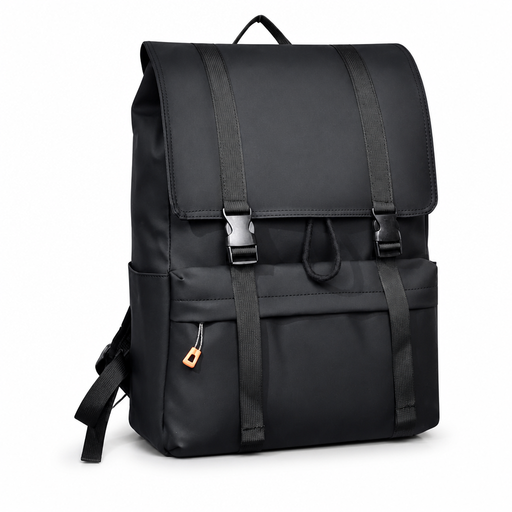
Why it's a match for this profile: Ideal for students who juggle classes, the library, and social outings. Its large capacity makes it easy to carry a laptop, binders, and personal items, all with a versatile, casual style.
The manufacturer is upfront: the fabric is water-resistant, not fully waterproof. No nasty surprises. The drawstring and flap closure adds protection against light rain, which is much more effective than a simple zipper exposed to the elements.
Its generous volume, perfect for carrying a PC, binders, and all your daily essentials. A simple, functional design without unnecessary frills. A reliable and effective choice.

Why it's a match for this profile: Its slim, minimalist design fits right in at any professional setting. It's designed for pros who hop between public transport and meetings and need a lightweight, organised, and efficient bag.
There's no gimmicky "anti-theft" pocket here. The bag offers well-structured compartments to secure your valuables. The USB port is honestly presented as a cable pass-through, clarifying that you need your own power bank. No false promises.
Its slim profile is ultra-practical on crowded transport. The internal organisation is optimised for direct access to your work tools: laptop, tablet, files, etc.
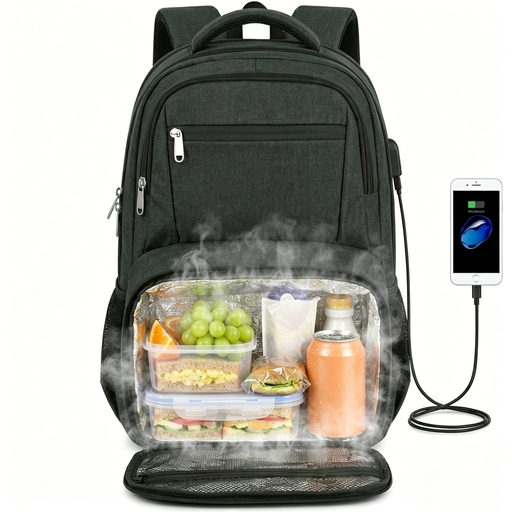
Why it's a match for this profile: This is the Swiss Army knife of backpacks. Perfect for those who want a single bag for the office, lunch, and travel. It's designed for people who carry their own meals, travel often, and have a large laptop (up to 17 inches).
It goes beyond basic padding by offering a dedicated compartment for a large laptop (up to 17.3 inches) and a well-placed anti-theft pocket. The insulated feature isn't a gimmick: it's a real asset, with an easy-to-clean aluminium lining.
The insulated and retractable lunch compartment, of course! It's the star feature. It's also designed for travel with its TSA-friendly design and luggage sleeve, making it an excellent travel companion.
We've put together a complete and up-to-date selection of backpacks that meet our demanding selection criteria and current safety standards.
Above all, don't put it in the washing machine! This could damage the padding and the water-resistant coating. Opt for spot cleaning with a damp cloth and a little mild soap. For the interior, empty it completely and use a vacuum cleaner to remove dust and crumbs. Then let it air dry, away from any heat source.
It all depends on your habits. The USB port is actually just a cable pass-through: it allows you to connect your phone to a power bank (not included) that stays inside the bag. It's convenient for charging on the go without holding the battery in your hand. If you're a frequent power bank user, it's a plus. Otherwise, it's definitely not an essential buying criterion.
It all depends on the build quality and how you use it. An entry-level model will show signs of wear (failing zippers, splitting seams) in just a year of daily use. Conversely, a well-made bag with reinforced stitching and robust fabric can last you 3 to 5 years, or even longer. It's often a more cost-effective investment in the long run.