
Livraison le jour même ou le lendemain

Qualité garantie

Débloquez vos offres de bienvenue: Livraison GRATUITE | Jusqu'à -80 % | 30 jours d'essai gratuits à JoyPlus
Téléchargez l'application
The iPad 10 is a true digital Swiss Army knife. But to truly unlock its full potential for study or work, adding a keyboard quickly becomes essential. Apple's Magic Keyboard Folio for iPad (10th generation) stands out as the gold standard, especially for its perfect integration. Be warned, however: the keyboard case market is a jungle where it's easy to make a mistake and end up with a disappointing accessory.
To help you avoid buyer's remorse, let's review the three most common pitfalls:
To avoid falling into these traps, here are the criteria that truly make a difference in daily use.
The connection type is arguably the most critical factor. While most third-party keyboards rely on Bluetooth, the Magic Keyboard Folio radically sets itself apart with its Smart Connector.
For working or simply writing comfortably, a QWERTY iPad 10 keyboard is non-negotiable in most English-speaking regions. Beyond the layout, the quality of the typing experience is paramount. The Magic Keyboard Folio uses a scissor mechanism with 1 mm of travel. In simple terms, each key offers a precise and pleasant tactile feedback, very similar to that of a good laptop, which significantly reduces fatigue during long typing sessions.
A keyboard with a trackpad for iPad 10 transforms the experience, bringing it closer to that of a laptop. A good trackpad must be responsive and support all of iPadOS's Multi-Touch gestures (two-finger scrolling, zooming, etc.). Let's not forget the primary function of a case: iPad 10 keyboard protection. The modular design of the Magic Keyboard Folio, with its detachable keyboard and back panel, offers welcome flexibility: full protection for transport, and the ability to use the iPad alone with its kickstand to watch a video.
Because every user has different needs and a different budget, here are our recommendations for three distinct profiles.

Why it's the right choice: Ideal for those who demand perfect, effortless integration with their iPad 10. The experience is completely seamless, intuitive, and designed for the Apple ecosystem, with no compromises on quality or design.
The Smart Connector completely eliminates Bluetooth connection and battery issues. Its modular design provides robust protection and a stable kickstand, avoiding the poorly designed case trap.
Instant connection and power via Smart Connector. Versatile modular design with a detachable keyboard. Comfortable typing and a high-precision trackpad.
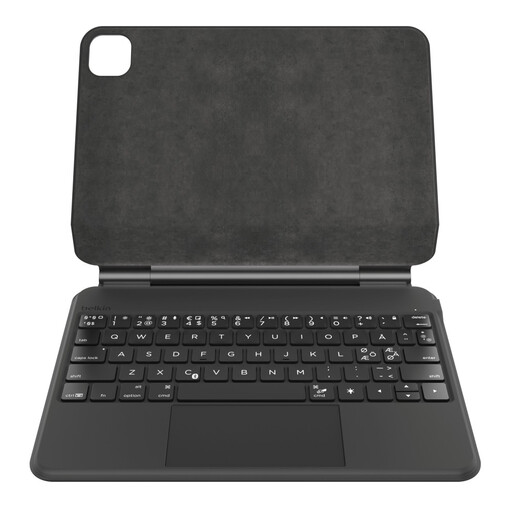
Why it's the right choice: Designed for those who are frequently on the move and work in various environments. Its reinforced protection and long-lasting battery make it a reliable travel companion.
Its rugged design effectively protects the iPad, and its high-capacity battery (600 mAh) prevents the frequent-recharging anxiety common with low-end Bluetooth keyboards.
Stable floating magnetic stand. Backlit keyboard for working in the dark. Record-breaking battery life and a holder for the Apple Pencil.
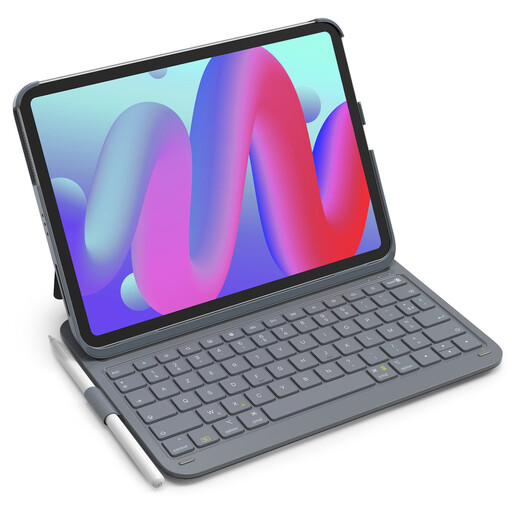
Why it's the right choice: An excellent alternative for students and users who want to turn their iPad into a workstation without breaking the bank. It offers essential features at a very attractive price point.
This model offers a comfortable typing experience with a standard QWERTY layout and shortcut keys, sidestepping the trap of basic, impractical keyboards. Its slim and lightweight design preserves the iPad's portability.
Excellent value for money. Ultra-slim and lightweight design. Integrated holder for the Apple Pencil.
We have tested and compiled a complete selection of models that meet our standards for quality and performance.
No. The Magic Keyboard Folio is powered directly by the iPad via the Smart Connector. This means you never need to charge it or replace any batteries. Simply attach it magnetically to your iPad, and it works instantly.
Yes, and that's one of the major advantages of its modular design. The Magic Keyboard Folio consists of two parts: the keyboard and the back panel with a kickstand. You can easily detach the keyboard to use the iPad in tablet mode or for viewing content, all while keeping the back protected and supported.
Absolutely. The official Apple Magic Keyboard Folio is available in various regional layouts, including the standard QWERTY layout used in the US and UK. We always recommend checking the model number or product description to ensure you are purchasing the correct layout for your region before completing your purchase.