
Livraison le jour même ou le lendemain

Qualité garantie

Débloquez vos offres de bienvenue: Livraison GRATUITE | Jusqu'à -80 % | 30 jours d'essai gratuits à JoyPlus
Téléchargez l'application
Juggling a laptop bag, a separate lunch tote, and sometimes even a handbag... It's a daily struggle for many professionals and students. This setup is not only bulky but also a real hassle on public transport or during marathon days. The insulated laptop backpack emerges as the all-in-one solution designed to simplify your life.
This guide is here to help you find the perfect model. We'll review the essential selection criteria and present a curated list of backpacks that have proven themselves in the field, whether for the office, university, or business trips.
To make the right choice, simply check a few key points that will be a real game-changer in your daily routine. Here are the criteria to scrutinize.
The first criterion is internal organisation. A good backpack with a lunch compartment must offer perfectly separate zones to isolate your electronics from moisture and food odours.
Ensure it has a dedicated padded compartment for your laptop, and check that it's compatible with its size (e.g., 15.6 or 17.3 inches). The insulated compartment, a true built-in cooler, should be large enough for your lunch box and a drink, while ensuring perfect insulation from your other belongings. Additional pockets for cables, documents, and personal items are a real bonus for flawless organisation.
The performance of the insulated section is obviously a crucial point. Most models promise to keep your meal cool for 2 to 4 hours thanks to their aluminium lining. You can easily extend this duration by adding a small ice pack.
Also, consider water resistance: opt for a waterproof laptop backpack. A water-repellent or waterproof outer shell will protect your electronic gear and documents from an unexpected downpour. It's an essential safeguard for daily commuters.
A bag carried daily must be comfortable. Padded, adjustable shoulder straps and a ventilated back panel are essential for distributing weight evenly and reducing fatigue.
Certain modern features can also make all the difference. An anti-theft backpack with a USB port is a highly-valued power duo, for example. The anti-theft pocket, often hidden in the back panel, secures your valuables (wallet, phone, keys). The external USB port allows you to charge your smartphone on the go: simply connect it to a power bank (not included) placed inside the bag.
Here are a few models that stand out for their design and features, suitable for both professionals and students.
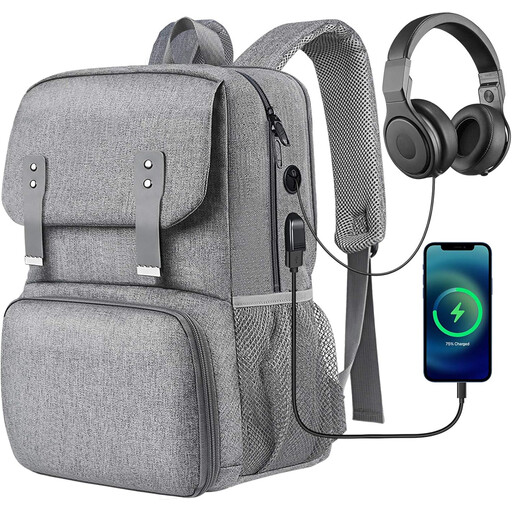
Key Features
This model combines elegance and practicality, making it an excellent women's office backpack. With its durable Oxford fabric and aluminium insulating liner, it's a reliable companion for long days at the office. It even includes a USB port and a headphone jack—thoughtful details for the daily commute.
Pros
Who is it for?
Ideal for professionals (teachers, nurses, etc.) and students looking for a versatile, well-organised bag to carry their laptop, class materials, and lunch.
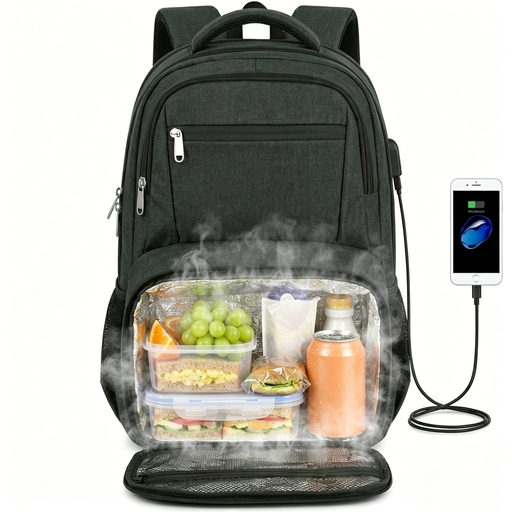
Key Features
Designed for those who need maximum space, this bag can accommodate a laptop up to 17.3 inches. Its lunch compartment is collapsible: once empty, it retracts to free up space in the main compartment. Its "TSA-Friendly" design, with a 180-degree opening, greatly simplifies airport security checks.
Pros
Who is it for?
Perfect for professionals on the go, those who carry a large laptop daily, and anyone looking for a flexible and spacious work-and-lunch backpack.
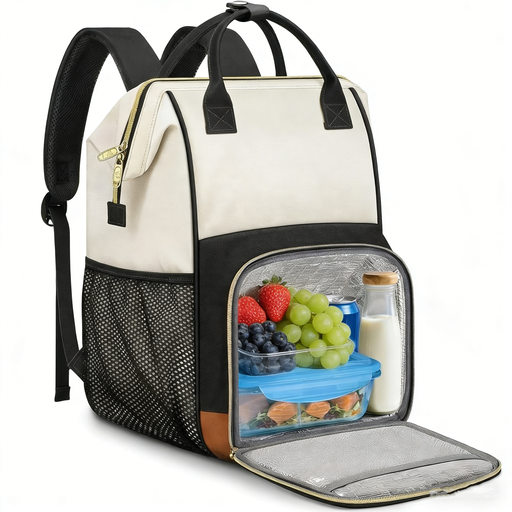
Key Features
Here, the key word is modularity. It features a fully removable insulated bag, which you can use on its own or take out completely to maximise interior space. Its polished design, with leather-look handles and a beige colour, makes it an elegant choice that fits perfectly in an office environment.
Pros
Who is it for?
An excellent option for active women, office workers, and students who want to adapt their bag to their day by choosing whether or not to bring the lunch compartment.
Not convinced by the models presented? If you want to explore other types of bags for your studies or work, plenty of alternatives are available.
Explore our complete collection of laptop bags and accessories to find the perfect companion for your travels.
As a general rule, a standard insulated compartment keeps food cool for 2 to 4 hours. This duration varies depending on the quality of the insulation, the outside temperature, and whether the food was placed in the bag cold. To extend the coolness, feel free to add a small ice pack.
Most importantly, do not put your bag in the washing machine! You risk damaging the waterproof coating and the insulated lining. For the exterior, a wipe with a damp cloth is sufficient. To clean the inside of the insulated compartment, use a sponge with a little mild soap and water. Rinse well and let it air dry completely.
The external USB port is not a battery itself, but simply a pass-through. Inside the bag, there is a cable where you connect your own power bank (not included). Once this power bank is connected, the external port is powered, and you can plug in your smartphone's cable to charge it without even opening your bag.