Whether you want to keep an eye on your children, a pet, or simply secure your home while you're away, the indoor Wi-Fi security camera has become a tool that's as accessible as it is effective. But with a market flooded with options, it can be tough to know where to start. This guide is here to help you make sense of it all by breaking down the essential features and presenting a selection of models suited for every need and budget—without the unnecessary marketing jargon.
Key Points to Check Before Choosing Your Camera
To make the right choice, it's essential to understand a few technical aspects that will make a real difference in your day-to-day use.
Image Resolution: 2K, 4K—Which Should You Prioritise?
Resolution determines the clarity of the image. The higher it is, the more you can zoom in on details without getting a pixelated mess.
- 2K (or QHD): Offers a much more detailed image than Full HD (1080p), which remains the standard. It's the sweet spot for most uses, allowing you to clearly identify a face or details in a room.
- 4K (or UHD): Delivers the highest level of detail available to consumers. This resolution is ideal if you need to monitor a large space and want to zoom in with precision on a specific area.
Power Source: Battery-Powered or Wired Model?
The power source directly impacts the installation flexibility of your camera.
- Wire-Free Indoor Camera (Battery-Powered): Its main advantage is total placement freedom. You can place it on any surface or move it as needed, without worrying about outlets. The trade-off: you have to remember to recharge it periodically.
- Wired Camera: Once plugged into an outlet, it runs 24/7 without interruption. It's a reliable, "set-it-and-forget-it" solution, but its placement will depend on the proximity of a power outlet.
Smart Features: More Than Just a Picture
Today's cameras do more than just record: they are supercharged with AI for greater efficiency.
- Motorised IP Camera (Pan/Tilt): Thanks to its motorised head, controllable from the mobile app, it can pivot horizontally (pan) and vertically (tilt) to cover an entire room and eliminate blind spots.
- AI Motion Detection: Say goodbye to unwanted alerts! Artificial intelligence allows the camera to distinguish between relevant motion (a person, an animal) and false alarms (shadows, a moving curtain).
- Night Vision: Essential for 24/7 surveillance. Infrared technology provides clear images even in complete darkness. Some models even go the extra mile by offering colour night vision.
Top Indoor Wi-Fi Security Cameras
We've selected three models that stand out from the crowd, each catering to a specific need.
COCOCAM 2K: The Battery-Powered Pan-Tilt Camera
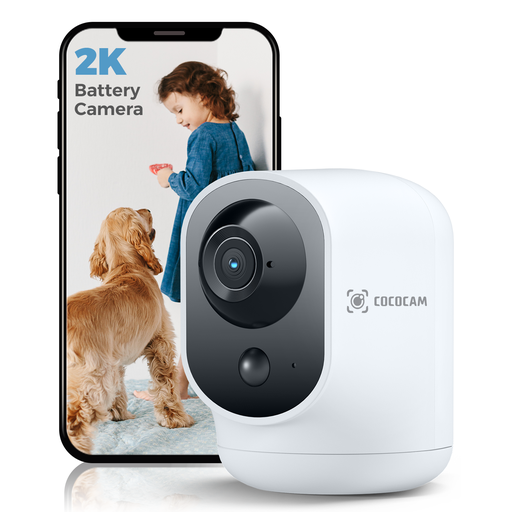
Why It Stands Out Its standout feature: a 5200 mAh rechargeable battery that frees it from the constraints of cables. Combined with its motorised head, it can scan a wide area from the corner of a shelf.
Pros
- 2K Resolution (2304x1296): Clear and detailed images.
- 100% Wire-Free: Long-lasting battery for complete placement freedom.
- 355°/90° Pan/Tilt: Full room coverage, remotely controllable.
- Two-Way Audio: Allows you to communicate through the camera.
- AI Motion Detection: Specialised PIR human detection for more accurate alerts.
- Compatibility: Works with Alexa and Google Assistant voice assistants.
Who Is It For? Ideal for renters or anyone who wants a portable surveillance solution, whether for security, as a backup baby monitor, or to keep an eye on a pet.
See details for the COCOCAM 2K camera
UNIVIEW Youkey S320: The Subscription-Free 2.5K Magnetic Camera
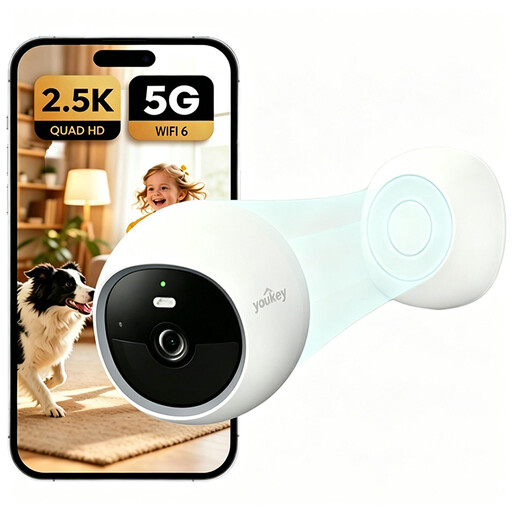
Why It Stands Out What makes it unique? Its built-in 8GB eMMC storage, which frees you from any monthly subscription fees. Add a clever magnetic mount and Wi-Fi 6 compatibility, and you get a product that's as modern as it is practical.
Pros
- 2.5K QHD Resolution: Superior image quality for maximum detail.
- Built-in Local Storage: 8GB of eMMC memory, no SD card or cloud subscription needed.
- 150° Wide Angle: Covers a broad field of view.
- Colour Night Vision: See colours clearly even in low light.
- AI Detection (Humans/Pets): Targeted alerts and a deterrent spotlight.
- Magnetic Installation: Easily attaches to any metal surface or via its included mount.
Who Is It For? Perfect for those looking for an all-in-one solution with no recurring costs, who appreciate the simplicity of a magnetic mount and the performance of Wi-Fi 6.
See details for the UNIVIEW Youkey S320 camera
eufy Security Indoor Cam S350: Dual-Lens and 4K for Powerful Zoom
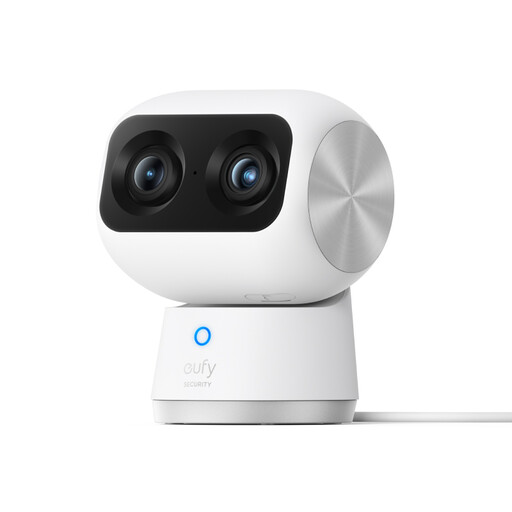
Why It Stands Out Its dual-lens system is its secret weapon: it combines a 4K wide-angle sensor with a 2K telephoto lens. The result is an incredibly precise 8x hybrid zoom, perfect for identifying a detail from across the room.
Pros
- Dual-Lens with 4K UHD Resolution: Exceptional image clarity.
- 8x Hybrid Zoom: Zoom in without sacrificing quality.
- 360° Coverage: The pan-tilt motor ensures a complete view of the space.
- AI Smart Tracking: The camera automatically follows a person or pet as they move within its field of view.
- High-Performance Night Vision: Ultra-sensitive sensor for clear night vision up to 10 metres.
- Wi-Fi 6 Compatibility: For a more stable and faster connection.
Who Is It For? For tech enthusiasts and those who demand the best in image quality. Its smart tracking makes it an excellent choice for pet monitoring or for keeping an eye on large living spaces.
See details for the eufy Security S350 camera
Looking for Other Surveillance Options?
If our selection doesn't quite meet your needs or if you'd like to explore other avenues, such as complete home security kits, feel free to browse our catalogue.
Discover our full range of battery-powered wireless security systems
Frequently Asked Questions (FAQ)
Is an indoor Wi-Fi security camera difficult to install?
Not at all. The vast majority of current models are designed to be installed in minutes, even by a novice. The process is almost always the same: plug in (or charge) the camera, download the manufacturer's app on your smartphone, create an account, and follow the steps to connect it to your Wi-Fi, often via a simple QR code.
How are recorded videos stored?
There are two main solutions:
- Local Storage: Recordings are saved to a microSD card inserted into the camera or to internal memory (like the UNIVIEW model). The advantage: no hidden fees, and you maintain full control over your data.
- Cloud Storage: Videos are uploaded to the manufacturer's servers. The main benefit: you can access your videos from anywhere, even if the camera is stolen or destroyed. This peace of mind comes at a cost, usually in the form of a monthly subscription, although some manufacturers offer limited free storage.
Can a security camera be used as a baby monitor?
Absolutely! It's actually an increasingly common use case. Models like the COCOCAM 2K or the eufy S350 are perfectly suited for this. With their two-way audio (to hear and soothe your baby), excellent night vision, and motion (and sometimes cry) alerts on your smartphone, they are every bit as good as a traditional baby monitor.
By the Joybuy Product Expert Team


