
Livraison le jour même ou le lendemain

Qualité garantie

Débloquez vos offres de bienvenue: Livraison GRATUITE | Jusqu'à -80 % | 30 jours d'essai gratuits à JoyPlus
Téléchargez l'application
Keeping an eye on your home, children, or pets has never been easier. But with the overwhelming number of models available, choosing the right indoor Wi-Fi security camera can quickly become a puzzle. Between resolution, viewing angles, and smart features, it's easy to get lost.
This guide is here to help you make sense of it all. As product experts at Joybuy, our mission is to decipher the technical specifications and select only reliable, relevant models that meet the real-world needs of users.
Before we present our top picks, here are a few essential criteria to keep in mind to ensure you make the right choice.
A clear image is crucial for precisely identifying what's happening. While 1080p (Full HD) is the standard today, a 2K camera (approximately 3MP) offers a much higher level of detail, which is very useful for zooming in on an area without turning the image into a pixelated mess.
Also, consider colour night vision. Unlike traditional black-and-white infrared, this technology uses even the slightest ambient light to render colours, even in near darkness. It's a detail that can make all the difference when identifying a person or an item of clothing.
A fixed-lens camera covers a defined angle, which may be sufficient for a small room or a hallway. However, to monitor a large living room or an open-plan space, a 360-degree camera (also known as PTZ for Pan-Tilt-Zoom) is essential. Thanks to its motorised base, it can be panned horizontally and tilted vertically from the app, allowing you to scan the entire area and eliminate blind spots.
The main advantage of a wireless IP camera is its simple installation. Most models plug into a standard power outlet and can be configured in minutes using a mobile app.
For storing recordings, you have two options:
Here are three models that cater to specific needs, whether for discreet surveillance, monitoring through a window, or easier communication with your loved ones.
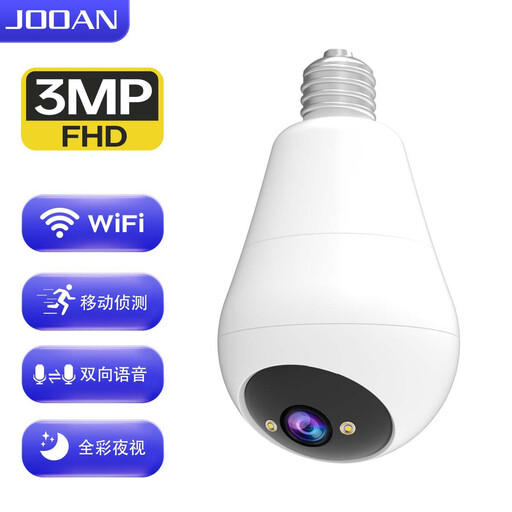
Its Key Feature: Its E27 light bulb format makes it almost invisible, and installation is a breeze. Simply screw it into an existing socket (ceiling fixture, bedside lamp) to power it.
The Highlights:
Who is it for? Ideal for renters or anyone looking for an effective and discreet security solution without drilling a single hole. Perfect for monitoring a living room, entryway, or a child's room from a high vantage point.

Its Key Feature: Placing a standard camera behind a window at night creates infrared reflections, making the image unusable. The ZOSI C680 integrates anti-reflection technology specifically designed to film perfectly through glass, day and night.
The Highlights:
Who is it for? The perfect solution for apartment dwellers or renters who want to keep an eye on the outside (their entrance, a driveway, a parking spot) without having to install an outdoor camera.

Its Key Feature: Much more than a camera, this model includes a 2.8-inch screen and a video call function. Ideal for easily communicating with loved ones at home.
The Highlights:
Who is it for? An excellent choice for families (as an advanced video baby monitor) or for maintaining a simple and reassuring visual connection with elderly relatives, while also looking after their safety.
The world of home security is evolving at lightning speed. If our selection doesn't check all your boxes, know that many other configurations exist, with various features (battery power, compatibility with voice assistants, etc.).
Explore our full range of remote IP cameras to discover other models and find the one that will perfectly fit your home and your lifestyle.
This is their greatest strength: installation is a breeze. Generally, it's a three-step process:
Absolutely. Most models, including those in our selection, have a microSD card slot. This allows you to store your videos locally without any subscription fees. Cloud storage remains an option, often for a fee, for those who prefer an off-site backup of their recordings.
Yes, it is generally legal to install cameras in your own home for security purposes. However, certain rules must be followed to protect the right to privacy. If you employ domestic staff (such as a cleaner or a nanny), you may be required to inform them and obtain their consent, depending on your local regulations. Crucially, the camera must only film the interior of your property and not public spaces or a neighbour's garden.