Choosing a gaming keyboard can quickly become overwhelming. Between switch technologies, different form factors, and a myriad of features, it's easy to get lost. This guide breaks down the essentials to help you find the perfect keyboard for your playstyle, desk, and budget, whether you're on PC or console.
The 3 Key Criteria for Choosing Your Gaming Keyboard
To make the right choice, three fundamental aspects set gaming keyboards apart.
1. Key Technology: Mechanical, Membrane, or Magnetic?
The type of keys (or switches) is the heart of the keyboard: it defines the typing feel, responsiveness, and sound.
- Mechanical Keyboard: The top choice for competitive gamers. It offers precise tactile feedback and flawless responsiveness thanks to a dedicated mechanical switch under each key. There is a wide variety of switches, such as Reds (linear and fast, perfect for FPS) or Blues (louder, with a very distinct "click").
- Membrane Keyboard: More budget-friendly and quiet, it uses a rubber dome under the keys. The keystroke is softer, which can be appealing for mixed use (gaming and office work), but its responsiveness is naturally a step below that of a mechanical keyboard.
- Magnetic Switch Keyboard: The latest innovation. This technology uses Hall effect sensors to detect key pressure. The result? Ultra-fast actuation and the ability to adjust the sensitivity of each key with pinpoint accuracy—a decisive advantage in games that demand surgical precision.
2. Keyboard Form Factor: TKL, 96%, or Full-Size?
The size of your keyboard has a direct impact on your setup's ergonomics.
- Full-Size (104/105 keys): The classic layout, complete with its numpad. Versatile, but also the bulkiest.
- TKL (Tenkeyless) Format: Lacking a numpad, a TKL gaming keyboard is about 20% more compact. It frees up valuable desk space for wide mouse movements, a crucial factor for FPS players who use low sensitivity.
- 96% Format: The perfect compromise. It keeps the numpad but tightens its spacing against the other keys, offering significant space savings without sacrificing this feature.
3. Layout and Compatibility: QWERTY and Consoles
While most keyboards in English-speaking regions use a QWERTY layout, it's always wise to double-check the layout before completing your purchase. If you play on a console, also ensure the keyboard is compatible. Many models are now plug-and-play with home consoles, making them an excellent PS5 gaming keyboard or Xbox peripheral.
Recommended Gaming Keyboard Picks
To help you see more clearly, here are a few models that stand out, each tailored to a specific type of gamer.
For Pure Performance: THE G-LAB KEYZ ELITE 400 HE
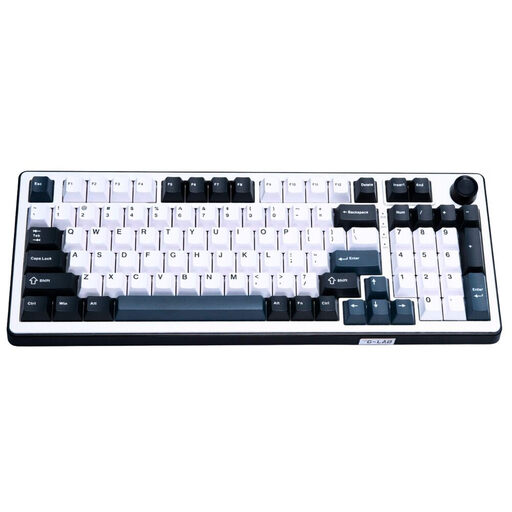
- Why it stands out: This keyboard features next-gen technology: Hall effect magnetic switches. They enable detection based on a magnetic field, offering lightning-fast responsiveness and fully customisable sensitivity. Its 8000 Hz polling rate crushes latency, a game-changer in competitive play. The 96% format is an excellent compromise, as it keeps the numpad while remaining compact.
- Pros:
- Magnetic (HE) switches for absolute responsiveness.
- 8000 Hz polling rate for near-zero latency.
- Compact 96% format with numpad.
- Durable PBT double-shot keycaps.
- Who is it for? Esports players and fierce competitors seeking maximum responsiveness and fine-tuned adjustments. This model comes in a standard QWERTY layout, making it ideal for most users in English-speaking regions.
For Mechanical Responsiveness: THE G-LAB Keyz Mercury TKL
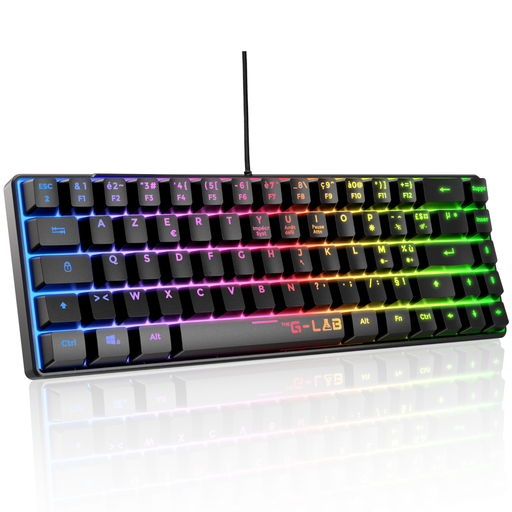
- Why it stands out: The Keyz Mercury is an excellent mechanical gaming keyboard in a TKL format. It's equipped with linear Red switches, the standard for fast actuation and low actuation force (45g)—the perfect combo for fast-paced games. Its compact form factor is a real blessing for freeing up desk space.
- Pros:
- Responsive and relatively quiet Red switches for a mechanical keyboard.
- TKL format for maximum space saving.
- Full anti-ghosting so no keystroke is lost in the heat of battle.
- PC and console compatible (PS4, PS5, Xbox).
- Who is it for? FPS and fast-paced game players who want a responsive keyboard and maximum room for their mouse. It's a safe bet for getting into mechanical keyboards without breaking the bank.
For Versatility and Silence: THE G-LAB Keyz Caesium TKL
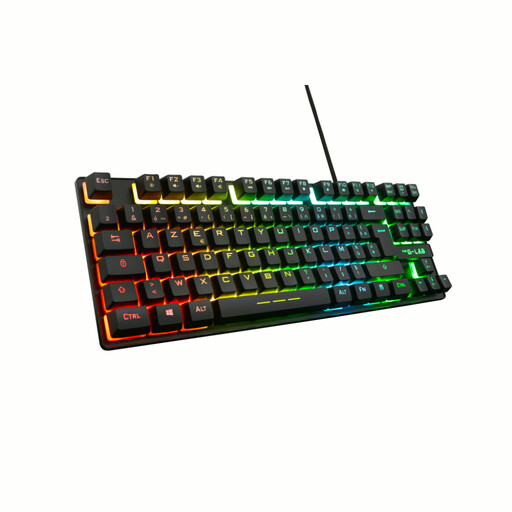
- Why it stands out: This model is a silent membrane keyboard that combines a very practical TKL format with exceptionally quiet keystrokes. It's ideal for late-night gaming sessions or in a shared office, without disturbing anyone. Despite its membrane technology, it provides good responsiveness and 26-key anti-ghosting to prevent missed inputs mid-game.
- Pros:
- Quiet and comfortable typing.
- TKL format and QWERTY layout.
- RGB backlighting with 11 effects.
- Wide compatibility (PC, PS4, PS5, Xbox).
- Who is it for? Casual gamers, those who share their gaming or workspace, and anyone looking for a versatile, affordable keyboard that's compatible with their console.
Want a More Personal Style?
If your setup's aesthetics are as important to you as its performance, a uniquely designed keyboard can make all the difference. For options that are out of the ordinary, check out our selection of cute custom keyboards and create a setup that truly reflects you.
Frequently Asked Questions (FAQ)
What is the best type of keyboard for gaming?
For pure performance, the mechanical keyboard remains king thanks to its responsiveness, durability, and tactile feedback. Red switches are particularly popular for their linear and fast actuation. A silent membrane keyboard is an excellent alternative for tighter budgets or for those who prefer quiet typing. Finally, magnetic keyboards represent the pinnacle of performance for the most demanding gamers.
Why choose a TKL gaming keyboard?
The TKL (Tenkeyless) format does away with the numpad to make the keyboard more compact. This space saving is a huge advantage in many games (especially FPS), as it allows for much wider mouse movements. It's also a plus for ergonomics, bringing the mouse closer to your body's centerline.
Is a gaming keyboard compatible with a PS5 or Xbox?
Yes, the vast majority of wired USB gaming keyboards are compatible with modern consoles like the PS5 and Xbox Series X/S. They are automatically recognized (plug-and-play) for typing text and for games that support a keyboard/mouse combo. It's always a good idea to check compatibility on the product page, but this is the case for The G-Lab keyboards featured in this guide.


