
Livraison le jour même ou le lendemain

Qualité garantie

Débloquez vos offres de bienvenue: Livraison GRATUITE | Jusqu'à -80 % | 30 jours d'essai gratuits à JoyPlus
Téléchargez l'application
Sitting for hours in front of a screen, whether for gaming, remote work, or studying, takes a real toll on your body. Back pain, neck tension, general fatigue… These are all warning signs you should never ignore. Far from being a mere gadget, an ergonomic gaming chair is an essential investment in your daily health and comfort.
Faced with an overwhelming number of options, it's hard to know where to start. As a product expert for Joybuy, my mission is to cut through the noise for you. The goal of this guide is simple?: to give you clear selection criteria and concrete recommendations to find the gaming chair that's perfectly suited to your needs, free from marketing jargon and empty promises.
Before you pull out your credit card, it's crucial to understand what really makes a difference. Here are the three essential points to check to make the right choice.
A good chair should adapt to your body, not the other way around. At the heart of ergonomics is lumbar support. Whether it's built-in, a removable cushion, or an adjustable 3D system, it must perfectly hug the natural curve of your back to reduce pressure on your vertebrae. The headrest is just as crucial for relieving neck strain during long sessions. Finally, make sure the basic adjustments are there?: seat height, backrest tilt, and armrests (2D, 3D, or 4D) are indispensable for finding your ideal position.
The upholstery has a direct impact on comfort, aesthetics, and ease of maintenance.
Certain options can literally transform your experience. A reclining chair that goes back to 155° or 170° allows you to switch from an intense work posture to a relaxation mode in the blink of an eye. For absolute comfort, a gaming chair with an integrated footrest is a welcome luxury. It lets you stretch out your legs during a break, a movie, or a more relaxed gaming session.
We've sifted through dozens of models to select three chairs that stand out for their balance of features, ergonomics, and comfort.
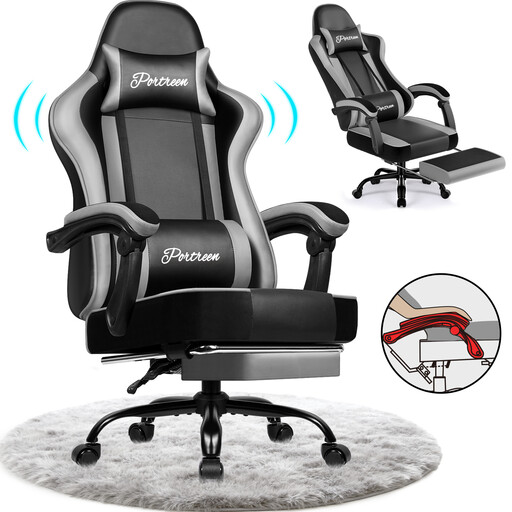
Why it stands out?: This model focuses on total comfort by integrating a retractable footrest. Its versatility is perfect for switching between gaming, work, and pure relaxation.
Pros:
Who is it for?? For those looking for an all-in-one PC chair that can transform into a true relaxation cocoon between intense matches.
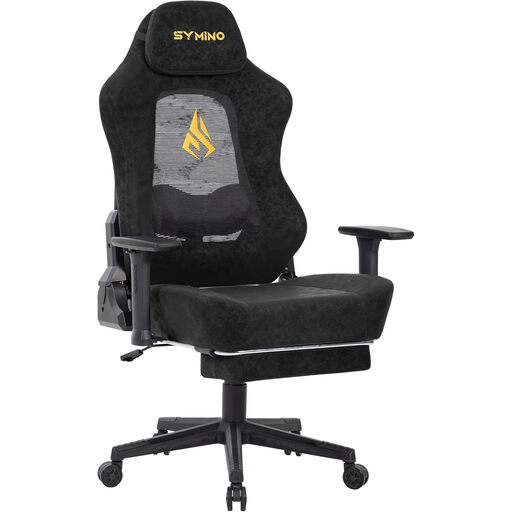
Why it stands out?: Its bold design, featuring a cut-out backrest and breathable mesh, is engineered to maximise airflow and help you say goodbye to overheating.
Pros:
Who is it for?? Ideal for gamers and remote workers who spend long hours in front of the screen and dread the heat.
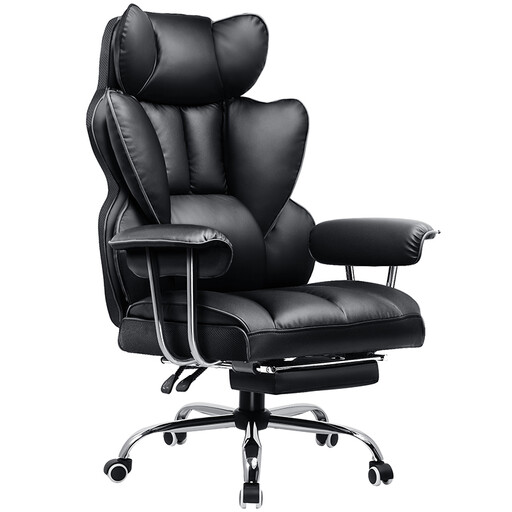
Why it stands out?: The result of a collaboration with ergonomists and physiologists, this model is notable for its understated look. Its design and precise adjustments make it an excellent ergonomic office chair that fits perfectly into a professional setting.
Pros:
Who is it for?? For remote workers who are also casual gamers and want a high-performance chair with a versatile design.
The chairs above are designed for optimal support during long, static periods. If your day is more active or if you prefer seating that encourages movement, other solutions exist. For an original approach that promotes an active posture, take a look at our selection of bungee chairs.
Originally, gaming chairs were recognisable by their "bucket seat" design inspired by auto racing, with flashy colours and removable support cushions. Ergonomic office chairs, on the other hand, focused on understated design and integrated adjustment mechanisms. Today, the line between the two is increasingly blurred. Many models, like those in our selection, combine the best of both worlds?: cutting-edge ergonomics and a style that suits both a gaming setup and a professional office.
Here are the basic adjustments to follow?:
The longevity of a PU faux leather cover depends on its quality and maintenance. On average, with normal use and regular cleaning (without harsh chemicals), a well-made faux leather can last 3 to 5 years. After this period, signs of wear such as cracking or peeling may appear, especially in areas of high friction.