
Livraison le jour même ou le lendemain

Qualité garantie

Débloquez vos offres de bienvenue: Livraison GRATUITE | Jusqu'à -80 % | 30 jours d'essai gratuits à JoyPlus
Téléchargez l'application
Spending hours glued to a desk, whether for work, study, or gaming, has become a daily reality for many of us. The consequences are often undeniable: back pain, poor posture, and dwindling concentration. This is where the ergonomic chair with a footrest comes in, designed to counteract these effects by offering comprehensive support and genuine moments of relaxation.
In this guide, we'll break down the essential criteria and present our selection of the best models to help you make the right choice and protect your daily well-being.
Before diving into our top picks, let's review the key points for finding the perfect chair that will seamlessly adapt to your needs.
A good ergonomic office chair's primary mission is to protect your back. Therefore, lumbar support is non-negotiable. Prioritise models with height and depth-adjustable support, or an adaptive system that conforms to the natural curve of your spine. Effective support in this area is the key to maintaining a healthy posture, preventing tension build-up even after long hours of work.
Being able to change positions is crucial to avoid ending the day feeling stiff. A reclining office chair allows you to lean back to relieve pressure on your intervertebral discs. Pay close attention to the maximum recline angle (often between 135 and 160°) and the type of mechanism. The synchronous mechanism, where the backrest and seat tilt in unison, is often favoured for its more natural movement. The ability to lock the recline in multiple positions is a real plus for finding your ideal resting posture.
This is the accessory that transforms a good chair into a true haven of comfort. It promotes better blood circulation in the legs and reduces pressure under the thighs. Most models feature a retractable footrest that extends from beneath the seat. You'll want to ensure its mechanism is both simple and sturdy, and that its length can comfortably support your legs.
We have selected three models for every profile and budget, whether you're a remote professional, a dedicated student, or a passionate gamer.
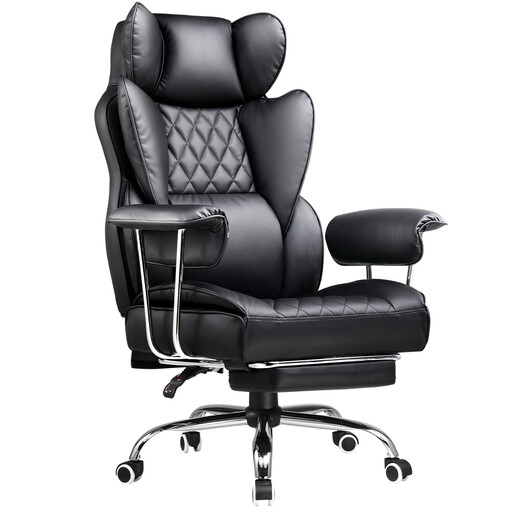
This GTPLAYER model embraces all the hallmarks of a gaming chair while adding a full suite of ergonomic features. Its high backrest and robust frame are designed for enveloping support, while the retractable footrest lets you switch from a work position to relaxation mode in an instant.
Ideal for gamers and streamers looking for a chair that is both comfortable and immersive. It will also appeal to remote workers who appreciate the bucket-seat design and the support of a high backrest.
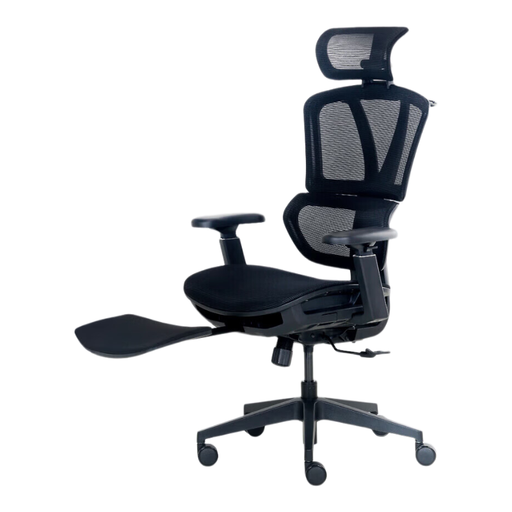
The Z9 Smart Chair stands out with its high-tech approach to back support. Its dual adaptive backrest was designed to provide dynamic lumbar support that follows your every move. Its understated, modern design fits seamlessly into a professional office setting. The integrated coat hanger on the back is a practical detail that makes all the difference for hanging a jacket.
This chair is primarily aimed at remote professionals seeking a cutting-edge ergonomic solution with a contemporary design. It's perfect for those who work long hours sitting down and need active lumbar support.
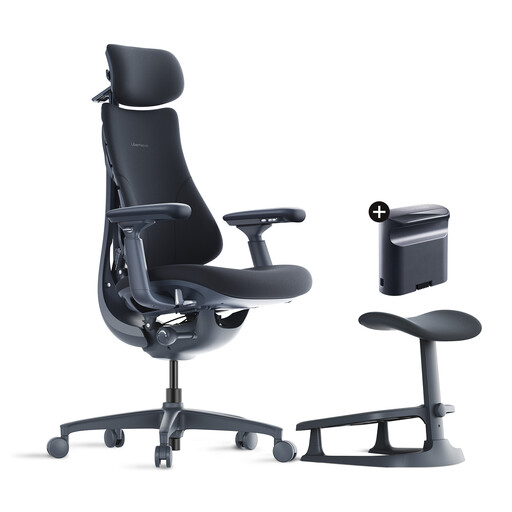
The Omni model from LiberNovo is all about deep relaxation, featuring a record-breaking recline angle of 160°. It goes a step further by integrating a spinal stretch function, specifically designed to release tension during breaks. Its sleek, all-black design makes it a discreet and elegant choice for any office.
This chair is for those who consider their breaks sacred. If you're looking for a reclining office chair that allows you to stretch and rest in a near-horizontal position, the LiberNovo Omni is made for you.
If you're already happy with your chair but your legs are craving more comfort, a simple accessory can make all the difference. A standalone footrest is a smart and effective solution to perfect your setup.
? Discover our selection of office footrests to optimise your workspace.
A footrest, whether integrated or standalone, serves several purposes. It elevates the legs, which promotes better blood circulation and reduces the risk of swelling. It also decreases pressure under the thighs for greater overall comfort. Finally, in a reclined position, it stabilises the body and distributes weight more evenly, which directly relieves the lower back.
The choice is primarily a matter of design and use. A gaming chair often has a bolder look, with a high backrest and side bolsters inspired by bucket seats for better immersion. A classic ergonomic office chair focuses on a more understated design and productivity-oriented features, such as highly-adjustable 4D armrests or breathable materials like mesh. Ultimately, both can offer excellent comfort; the final choice comes down to your personal taste and work environment.
For a perfectly fine-tuned setup, follow these steps: