
Livraison le jour même ou le lendemain

Qualité garantie

Débloquez vos offres de bienvenue: Livraison GRATUITE | Jusqu'à -80 % | 30 jours d'essai gratuits à JoyPlus
Téléchargez l'application
Remote work has become the new standard, and with it, long hours glued to our chairs. The result? Back pain, fatigue, and dwindling focus—ailments often linked to a static posture. The most effective solution is to adopt an electric standing desk. It allows you to easily alternate between positions throughout the day, a simple change that can boost your well-being and productivity.
But with an overwhelming number of options on the market, how do you make the right choice? Don't worry. This guide is here to break down the essential criteria and present our selection of proven models, whether you're a heavy remote worker, a student, or simply looking for better daily comfort.
Before you pull out your credit card, there are a few crucial points to check to ensure your future desk will fit perfectly into your space and workflow.
First step: grab a tape measure! Measure your available space. A desk that's too large will overwhelm a small room, while a top that's too small will quickly become a headache if you're juggling multiple monitors and accessories. Standard widths range from 120 cm to 160 cm. List all your equipment (computer, monitors, keyboard, mouse, etc.) and make sure you leave enough room for a notebook or a few documents.
A good ergonomic desk does more than just go up and down. It's the additional features that truly make a difference and transform your daily experience.
Stability is non-negotiable. A good desk should absolutely not wobble, even in its highest position, when you're typing furiously on your keyboard. The quality of the motor(s) is just as crucial: the movement should be smooth, fast, and above all, quiet, so it doesn't disturb your concentration or your colleagues (or family). Finally, check the maximum supported load (in kg) to ensure it's compatible with the weight of all your equipment.
After analysing the market, we've selected three models that stand out for their value and versatility.
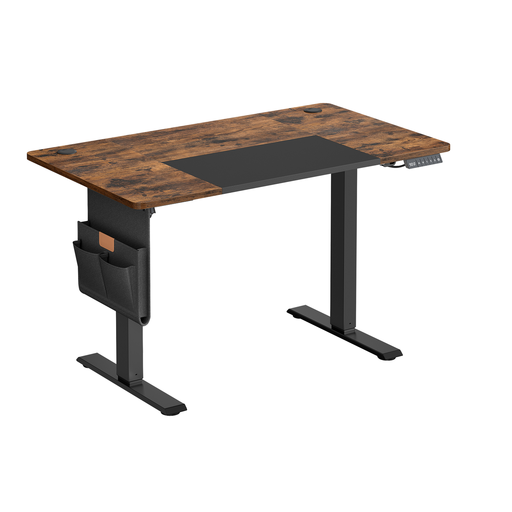
Why it stands out: This model checks all the boxes for small spaces. It includes all the essential modern features, plus some thoughtful accessories for organisation.
Advantages:
Who is it for? Ideal for students or for a home office corner in a limited space. Its 120 x 60 cm dimensions can easily accommodate a single-monitor setup while leaving plenty of room to work comfortably.

Why it stands out: With its more generous desktop, this desk strikes the perfect balance between comfort and footprint. Its understated design and black finish allow it to blend into any decor.
Advantages:
Who is it for? The go-to choice for remote workers who need more space, especially for a dual-monitor setup or for reviewing documents. A versatile model that's equally suited for work and study.
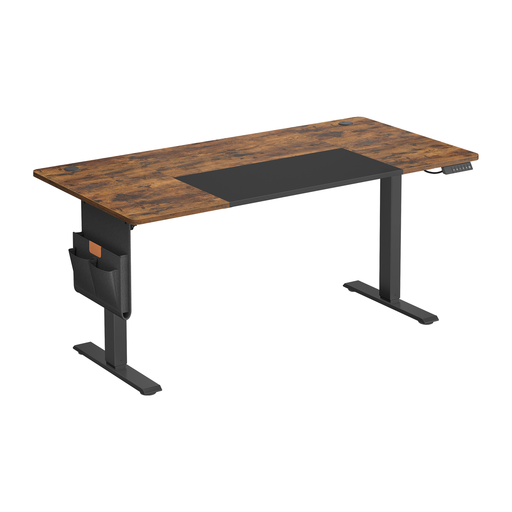
Why it stands out: Here, we step up in size with a very comfortable 160 x 70 cm desktop, perfect for the most demanding setups. It naturally includes all the excellent ergonomic features of the range.
Advantages:
Who is it for? For anyone who needs maximum space: creatives, developers, architects, or anyone juggling multiple monitors and numerous peripherals.
If you prefer a fixed desk that's all about storage, other options are available. To discover models that combine design and functionality, take a look at our selection.
? Discover our range of high-gloss white desks with shelves
The right height is your height! It depends entirely on your body. The golden rule: whether you're sitting or standing, your elbows should form a 90-degree angle when your forearms are resting on the desktop, and your wrists should remain straight. When sitting, your feet should be flat on the floor. This is precisely where the memory function of an electric desk comes into its own, allowing you to switch between your two ideal positions in a flash.
Rest assured, its consumption is minimal. The motor is only active for the few seconds it takes to adjust the height. The rest of the time, its standby power consumption is negligible, comparable to any other device on standby. Many models also include a power-saving mode to reduce it even further.
Cable management is the key to a clean and safe setup. Take advantage of any built-in grommets. If there aren't any, cable trays or sleeves attached under the desktop will work wonders to hide the jungle of wires. The most important tip: always leave enough slack so the cables don't pull when the desk is in its highest position. Accessories like pouches and hooks are also perfect for keeping chargers and headsets within reach, but off the desktop.