
Livraison le jour même ou le lendemain

Qualité garantie

Débloquez vos offres de bienvenue: Livraison GRATUITE | Jusqu'à -80 % | 30 jours d'essai gratuits à JoyPlus
Téléchargez l'application
An ergonomic desk is about more than just an adjustable desktop. Whether you work from home, study or play games, it should suit your posture, equipment and the space you actually have available. A desk that’s too narrow may struggle to accommodate a screen and keyboard, while an oversized model could overwhelm a bedroom or studio flat.
Before you place your order, watch out for these three common pitfalls:
Here are the criteria to check to make a more confident choice.
For a standard computer setup, start by measuring the available depth. A desktop 60 to 70 cm deep will generally give you more distance from the screen than a compact desk measuring 40 to 50 cm. The width you need depends on your equipment: a single screen takes up less space than two monitors alongside speakers and paper documents.
A height-adjustable desk lets you adapt your position to suit your height and chair. The electric models featured here offer an adjustment range of around 71 to 120 cm, depending on the model. The aim is to keep your shoulders relaxed and your forearms at a comfortable height, without presenting this adjustment as a medical solution.
Before checking out, make sure you’ve considered:
An electric sit-stand desk should remain stable as it rises and lowers. Check the frame, the type of feet and the maximum stated load. Some models support up to 70 or 80 kg, while a compact desk may be limited to 20 or 25 kg.
Collision protection, overheating protection and adjustable feet are also useful features to look for in the product details. However, they don’t remove the need to clear obstacles from around the desk or follow the assembly instructions.
For an adjustable desk frame, also check that it’s compatible with your own desktop: minimum and maximum dimensions, recommended thickness, fixing system and total supported weight. A frame sold without a desktop needs a little more preparation, but it could be a good option if you want to reuse an existing worktop.
A computer desk with storage can free up floor space and make a room feel less cluttered. Drawers, shelves, a PC tower holder and a printer shelf each serve different needs. Open storage makes your belongings easy to reach, while drawers keep stationery and documents out of sight.
In a small space, a compact desk that folds away or has castors will often be easier to fit in. Remember to check the depth of the shelves and how far the drawers open, though: a piece of furniture that looks compact may need plenty of clearance.
The models below have been selected based on verifiable features, including dimensions, stated capacity, accessories and storage options.
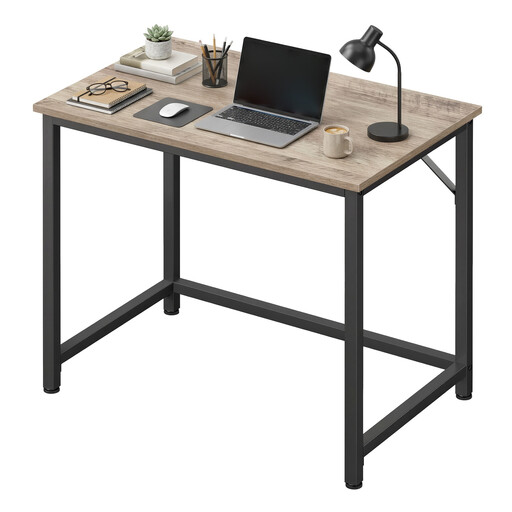
Why this desk suits you: Measuring 80 × 50 × 76 cm, this desk is a good fit for a laptop, studying or a first work-from-home set-up in a bedroom or studio flat.
Its dimensions are clearly stated, and the adjustable feet can help compensate for minor unevenness in the floor. The stated static load capacity is 50 kg.
A steel frame and particleboard desktop, assembly with clearly labelled parts, and an understated greige and black design.
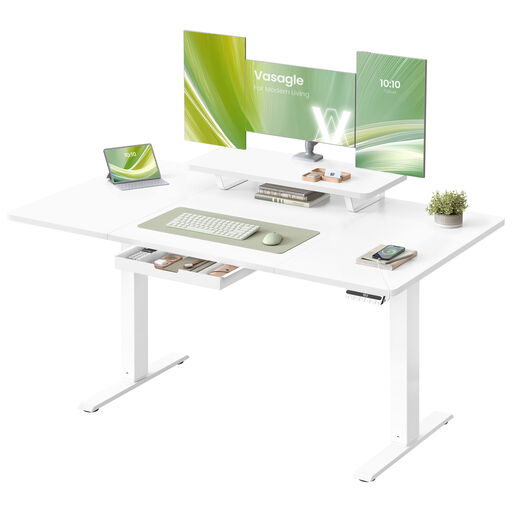
Why this desk suits you: Its 140 × 70 cm desktop provides plenty of room for several screens, files and the accessories you need for a well-equipped home office.
The product details specify an adjustment range of 72 to 120 cm, three memory settings and a motor rated at less than 48 dB. The stated maximum load is 70 kg.
A removable monitor stand and drawer, a cable-management desktop and built-in hooks to keep your workspace tidier.
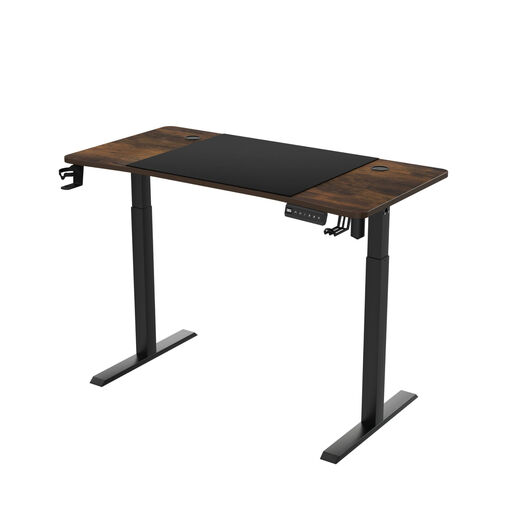
Why this desk suits you: If you regularly switch between sitting and standing, you can save three height settings and choose from several desktop sizes.
The stated height range is 75 to 120 cm, with collision and overheating protection. The stated maximum load is 80 kg.
A USB Type-C port, a hook for a headset or bag, a cup holder and a scratch-resistant surface, according to the product description.
We’ve put together a comprehensive, regularly updated selection of products that meet these exacting criteria and European safety standards.
Set up your desk on a stable floor and leave enough clearance around the electric mechanism. For a gaming desk or a set-up with several screens, spread the load out rather than placing all the heavy items on one side.
Tighten the fixings after a few weeks of use if the instructions recommend it. Clean the desktop with a soft, slightly damp cloth and avoid abrasive products, which could damage the finish. A metal desk organiser can complete your set-up without taking up too much space.
A depth of 60 to 70 cm will generally give you more distance from the screen and more room for your keyboard. If you’re only using a laptop, 45 to 50 cm may be enough when space is tight.
Power consumption depends on how often you adjust the desk and on the motor. The desk only operates while moving up or down, but it needs to remain plugged in to power the electric mechanism and use the saved height settings. Check the technical details for the information available for your model.
Its lifespan depends on the load it supports, how often you adjust it, the quality of the assembly and how well it’s maintained. Staying within the maximum weight capacity, keeping obstacles clear and holding on to the instructions can all help extend its useful life. If you’re buying a frame separately, compatibility with the desktop is also essential.