
Livraison le jour même ou le lendemain

Qualité garantie

Débloquez vos offres de bienvenue: Livraison GRATUITE | Jusqu'à -80 % | 30 jours d'essai gratuits à JoyPlus
Téléchargez l'application
Remote work, studying, personal projects… Setting up a dedicated workspace at home has become essential for many of us. But with a jungle of available models, choosing the right computer desk can quickly become a headache. Should you prioritise a compact design, ergonomics, or storage??
Our mission?? To bring you some clarity. This guide breaks down the essential criteria and presents a selection of desks designed for various needs. The goal?: to help you find the desk that will fit perfectly into both your daily routine and your home's decor.
Before you dive in, a few points deserve your attention. A well-thought-out choice is the key to a functional and pleasant workspace for years to come.
The first step is to take out a tape measure and size up your available space. In a studio or bedroom, a small, straight desk is often the easiest solution to integrate. Have an unused corner?? A corner desk can be a highly effective option to maximise your work surface without encroaching on your living area. Also, consider the equipment you'll be placing on it?: a simple laptop has different requirements than a dual-monitor setup complete with a printer.
Spending long hours at a desk takes a toll on your posture and well-being. This is where an ergonomic desk, designed to adapt to you and not the other way around, comes into play. The biggest trend right now is the sit-stand desk, which allows you to alternate between positions throughout the day. Its adjustable height, whether manual or electric, is a true asset for preventing back pain and boosting concentration. It's a non-negotiable feature if you're looking for a desk for intensive remote work.
A tidy desk leads to a clearer mind. To avoid chaos, a desk with built-in storage (drawers, shelves, cabinets) is the ideal solution for keeping documents, supplies, and cables out of sight. If the model that catches your eye lacks storage, you can always supplement your setup with external storage solutions.
To help you bring your project to life, here are three models that caught our attention. Each one meets a specific need and offers excellent value for money.

What Makes It Stand Out
This desk gets straight to the point with impressive efficiency. Its minimalist design and compact dimensions (80 x 50?cm) make it a smart choice for small rooms. Despite its apparent simplicity, its reinforced steel frame provides excellent stability, supported by adjustable feet that can handle uneven floors. A solid and discreet foundation for your work.
Key Features
Who Is It For??
Students, occasional remote workers, and anyone looking for a simple, affordable, and space-saving solution for a laptop and a few files.
What Makes It Stand Out
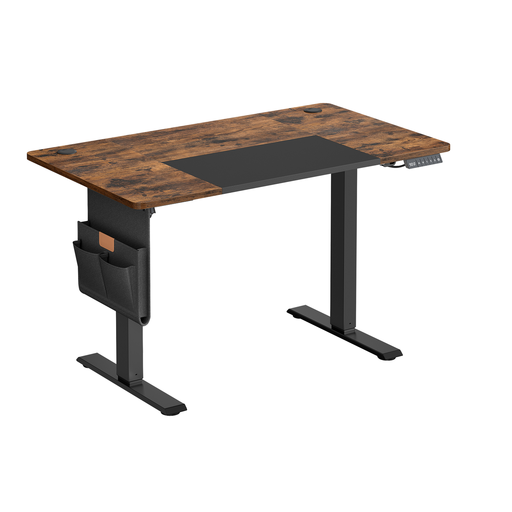
With this electric sit-stand desk, ergonomics takes centre stage. Its quiet motor allows you to adjust the desktop height from 72 to 120?cm, letting you seamlessly alternate between sitting and standing. Thoughtful features, like the 4 memory presets and the built-in USB-C port, make it a modern and incredibly practical workstation. The icing on the cake is the included clever accessories, such as a storage pouch and hooks.
Key Features
Who Is It For??
Remote professionals and anyone who spends long hours at their desk and wants to invest in an ergonomic solution to protect their comfort and health.

What Makes It Stand Out
This L-shaped desk is a true workstation. Its L-shape provides a generous surface area, perfect for a multi-monitor setup. Its key advantage?? Massive storage capacity?: with 4 drawers and 2 open shelves, everything stays within arm's reach yet perfectly organised. Another significant plus is its reversible design?: you can assemble the storage unit on the left or right, depending on your room's layout.
Key Features
Who Is It For??
Creatives, developers, and anyone who needs a vast workspace and ample storage to manage their home-based business and file documents.
A good desk is the centrepiece of your workspace, but a well-thought-out organisational system is just as crucial. To complete your setup and make use of every corner of the room, additional storage solutions can make all the difference.
Explore our selection of cabinets and shelves to perfect your home office.
Discover Our Selection of Cabinets and Shelves
The standard height for a fixed desk is typically between 72 and 75?cm. In reality, the ideal height depends on your body. The golden rule?: when seated, your feet should be flat on the floor, your knees should form a 90-degree angle, and your forearms should rest flat on the desk without your shoulders shrugging. This highlights the benefit of a height-adjustable desk or, failing that, a well-adjusted office chair.
A depth of 60?cm is a good compromise for most uses. It provides enough space for a laptop or monitor, a keyboard, and a mouse, while maintaining a comfortable viewing distance. If you use a large monitor (over 27 inches) or need space for handwritten notes, a depth of 70 to 80?cm will be more comfortable.
Rule number one?: clear your desktop. Use pen holders and small organisers for supplies. Consider a monitor stand to elevate your screen and free up valuable space underneath. Tame the cable jungle with cable ties or raceways. Finally, reserve drawers and shelves for documents and accessories you don't use daily. The goal is to keep only the essentials within arm's reach.