
Livraison le jour même ou le lendemain

Qualité garantie

Débloquez vos offres de bienvenue: Livraison GRATUITE | Jusqu'à -80 % | 30 jours d'essai gratuits à JoyPlus
Téléchargez l'application
A desk overrun with cables, overheating wall sockets, the endless hunt for the right charger for the right device… Does this scenario sound familiar? A centralized charging station is probably the solution you need. Laptops, smartphones, smartwatches, earbuds: our devices are multiplying, and with them, the need for an efficient and organized charging solution.
As product experts at Joybuy, our mission is to help you navigate the jungle of chargers. This guide breaks down the essential criteria to consider and presents our selection of the best models for 2026.
Before you take the plunge, it's essential to understand a few key concepts that will make all the difference in your daily use. Here are the three points to check to ensure you make the right choice.
Power, measured in watts (W), is the most critical factor. A good charging station must not only have a high total wattage but also know how to distribute it intelligently among its different ports.
The number and type of ports determine your station's versatility.
The station's design should fit your space and your needs.
Here are a few models that cater to different needs, from the hyper-connected professional to the user primarily seeking simplicity.
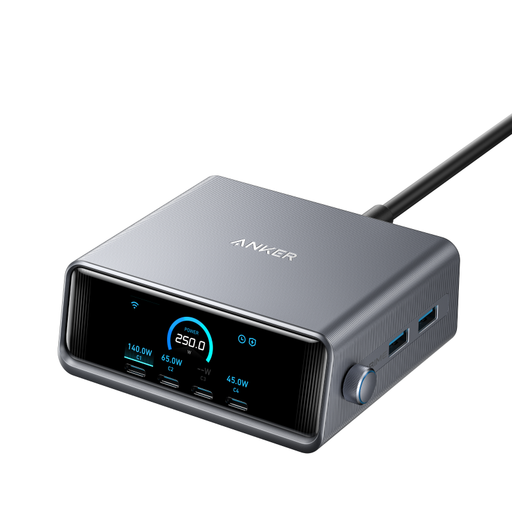
Why It Stands Out
With a colossal total output of 250W, this desktop charger is built for users who make no compromises. It can simultaneously power two laptops, a smartphone, and several other accessories without breaking a sweat. The detail that makes the difference: its LCD screen displays the power delivered by each port in real time. Meanwhile, its GaNPrime technology ensures remarkable thermal management and efficiency for such a powerful package.
Key Features
Who is it for? For the professional or tech enthusiast who juggles an arsenal of devices (powerful laptop, tablet, smartphone…) and is looking for the ultimate, centralized, no-compromise charging solution.
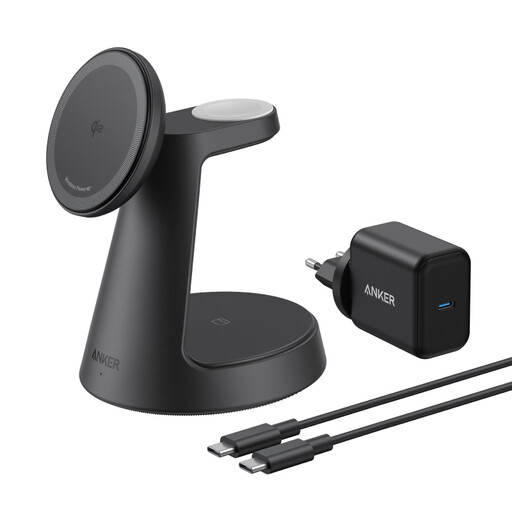
Why It Stands Out
This wireless charging station is for fans of the Apple ecosystem who appreciate beautiful design and clean desks. It combines a 15W MagSafe charger (Qi2 certified) for iPhone, a fast-charging module for Apple Watch (MFi certified), and a pad for AirPods. No more messy cables on the nightstand: each device has its own spot for simple, organized charging.
Key Features
Who is it for? For owners of Apple devices (iPhone 12 or newer, Apple Watch, AirPods with wireless charging case) who want an all-in-one solution that is as stylish as it is practical for charging all their devices in one place.
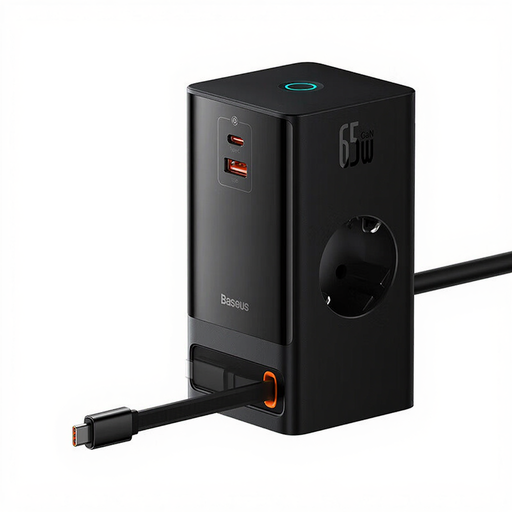
Why It Stands Out
More than just a charger, the Baseus PowerCombo is a true next-generation USB-C power strip. It combines two classic AC outlets, USB-A and USB-C ports, and even a clever retractable USB-C cable. With 65W on its main USB-C port, it can easily power an ultrabook while charging other devices. Its compact form factor, made possible by GaN technology, makes it the perfect companion for a well-organized desk.
Key Features
Who is it for? For those who want to do a major cleanup on their desk by replacing an old power strip and a stack of chargers with a single solution capable of powering both peripherals (monitor, lamp) and USB devices (laptop, smartphone).
This selection highlights very specific use cases. To discover a wider range of solutions, from desktop chargers to USB power strips, feel free to browse our complete category.
? Discover Our Full Range of USB Charging Stations
1. What is a GaN charger and why is it better? A GaN charger uses Gallium Nitride components instead of traditional silicon. The result: it's smaller, runs cooler, and offers better energy efficiency. For a multi-port charger, this technology is a true guarantee of performance and compactness.
2. What wattage should I choose for my charging station? It all depends on your devices. For a laptop, plan for at least 65W. For a fast-charging smartphone, count on 20-30W. Simply add up the power needs of the devices you plan to charge at the same time. A 100W to 150W station is an excellent sweet spot for most users.
3. Can I charge devices from different brands with the same station? Yes, absolutely. Standards like USB-C Power Delivery (PD) and USB-A are universal. You can therefore charge Apple, Android, Windows PC, and many other accessories without any issues. Just make sure the port's power output is suitable for your device. The rare exceptions involve old proprietary technologies, which have all but disappeared today.