
Livraison le jour même ou le lendemain

Qualité garantie

Débloquez vos offres de bienvenue: Livraison GRATUITE | Jusqu'à -80 % | 30 jours d'essai gratuits à JoyPlus
Téléchargez l'application
By our Joybuy product experts, July 10, 2026
With the arrival of AMD Ryzen 9000 processors, the new B850 chipset is emerging as the smart choice for anyone building a new machine. Choosing the right B850 motherboard is a crucial step?: it's the true backbone of your build, dictating its performance, upgrade potential, and stability. But with a jungle of models to choose from, finding the right one can be a challenge.
This guide is here to help. We've broken down the essential criteria and selected the most compelling models to help you choose the ideal motherboard, whether you're a gamer, a content creator, or just looking for a versatile all-around machine.
Before diving into our top picks, let's review the key technical criteria to consider to make the right choice.
The B850 chipset is the heart of the AM5 platform, ensuring native compatibility with the new Ryzen 9000 processors, as well as the 8000 and 7000 series. One of the platform's major advantages is its exclusive support for DDR5 memory. This new generation of RAM promises higher speeds and better power efficiency, delivering a tangible boost for gaming and demanding applications. Also, ensure the board has a PCIe 5.0 slot for the graphics card and at least one M.2 SSD. This is your ticket to a future-proof build, ready to handle the fastest components on the market.
Connectivity is another point you shouldn't overlook. Choosing a motherboard with Wi-Fi 7 is a smart investment in the future, delivering massively increased wireless speeds and lower latency—a decisive advantage for online gaming. On the wired side, a 2.5 Gb/s Ethernet port has become a welcome standard, with some models even pushing it to 5 Gb/s. Take a close look at the rear I/O panel?: the number and type of USB ports are critical. A 20 Gb/s USB-C port (USB 3.2 Gen 2x2), for example, will prove essential for transferring large files at lightning speed.
The motherboard's form factor must, of course, be compatible with your case. The ATX format is the most common, offering the maximum number of connectors and expansion slots. For a more compact PC, Micro-ATX is an excellent alternative. Finally, don't neglect the power delivery system (VRM), especially if you're aiming for a high-end processor. A robust, well-cooled VRM is the guarantee of stable power delivery to the CPU. This is an absolute prerequisite for consistent performance, whether under intense workloads or during long gaming sessions.
Here are three models that caught our eye, each standing out for its balance of features, performance, and price.
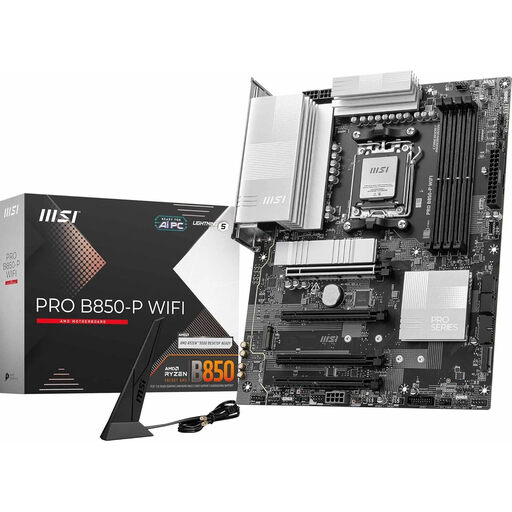
Why it stands out?: The MSI PRO B850-P WIFI is an ATX motherboard that focuses on versatility and simplicity. It incorporates modern features like Wi-Fi 7, a 5G LAN port, and PCIe 5.0 support for both the graphics card and an M.2 SSD. Its "EZ DIY" features, such as tool-less clips for M.2 SSDs and graphics cards, greatly simplify the building process.
Pros?:
Who is it for?? For those looking for a reliable and well-equipped ATX B850 motherboard for a gaming or productivity build. Its balanced approach and builder-friendly features make it particularly accessible, even for a first-time build on the AM5 platform.
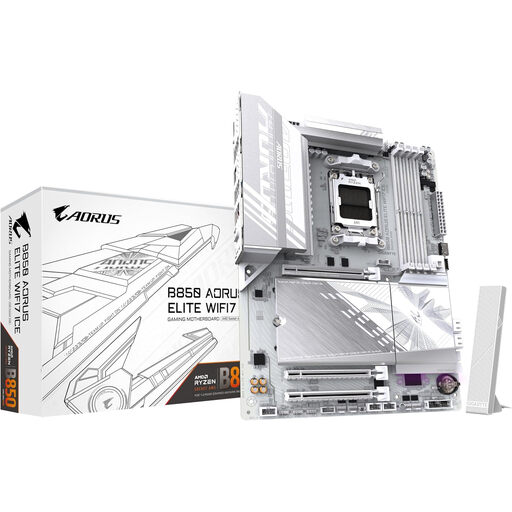
Why it stands out?: The Gigabyte AORUS ELITE WIFI7 ICE is a head-turner with its immaculate, all-white aesthetic, perfect for themed builds. Beyond its looks, it offers high-end features like a Twin Digital 14+2+2 power delivery system and comprehensive connectivity, including Wi-Fi 7 and PCIe 5.0 support. Gigabyte also highlights software features, like "X3D Turbo" mode, designed to optimize performance with compatible processors.
Pros?:
Who is it for?? For enthusiasts and gamers who want a machine that is as beautiful as it is powerful. It's the ideal foundation for a white, high-performance gaming build that's built to last.
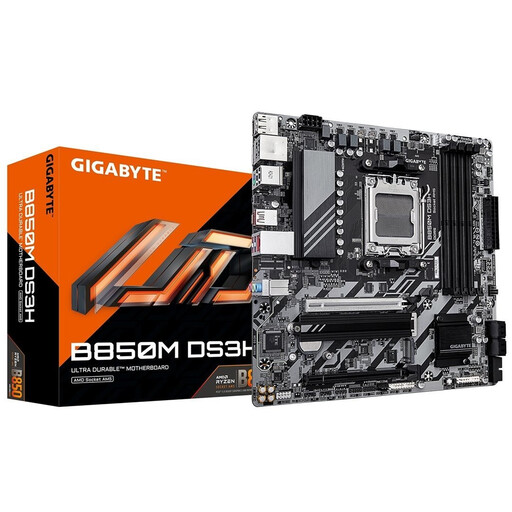
Why it stands out?: This Micro-ATX model from Gigabyte focuses on the essentials while still incorporating the key technologies of the AM5 platform. It offers PCIe 5.0 support for the graphics card and an M.2 SSD, as well as four slots for DDR5 memory. Its pragmatic approach makes it a prime candidate for compact builds or tight budgets.
Pros?:
Who is it for?? For those who want to build a powerful PC in a compact case or are looking to maximize every dollar of their budget. It provides a solid, modern foundation without sacrificing key technologies like PCIe 5.0.
This selection is, of course, just a glimpse of the many options available. Every PC build is unique, and your needs may require specific features. If you're looking for other models or compatible components, feel free to explore our full catalog.
Explore our complete collection of DDR5 Components to discover other motherboards, memory modules, and more.
The X870 chipset is positioned in the high-end segment. It generally offers more PCIe lanes, USB 4 ports, and richer connectivity, targeting the most demanding users who want maximum bandwidth. The B850, on the other hand, offers a very well-balanced feature set that covers the needs of 99% of users, including for a high-end gaming build, all at a more accessible price point.
Absolutely. A good B850 motherboard is not only sufficient but is an excellent choice for a modern gaming build. It has everything you need?: a PCIe 5.0 x16 slot for the latest generation of graphics cards, support for high-frequency DDR5, and a power delivery system capable of handling the load from the most powerful processors.
Since B850 motherboards are launching alongside the Ryzen 9000 processors, they are compatible out of the box with no extra steps needed. However, it's always wise to check the manufacturer's website for any available BIOS updates after your purchase. These updates can improve stability, memory compatibility, or even performance. Fortunately, features like Q-Flash Plus (Gigabyte) or Flash BIOS Button (MSI) make it very easy to flash the BIOS, sometimes even without a CPU installed.