
Livraison le jour même ou le lendemain

Qualité garantie

Débloquez vos offres de bienvenue: Livraison GRATUITE | Jusqu'à -80 % | 30 jours d'essai gratuits à JoyPlus
Téléchargez l'application
Finding a device that combines the portability of a smartphone with the productivity of a laptop can sometimes be a real headache. The Android tablet with a keyboard is the ultimate versatile solution, equally at home during work sessions as it is for moments of relaxation. Whether you're a student, a mobile professional, or looking for a device for the whole family, the goal remains the same: to find a high-performance tool without breaking the bank.
In this guide, we've selected tablets that come with essential accessories like a keyboard and, in some cases, a stylus, right in the box. We've focused on models that offer excellent value for everyday use, from note-taking and light office work to streaming your favourite shows.
Before we dive into our selection, here are the key criteria to keep in mind to find the device that truly meets your needs.
The main advantage of these bundles? They offer an all-in-one, out-of-the-box solution. A tablet with a stylus and keyboard allows you to be productive from the moment you unbox it. The keyboard transforms your tablet into a small secondary workstation, ideal for typing emails, writing reports, or taking notes in class. The stylus, meanwhile, greatly expands the possibilities for drawing, annotating documents, or simply for more precise navigation. Double-check that these accessories are included to avoid any unpleasant surprises and extra expenses.
The spec sheet will dictate the smoothness of your daily experience. For comfortable multitasking (web browsing, office apps, streaming), 6?GB of RAM or more is highly recommended. A storage capacity of 128?GB or 256?GB provides ample space for your applications and files. An octa-core processor is now the standard to ensure good responsiveness. These features make it a perfectly viable tablet for students or a tablet for work.
The screen size is a key factor for comfort. A 10-inch tablet or larger offers a great workspace and viewing area. In terms of connectivity, 5G Wi-Fi ensures high speeds at home or in the office. If you're often on the go, a 4G tablet guarantees you internet access anywhere, without having to rely on the unpredictability of public Wi-Fi. This mobility makes it a very serious alternative to the iPad for those who prefer the Android ecosystem.
Here are three models that stand out from the crowd with their complete accessory packages and well-thought-out specs for mixed use.
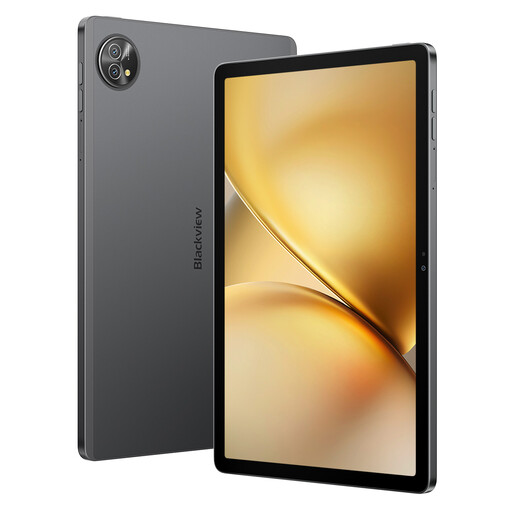
Why does this model stand out? The Blackview Zeno 10 is aimed at those who demand both performance and connectivity. Its large 11-inch 2K screen is highly immersive, while its Dual SIM 4G + 5G Wi-Fi compatibility ensures a rock-solid connection. The RAM, advertised at 24?GB (8?GB physical + 16?GB virtual expansion), and its 256?GB of storage make it a machine built for intensive multitasking. The integrated PC Mode completes the package, making it an excellent mobile productivity tool.
Highlights:
Who is it for? Mobile professionals and students who need to stay connected at all times with a machine capable of juggling numerous apps without ever slowing down.
See details for the Blackview Zeno 10
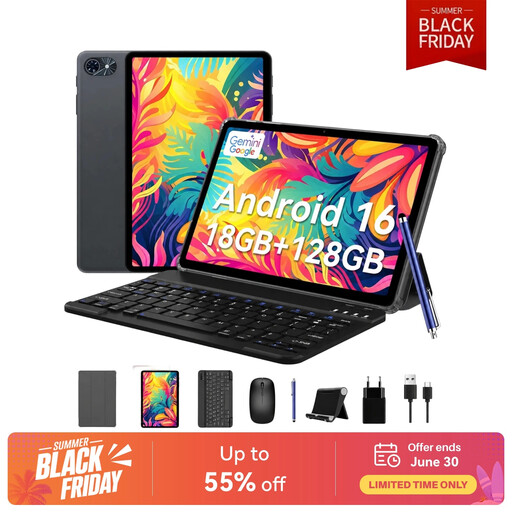
Why does this model stand out? The TABWEE T80 is the epitome of a budget-friendly tablet that doesn't skimp on accessories. It comes with an ultra-complete bundle: keyboard, mouse, stylus, case, stand, and even a glass screen protector. With 6?GB of RAM, 128?GB of storage, and Android 15, it has a solid technical foundation for daily tasks. It's the ideal solution for anyone looking for a functional device without the hassle of buying accessories separately.
Highlights:
Who is it for? First-time buyers, families, or anyone who wants a ready-to-use solution on a controlled budget.
See details for the TABWEE T80

Why does this model stand out? The Teclast ArtPad Pro plays in the big leagues with its huge 12.7-inch 2K screen. It offers remarkable viewing comfort for working on documents, drawing, or watching movies. It will particularly appeal to creatives thanks to its stylus with 4096 levels of pressure sensitivity. The Helio G99 processor, backed by up to 20?GB of expandable RAM, ensures very solid performance. Its massive 10,000?mAh battery promises marathon-like battery life.
Highlights:
Who is it for? Creatives, graphic designers, and professionals who handle large documents and need a large display area to be efficient.
See details for the Teclast ArtPad Pro
Our selection focuses on complete bundles for maximum out-of-the-box versatility. Of course, the tablet market is full of other gems, and your needs might be more specific. If you want to explore other models, especially tablets specialised for drawing or in different form factors, feel free to browse our catalogue.
Discover our full range of tablets with styluses
In many cases, yes! A tablet with a keyboard is perfect for browsing the web, managing emails, taking notes, handling office tasks (word processing, spreadsheets), and entertainment. However, for very resource-intensive software (advanced video editing, 3D modelling, intensive coding), a laptop remains essential.
RAM is the name of the game for multitasking. The more you have, the more applications you can run simultaneously without experiencing slowdowns.
The keyboards and styluses provided in these bundles are designed to be immediately functional and offer an economical solution. For daily use, they get the job done perfectly. The most intensive users might eventually want to upgrade to more specialised accessories, but for the vast majority, this equipment is an excellent starting point.