
Livraison le jour même ou le lendemain

Qualité garantie

Débloquez vos offres de bienvenue: Livraison GRATUITE | Jusqu'à -80 % | 30 jours d'essai gratuits à JoyPlus
Téléchargez l'application
The Android tablet market is a veritable jungle, and finding your way can quickly become a headache. Between the spec sheets, screen sizes, and accessories, choosing the right model can feel like an uphill battle. Whether you're a student looking for a productivity tool, a family seeking an entertainment screen, or a budding creative, finding that perfect gem that meets your needs and budget is key.
To help you see more clearly, as the Head of Product Recommendations at Joybuy, my mission is to do the legwork for you. Forget the technical jargon! Together, we'll break down the criteria that truly matter and present a selection of tablets that shine with their excellent price-to-performance ratio.
Before we dive into our selection, let's review the key points that will guide your choice.
One of the biggest advantages of many Android tablets today is the wealth of accessories included right out of the box. A complete Android tablet bundle with a keyboard and stylus can instantly transform a simple entertainment device into a true mobile workstation. For a tablet for students or professional use, the keyboard quickly becomes essential for note-taking and writing. Meanwhile, a tablet with a keyboard and stylus offers impressive versatility for browsing, annotating PDFs, or letting your creativity flow.
There are two numbers to keep an eye on: RAM and storage (ROM).
Finally, for a tablet, good battery life is a non-negotiable feature. Take a look at the battery capacity, expressed in milliampere-hours (mAh). Anything over 8,000?mAh is generally a good indicator of all-day endurance.
The display is your gateway to your content. A large-screen tablet (over 11 inches) offers unparalleled viewing comfort for movies or working on documents. For a tablet for drawing, the resolution (Full HD or 2K) and the stylus's pressure sensitivity are two criteria you absolutely shouldn't overlook.
On the connectivity side, Wi-Fi is standard. But if you're often on the move and internet access is vital, a 4G tablet with a SIM card slot is the ideal solution.
Here are three models that tick all the boxes, with a complete set of equipment and a particularly competitive price point.
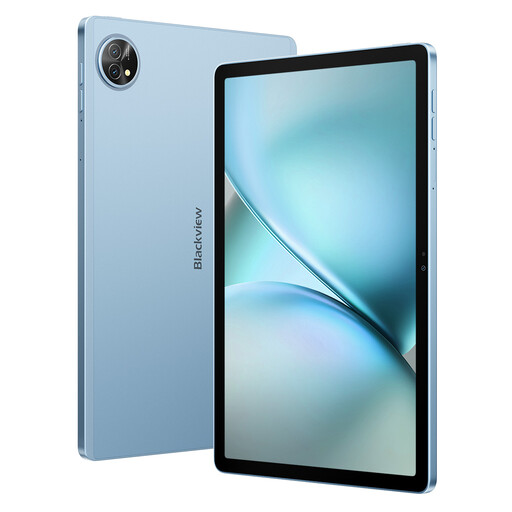
What sets it apart The Blackview Zeno 10 stands out as the ultimate all-in-one solution. Delivered with its keyboard and stylus, it's tailored for on-the-go productivity. Its PC mode transforms the experience to mimic that of a laptop, while its 4G connectivity ensures you have internet access wherever you are.
Key Features
Who is it for? Perfect for students and mobile professionals looking for a lightweight alternative to a laptop, without compromising on performance or connectivity.
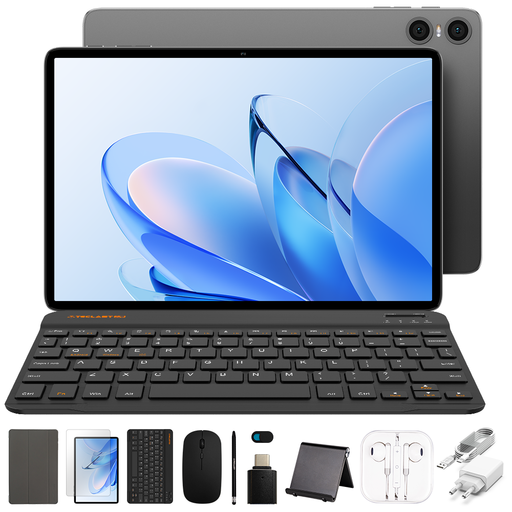
What sets it apart The TECLAST P30T is the very definition of a budget-friendly tablet that delivers the essentials without compromise. With its octa-core processor and a comfortable 128?GB of storage, it's perfectly suited for daily tasks like web browsing, video streaming, and social media. A nice bonus: it comes with a protective case right out of the box.
Key Features
Who is it for? Perfect for families, kids, or anyone needing a secondary tablet for entertainment and basic use, without breaking the bank.

What sets it apart With a name like that, it's no surprise: the ArtPad Pro is designed for creatives. Its large 12.7-inch screen with 2K resolution provides a very comfortable digital canvas. Its T-Pen stylus, with 4,096 levels of pressure sensitivity, ensures high-precision drawing. And its massive 10,000?mAh battery delivers excellent battery life, even during the longest creative sessions.
Key Features
Who is it for? For budding artists, art students, or simply those who want a very large screen for multimedia and handwritten notes.
Sometimes, the right accessory makes all the difference. If you already have a tablet but want to boost your productivity or creativity, a precision stylus can change everything.
Discover our range of styluses for tablets to find the one that matches your device and your ambitions.
To put it simply, RAM (Random Access Memory) is your tablet's short-term memory: it manages ongoing tasks. The more you have, the more responsive your device is and the better it can juggle multiple apps without slowing down. Storage (ROM) is the long-term memory, equivalent to your hard drive: it's where your apps, photos, videos, and files are stored.
It all depends on your usage. If your tablet rarely leaves your home, office, or places with reliable Wi-Fi, a Wi-Fi-only model is more than enough. However, if you're frequently on the move and need constant internet access for work, browsing, or communication, a 4G tablet is a major advantage for your freedom and flexibility.
Yes, absolutely! With the right accessories, an Android tablet transforms into a remarkably effective work tool. A model equipped with a keyboard, a stylus, and a 'PC' or 'Desktop' mode will allow you to write documents, manage your emails, create presentations, and even do light video editing. It's an ideal solution for mobile workers and students.