
Livraison le jour même ou le lendemain

Qualité garantie

Débloquez vos offres de bienvenue: Livraison GRATUITE | Jusqu'à -80 % | 30 jours d'essai gratuits à JoyPlus
Téléchargez l'application
The tablet market is a jungle, and it's easy to get lost. Between models designed for entertainment, those optimised for work, and niche tools for creation, how do you find the perfect fit that will truly meet your expectations? Forget the race for raw power: the best tablet is the one that perfectly suits your use case, whether you're a student, a mobile professional, or a creative at heart.
As the Head of Product Recommendations at Joybuy, my mission is to do the legwork for you. In this guide, we get straight to the point: presenting relevant options and practical advice to help you make an informed choice, free of marketing jargon. We'll explore models that stand out from the crowd, whether it's a large-screen tablet for total immersion, an e-ink digital notebook for distraction-free note-taking, or a graphics tablet for drawing with professional precision.
Before diving into our selection, let's review the key points that will make all the difference.
The diagonal measurement is one thing. But the display technology is what changes everything.
The processor and RAM are the engine of your tablet. A modern octa-core processor, like the Helio G99, paired with a good amount of RAM (8?GB or more), will ensure a smooth day-to-day experience. On the connectivity side, don't overlook anything:
A tablet with a keyboard and stylus expands its capabilities tenfold. For students and professionals, a keyboard transforms it into a capable ultra-portable, perfect for taking notes in class or writing long emails. For creatives, a pressure-sensitive stylus is the indispensable tool for drawing and annotating. Remember to check if these valuable allies are included or sold separately.
We have selected three models with very distinct profiles, each excelling in its own field.
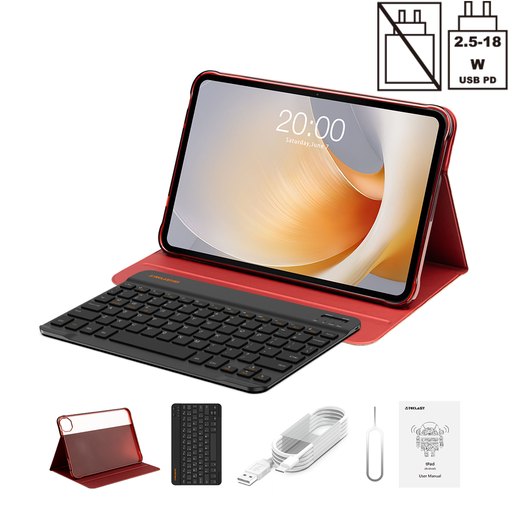
The Teclast T65 Plus is for those who think big. Its XXL format makes it the ideal companion for your movie nights, as well as a powerful ally for working on complex documents.
Why it stands out: Its key feature: a giant 13.4-inch screen with a 120?Hz refresh rate. This combination offers stunning fluidity and visual comfort, especially at this price point. It's also generously equipped with 20?GB of RAM (8?GB physical + 12?GB virtual) for multitasking without a hitch.
Key Features:
Who is it for? For binge-watchers, families, and professionals who juggle large spreadsheets, plans, or presentations.

The Teclast ArtPad Pro hits the mark: it's tailor-made for digital artists and fans of handwritten notes. It's a true graphics tablet for drawing, designed for creation.
Why it stands out: Its strong point is its T-Pen stylus and its 4096 levels of pressure sensitivity. This allows you to vary the thickness of your lines with the precision of a real pencil for a natural feel. Its 12.7-inch 2K screen provides a comfortable canvas to let your imagination run wild.
Key Features:
Who is it for? For art students, illustrators, designers, and all professionals who like to annotate documents or jot down ideas on the fly.

The iFLYTEK AINOTE 2 is not your average tablet. It's an e-ink digital notebook entirely dedicated to productivity, reading, and note-taking.
Why it stands out: Its 10.65-inch E-Ink screen offers unparalleled reading and writing comfort, far from the harsh blue light of traditional screens. Its thinness (4.2?mm) and light weight are simply stunning. But its real game-changer is its AI-powered features: it can transcribe audio recordings into text in 16 languages, summarise, and even organise your handwritten notes.
Key Features:
Who is it for? The dream tool for professionals who jump from meeting to meeting, students in lecture halls, researchers, authors... In short, for anyone who wants to capture and organise their ideas, far from the distractions of a traditional tablet.
Our selection focuses on specific use cases, but the possibilities don't end there. Accessories, in particular, can radically transform your experience. A good keyboard case can turn a simple entertainment tablet into an ultra-efficient ad-hoc workstation.
To boost your productivity, take a look at our selection of keyboards and cases and find the perfect partner for your tablet.
1. Can an Android tablet replace a laptop for a student? For everyday tasks—note-taking, web research, reading PDFs, emails—a tablet is not only sufficient but often more practical. A model equipped with a keyboard and stylus becomes a true Swiss Army knife. However, for demanding or highly specific software (advanced video editing, coding, 3D), a laptop still has the edge.
2. How important is pressure sensitivity for a graphics tablet for drawing? It's an absolutely critical factor. It allows you to vary the thickness and opacity of the line based on the force applied to the stylus, just like with a real pencil or brush. The higher the number of levels (like the 4096 on the ArtPad Pro), the finer and more nuanced the control. It's the key to an expressive and richly detailed drawing.
3. Are tablets with E-Ink screens suitable for more than just reading? Absolutely. While e-readers of the past were limited to reading, modern models like the iFLYTEK AINOTE 2 are true productivity powerhouses. Thanks to their responsive stylus and advanced software, they excel at note-taking, PDF annotation, and even audio transcription. Their matte screen, readable in direct sunlight, and record-breaking battery life make them formidable daily companions.