
Livraison le jour même ou le lendemain

Qualité garantie

Débloquez vos offres de bienvenue: Livraison GRATUITE | Jusqu'à -80 % | 30 jours d'essai gratuits à JoyPlus
Téléchargez l'application
For a competitive gamer, every millisecond counts. Combining an ultra-detailed image with rock-solid fluidity is the secret to peak performance. This is precisely the promise of a 2K 240?Hz gaming monitor: the precision of QHD (2560x1440p) coupled with responsiveness engineered for victory.
But navigating the jungle of spec sheets can quickly become a headache. Between panel types, response times, and HDR standards, it's easy to get lost. As the editorial team's hardware expert, my mission is to cut through the noise for you. This guide gets straight to the point: breaking down the key features and presenting a selection of monitors for different user profiles, so you can invest with confidence.
Before we dive into our top picks, let's review the essential criteria to keep in mind to make the right choice.
The panel type is the heart of your monitor: it dictates both image quality and responsiveness. For 240?Hz gaming, Fast IPS technology has established itself as the gold standard. It offers the best of both worlds: the accurate colours and wide viewing angles of traditional IPS, combined with the ultra-low response times worthy of TN panels, but without sacrificing display quality. It's the ultimate versatile choice, equally at home in a fast-paced FPS as it is for watching your favourite shows.
A 240?Hz refresh rate is useless without a response time to match. Aim for a 1440p 240?Hz 1?ms (GTG, or Grey-to-Grey) monitor to eliminate motion blur. Just as essential is compatibility with adaptive sync technologies (AMD FreeSync or NVIDIA G-SYNC), which ensures a perfectly smooth gaming experience. By synchronising the monitor with your graphics card, it says goodbye to screen tearing.
HDR (High Dynamic Range) certification promises more dynamic images, with intense peak brightness and deep, abyssal blacks. An HDR400 monitor, for example, guarantees a minimum peak brightness of 400 nits. Even though this is an entry-level HDR standard, the gain in contrast over a standard display is immediate. Game scenes become more immersive and legible, with more detail visible in both very dark and very bright areas.
Here are a few models that stand out from the crowd thanks to their specs and market positioning.
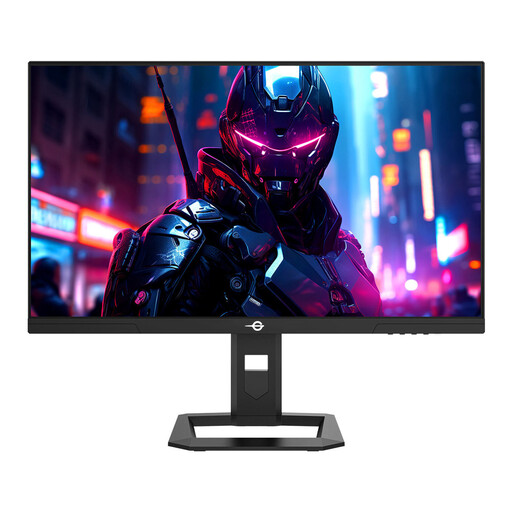
Why it stands out: The TITAN ARMY P2710S checks all the boxes for the demanding gamer looking for a 2K 240?Hz gaming monitor. It features a Fast IPS panel, QHD resolution, and a 1?ms response time, all in an ideal 27-inch format. The numerous reviews for the Titan Army P2710S unanimously praise its excellent performance-to-price ratio.
Advantages:
Who is it for? This monitor is aimed at competitive PC gamers who want a tangible in-game advantage without sacrificing image quality. It is particularly formidable in FPS, racing games, and any title where responsiveness is king.
See the price for the TITAN ARMY P2710S
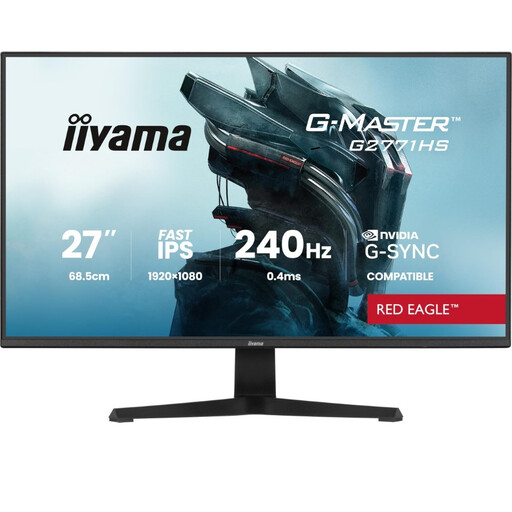
Why it stands out: The Iiyama G2771HS-B1 is all about pure speed. With its 27-inch Fast IPS panel and 240?Hz refresh rate, it's built for gamers who swear by frames per second. Its Full HD (1920x1080) resolution is less demanding on the graphics card, making it easier to hit the 240 FPS mark.
Advantages:
Who is it for? Ideal for esports players and competitors in titles like Valorant or CS:GO, where achieving the highest possible framerate is the absolute priority, even if it means sticking with a 1080p resolution.
See the price for the Iiyama G-Master G2771HS-B1
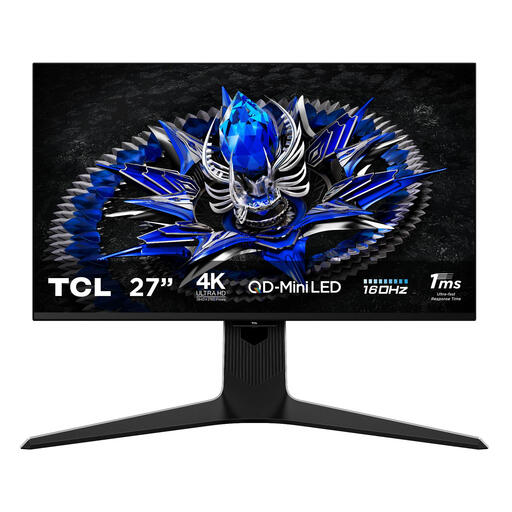
Why it stands out: The TCL 27R83U plays in a different league. It delivers an extraordinary visual experience thanks to its 4K UHD panel and QD-Mini LED technology featuring 1152 local dimming zones. While its refresh rate peaks at 160?Hz, its phenomenal image quality, HDR1400 certification, and colour accuracy make it a top contender for fans of AAA games and content creation.
Advantages:
Who is it for? For the passionate gamer who refuses to choose between gaming and image quality. It's the perfect monitor for anyone who devours immersive AAA titles, watches 4K movies, and engages in photo or video editing, all while demanding high fluidity in games.
See the price for the TCL 27R83U
Our selection highlights three distinct gamer profiles. If you're looking for a model with different features, many other options await you.
? Explore our full collection of 240Hz Gaming Monitors to discover other models.
1. Is a 240?Hz monitor really useful for gaming? Yes, absolutely. For fast-paced games (FPS, racing, fighting), the difference between 144?Hz and 240?Hz is clearly noticeable. Motion is sharper, target tracking is easier, and display latency is reduced, which can provide a significant competitive advantage. For slower-paced games (strategy, RPGs), the benefit is less obvious.
2. What graphics card is needed for a 2K 240?Hz monitor? To take full advantage of such a monitor, a powerful graphics card is essential. You should aim for models capable of generating close to 240 frames per second in 1440p. Think of high-end cards from the latest generations, such as an NVIDIA GeForce RTX 4070 Super / 4080 or an AMD Radeon RX 7800 XT / 7900 XT, depending on the games and your desired graphics settings.
3. Fast IPS or VA for a 240?Hz monitor? For a 240?Hz monitor, Fast IPS is generally the best choice due to its superior responsiveness and lack of ghosting, a flaw that can still affect some fast VA panels. However, VA panels maintain an advantage in contrast (deeper blacks), which is a plus for atmospheric games or watching movies in a dark room. The choice therefore depends on your priority: maximum responsiveness (Fast IPS) or better contrast (VA).