
Livraison le jour même ou le lendemain

Qualité garantie

Débloquez vos offres de bienvenue: Livraison GRATUITE | Jusqu'à -80 % | 30 jours d'essai gratuits à JoyPlus
Téléchargez l'application
By the Joybuy Editorial Team, July 5, 2026
The iPad is a fantastic tool for creativity, entertainment, and browsing. But when it comes to typing long emails, writing reports, or working on documents, its virtual keyboard quickly shows its limitations. That's where a Belkin iPad keyboard case comes in: it transforms your tablet into a true mobile workstation while protecting it from the bumps and scrapes of daily life.
But with so many models to choose from, how do you find the right one? This guide is here to break down the key criteria and introduce you to the best Belkin models, helping you find the perfect match for your iPad and your workflow.
To make sure you're making the right choice, here are the key points to check before you buy.
It might seem obvious, but it's always worth repeating: check that the case is compatible with your specific iPad model. Dimensions, button placements, and camera cutouts vary from one generation to the next. A keyboard case for the 10th-generation iPad won't fit an iPad Pro, and vice versa. Make sure you know your exact model (e.g., 11-inch iPad Pro M4) to avoid any disappointment. The product pages always clearly list compatible devices.
The goal is to boost your productivity, right? Pay close attention to the following features:
Nobody wants to be charging their keyboard every other day. Check the battery life, often expressed in standby days or hours of use. Many Belkin models offer outstanding battery life and charge independently of the iPad. Versatility is also a key factor: a detachable keyboard or a multi-angle stand will let you adapt the setup for different situations, whether you're typing, watching videos, or reading.
To help you decide, we've selected three flagship models from the Belkin iPad accessories lineup, each designed for a different use case.
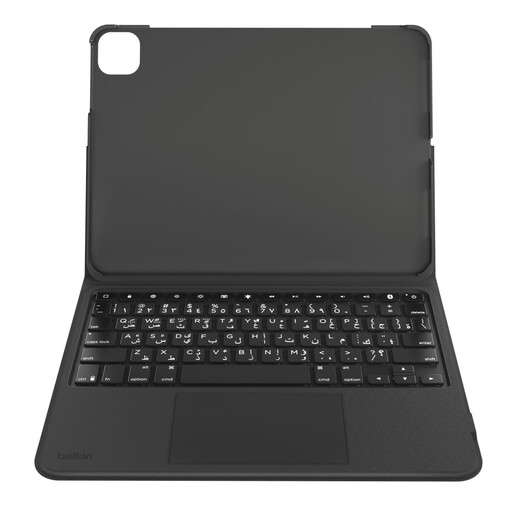
Its Standout Feature
This case shines with its versatility. Its detachable keyboard lets you instantly switch from a "laptop" mode to a pure "tablet" mode. It's an incredibly practical solution for those who juggle different tasks throughout the day. The robust protection and Apple Pencil holder make it a reliable companion for life on the go.
Highlights
Who is it for?
For students and mobile professionals who need an all-in-one solution for switching between note-taking, writing, and browsing content. Its flexibility is its greatest strength.
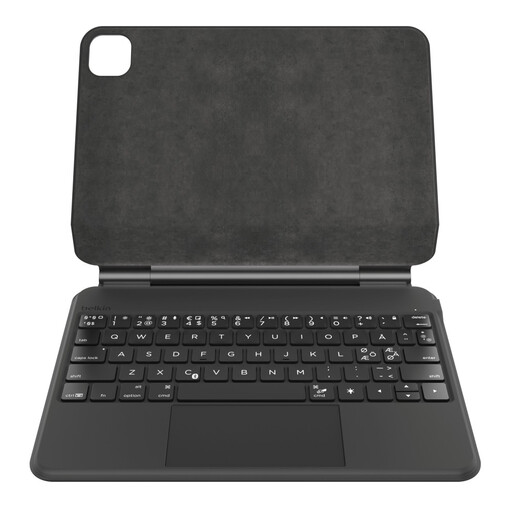
What We Love
Here, Belkin delivers a more premium experience with seamless iPad integration. Its "floating" magnetic mount holds the tablet securely in place while offering a clean, minimalist look. The auto sleep/wake function when opening and closing the case is a clever detail that preserves the battery life of both the iPad and the keyboard.
Highlights
Who is it for?
For users seeking an experience that's very close to a laptop, complete with a polished finish and smart features. Ideal for heavy use at the office or at home.
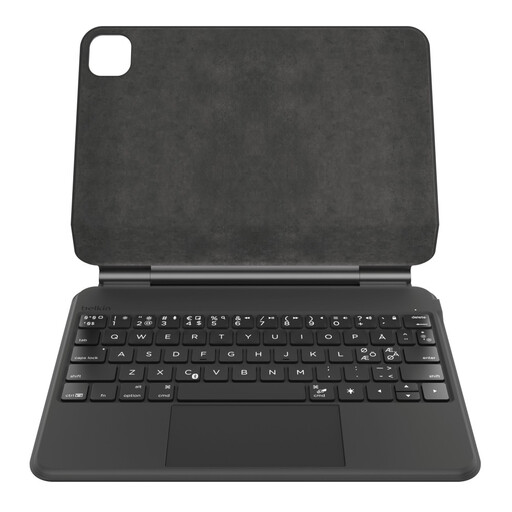
The Pro Touch
Specifically designed for the powerful 11-inch iPad Pro (M4), this model takes the best of the Pro lineup and adapts it with a "floating" cantilever design that allows you to adjust the viewing angle with incredible precision. It turns the iPad Pro into a true creative workstation, without compromising on performance or style. The plastic-free packaging is also a bonus for environmentally-conscious users.
Highlights
Who is it for?
For creatives, designers, and all demanding iPad Pro users who want the very best in performance, ergonomics, and design to complement their high-end device.
The Belkin range is extensive, but if you haven't found what you're looking for or are curious to see what the competition offers, feel free to explore our full catalog.
? See all our tablet keyboard cases
1. How do I connect a Belkin wireless keyboard to my iPad? Connection is simple via Bluetooth. Turn on the keyboard, enable Bluetooth on your iPad in "Settings," then select the Belkin keyboard from the list of available devices. Pairing only takes a few moments.
2. Will the keyboard drain my iPad's battery? Not at all. Belkin keyboard cases have their own built-in battery and are charged independently of the iPad via a dedicated port. This means you can use and charge your keyboard without affecting your tablet's battery life.
3. Is the trackpad a gimmick or a real game-changer? It's a real game-changer, without a doubt! A trackpad brings the experience much closer to that of a laptop. It makes it easier to navigate, precisely select text, scroll through pages, and use iPadOS Multi-Touch gestures, which dramatically boosts productivity for more complex tasks.