
Livraison le jour même ou le lendemain

Qualité garantie

Débloquez vos offres de bienvenue: Livraison GRATUITE | Jusqu'à -80 % | 30 jours d'essai gratuits à JoyPlus
Téléchargez l'application
A baby monitor with camera lets you keep an eye on your little one from another room, or even when you're out and about. The trouble is, product listings often mix genuinely useful features with marketing claims that are hard to separate. Before you order a video baby monitor, focus on what really matters: the type of connection, the quality of the night-time image and the security of the setup.
A long-range baby monitor might promise several hundred metres. However, this measurement is taken in open, unobstructed conditions. In a typical British home, thick walls, multiple floors and lots of connected devices can significantly reduce the indoor range.
A model with a dedicated screen and local connection means you're not entirely reliant on your home network. On the other hand, a Wi-Fi baby monitor lets you check on your child from work or while you're travelling, but it does require a stable connection and a properly secured setup.
A 1080p baby camera already shows enough detail to check your child's general position. A 4K baby camera goes further, offering a sharper image and a more usable digital zoom. The trade-off is that it can use more bandwidth and storage space.
Resolution isn't everything, especially at night. Instead, check how clear the infrared image is in the dark, how discreet the indicator lights are, and whether the field of view suits the room.
Cry and motion detection can alert you when a sound or movement is picked up. But the camera might also react to outside noise, a pet walking past, or a change in light. These alerts are a handy extra, not a replacement for adult supervision.
Before first use, change the default password on your router and on any associated account. Install any available updates, and limit video sharing to only those who genuinely need it.
For a standard nursery, consider the following points:
A motorised camera can follow a person or pet, but this automatic movement isn't necessarily useful when you're pointing it at a cot that doesn't move. A well-positioned manual camera can be perfectly adequate.
Two-way audio lets you speak to your child through the screen or app. Check the sound level, the transmission delay, and whether you can mute the microphone. For recording, compare local storage on a memory card with cloud storage, which often requires a subscription after the trial period ends.
Battery life mainly matters for the parent unit and for models with a portable camera. For a device that's plugged in all the time, the length and security of the cable are more important than the battery capacity.
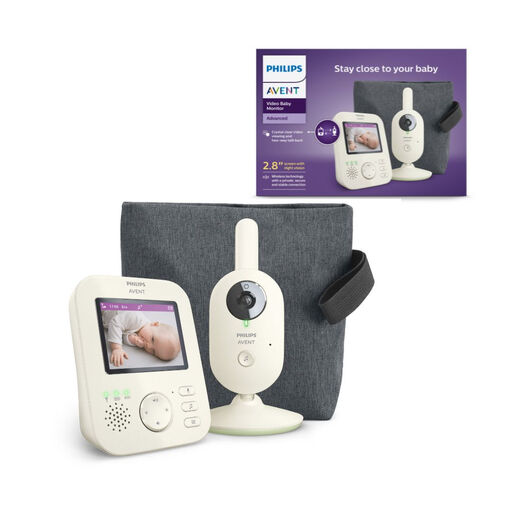
Why this suits this profile: Its 2.8-inch colour screen and dedicated wireless connection are ideal for parents who want to keep an eye on their child at home without installing an app.
The advertised range is 50m indoors and 300m outdoors. Its dedicated 2.4GHz connection means you don't rely on your home Wi-Fi.
Automatic infrared night vision, two-way audio, eco mode and up to 12 hours of battery life for the parent unit.
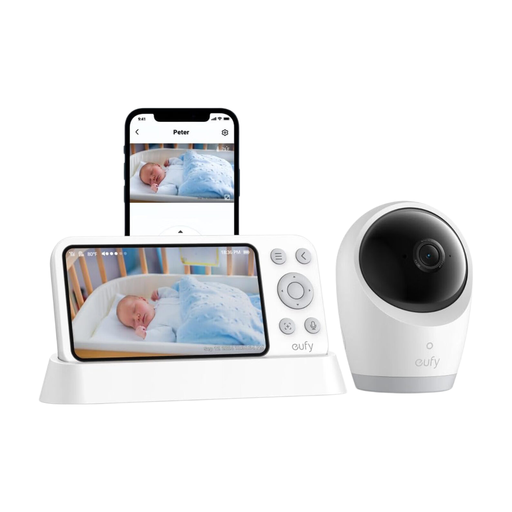
Why this suits this profile: This hybrid system is designed for families who want a local screen at home while still being able to access the camera via an app when they're out.
Switching between Wi-Fi and local connection reduces reliance on the internet. The listing also mentions SD card storage, sold separately.
Advertised 4K UHD resolution, 5-inch screen, 330° rotation and 60° tilt, 8× zoom, cry detection and a 5,000mAh battery.
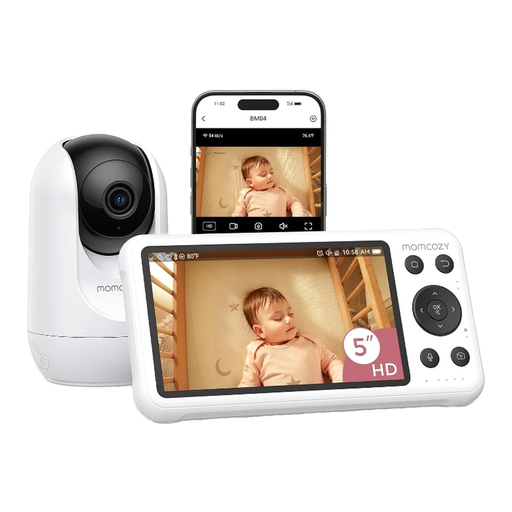
Why this suits this profile: Its dual use, with a dedicated screen and Wi-Fi access from your phone, suits parents who switch between monitoring at home and checking in remotely.
The local screen lets you view the camera without always opening the app. The listing also mentions local recording and real-time alerts.
1080p camera, 5-inch screen, night vision, two-way audio, motion and cry detection, with app control.
We've put together a complete, regularly updated selection of products that meet these exacting standards, while also taking European safety regulations into account.
Place the camera on a stable surface or fix it securely, following the instructions carefully. Cables must be kept out of your baby's reach, at least one metre away from the cot when it's a power cord. Never put the device inside the cot or against the cot bars.
Before ordering, check that the regulatory information is present, that there are instructions in English, and that the contact details of the responsible party established in the European Union are provided where required. A baby monitor with camera is not a medical device and will never replace direct adult supervision.
Go for a local connection if you mainly use the monitor at home and want simplicity. Wi-Fi becomes useful for viewing the camera remotely, as long as you're happy relying on the internet and you secure the account properly.
1080p is enough for most everyday needs. 4K gives you more detail and offers greater flexibility for zooming, but it can also increase your storage requirements. In any case, pay just as much attention to the quality of the night vision and the viewing angle.
Basic features may be included, while some cloud storage options require a subscription after a trial period. A compatible microSD card can sometimes let you prioritise local recording. Always check the terms stated on the listing for the model you choose.