
Livraison le jour même ou le lendemain

Qualité garantie

Débloquez vos offres de bienvenue: Livraison GRATUITE | Jusqu'à -80 % | 30 jours d'essai gratuits à JoyPlus
Téléchargez l'application
When building a new PC in 2026, especially with AMD's Ryzen 9000, 8000, or 7000 series processors, the B850 AM5 motherboard is the cornerstone of your build. This new chipset has quickly established itself as the ideal balance for demanding gamers and creators who want cutting-edge technology without targeting the premium tier, which is often prohibitively expensive.
But with an overwhelming number of options, how do you make the right choice? Don't worry. This guide is here to demystify the market and equip you with the knowledge to find the perfect motherboard for your needs and your budget.
By our Joybuy Hardware Experts
Before diving into our top picks, let's review the essential criteria that define a good B850 motherboard. Here are the key points to watch for to ensure you make the right decision.
The power delivery stage, or VRM (Voltage Regulator Module), is critically important: it supplies stable and clean power to your processor. For a Ryzen 9000 motherboard, especially if you're eyeing a high-end CPU, a robust VRM is non-negotiable. It ensures stability under full load and opens the door to worry-free overclocking. A good indicator? The number of power phases (e.g., 14+2+2): the higher it is, the better the motherboard will handle the power draw of the most demanding processors.
The B850 chipset brings future-proof technologies to the mainstream.
Your motherboard's form factor determines the size of your case and the number of expansion slots.
Let's get to the specifics with our selection of models that perfectly embody the potential of the B850 chipset. This B850 comparison is based on manufacturer-provided data to give you an initial overview.
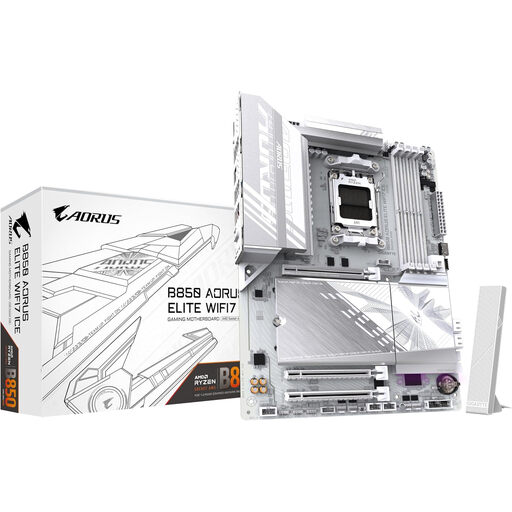
Why it stands out: With its pristine "ICE" white design, this model is a prime foundation for the currently trending all-white builds. But its looks aren't its only strength: it's packed with cutting-edge technologies like Wi-Fi 7 and PCIe 5.0 support for both storage and the graphics card. Its robust power delivery is designed to handle the most powerful AMD processors without breaking a sweat.
Key Features:
Who is it for? For enthusiasts who appreciate beautiful builds and want a flawless white aesthetic with cutting-edge performance, without compromising on future-proof connectivity.
See details and price on Joybuy.fr
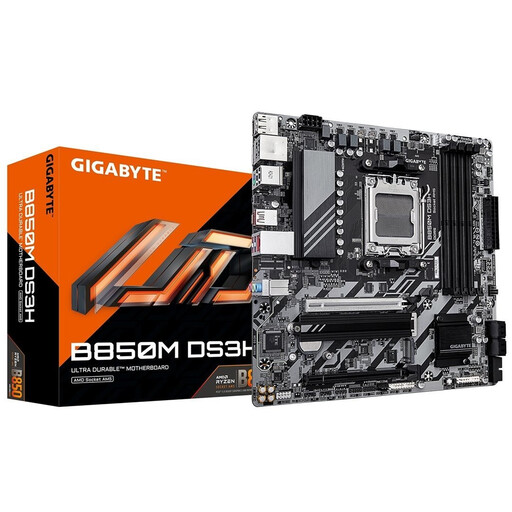
Why it stands out: The B850M DS3H is the smart entry point to the B850 AM5 platform. In a Micro-ATX format, it gets straight to the point: PCIe 5.0 support for the graphics card and an M.2 SSD, DDR5 compatibility, and a digital power delivery system sufficient for the vast majority of Ryzen processors. It's the sensible choice for compact, budget-conscious builds.
Key Features:
Who is it for? For those building a high-performance PC in a compact form factor or looking to experience the B850 platform on a tight budget, without needing integrated Wi-Fi.
See details and price on Joybuy.fr
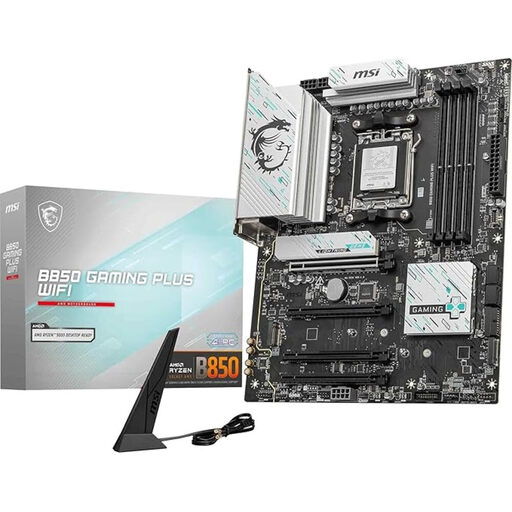
Why it stands out: The MSI B850 GAMING PLUS WIFI is the queen of versatility in the ATX format. Designed for gaming, it combines a 12-phase power delivery system, a comprehensive cooling system (Extended Heatsink, M.2 Shield Frozr), and top-tier network connectivity with Wi-Fi 7 and a 5 Gbps LAN port. The icing on the cake is the "EZ DIY" features that make the building process much easier.
Key Features:
Who is it for? For gamers and content creators looking for a versatile B850 gaming motherboard with excellent cooling and top-of-the-line network connectivity.
See details and price on Joybuy.fr
Choosing a motherboard is ultimately a personal decision, a compromise between features, form factor, and budget. If your perfect match isn't in this selection, explore our full catalog to discover other models.
Discover all our new motherboards on Joybuy.fr
Yes, absolutely. The AM5 socket was designed for excellent longevity. B850 chipset motherboards are therefore compatible with AMD Ryzen 9000, 8000, and 7000 series processors. A BIOS update may be required for the newest CPUs, a simple operation that most boards now allow you to perform without even installing a processor (via the BIOS Flashback function).
These technologies are the standards of tomorrow. In 2026, choosing a motherboard that integrates them is the best way to ensure your build is future-proof. PCIe 5.0 will become essential for future graphics cards and ultra-high-speed SSDs, while Wi-Fi 7 will establish itself as the standard for a flawless wireless connection. If your budget is tighter, a board without Wi-Fi 7 or with more limited PCIe 5.0 support remains an excellent option.
The X670(E) chipset is aimed at the most demanding users (the enthusiast segment). It generally offers more PCIe lanes, allowing for more M.2 and high-speed USB ports, and its overclocking capabilities are often more advanced. The B850 motherboard, on the other hand, targets the mainstream market: it includes essential technologies like PCIe 5.0 but with slightly less extensive connectivity, which makes it much more affordable.