
Livraison le jour même ou le lendemain

Qualité garantie

Débloquez vos offres de bienvenue: Livraison GRATUITE | Jusqu'à -80 % | 30 jours d'essai gratuits à JoyPlus
Téléchargez l'application
A mechanical gaming keyboard with AZERTY layout can improve typing comfort while freeing up space for your mouse. But you need to choose a model that suits the way you play and work. With all the promises of responsiveness, RGB effects and compact formats, some essential criteria can easily be overlooked.
The word "gaming" doesn't guarantee genuine mechanical switches. Some models rely on a membrane or so-called semi-mechanical technology. They might be fine for occasional use, but the feel, precision and customisation options are nothing like those of a mechanical gaming keyboard.
So take the time to check the type of switch used: mechanical, optical-mechanical, magnetic or membrane. This information tells you far more than the number of RGB colours the manufacturer highlights.
A TKL, 65%, 75% or 60% mechanical keyboard takes up less desk space, but this compactness often means removing certain keys or making them accessible via the Fn key. If you regularly use the numeric keypad, function keys or arrow keys, a compact gaming keyboard may require a short adjustment period.
The 65% format usually keeps the arrow keys. The 75% often adds a function row while maintaining a compact chassis. The TKL, meanwhile, mainly removes the numeric keypad.
A wireless mechanical keyboard can communicate via Bluetooth, 2.4 GHz or a USB cable. These three modes don't all serve the same needs. Bluetooth is handy for switching between devices, while the 2.4 GHz receiver is generally preferred for PC gaming thanks to its lower latency.
Also check the advertised battery life, the conditions under which it was measured, and whether you can continue playing while the keyboard charges.
Red switches, or linear switches, offer a smooth, consistent keystroke with no tactile click. A keyboard with red switches can work well for games that require repeated presses, as well as for relatively quiet typing. However, the noise level also depends on the keycaps, the keyboard's construction and the force you apply to the keys.
Tactile or clicky switches provide more noticeable feedback with each press, but their noise can quickly become annoying in shared accommodation. Some optical and magnetic models offer more advanced adjustments, such as customising the actuation point or replacing the switches.
An anti-ghosting gaming keyboard is designed to register multiple keys pressed simultaneously without generating any unwanted commands. For rhythm games, complex shortcuts or movements that combine several keys, look for precise information: the number of keys supported or the mention "full NKRO".
A simple promise of "high responsiveness" doesn't replace a verifiable technical specification.
The advertised compatibility with PCs, PlayStation or Xbox should also be checked on a case-by-case basis. Advanced features, such as macros or lighting customisation, may require software that is only available on Windows.
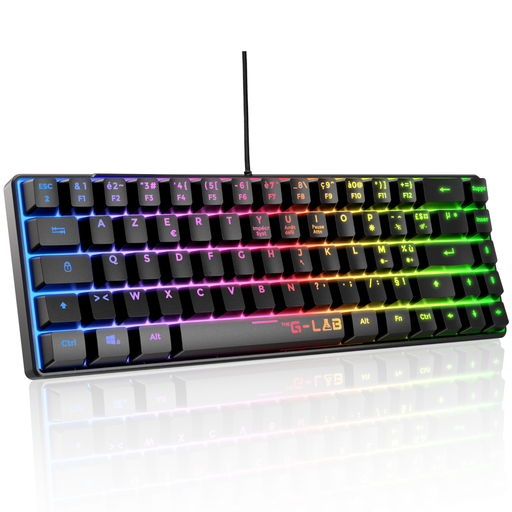
Why this choice suits this profile: This wired mechanical keyboard in a French layout keeps 87 keys in an affordable TKL chassis, with red switches and compatibility with PC, PS4, PS5 and Xbox.
The specification sheet clearly states the switch type, AZERTY layout, full anti-ghosting and compatibility with multiple consoles.
32 programmable macros, 12 multimedia shortcuts and 20 backlighting modes.
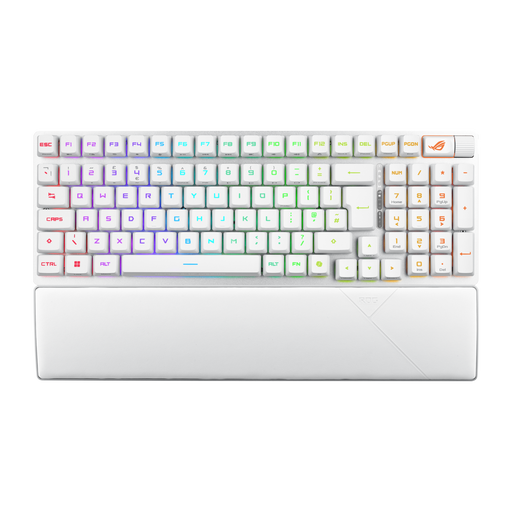
Why this choice suits this profile: Its 96% format keeps the numeric keypad while reducing the footprint, with 2.4 GHz, Bluetooth and USB-C connections.
Its three connection modes mean you're not tied to a single use, while its format is clearly distinct from a traditional full-size keyboard.
ROG RX Red optical switches, double-shot PBT keycaps, magnetic wrist rest and per-key RGB backlighting.
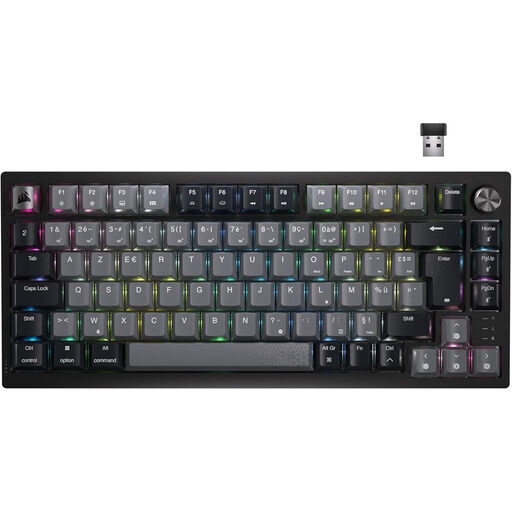
Why this choice suits this profile: This wireless mechanical keyboard combines a 75% format, a volume wheel and Bluetooth, USB-C and 2.4 GHz connections.
The wired mode lets you play while charging the keyboard, while the 2.4 GHz receiver complements the Bluetooth connection.
Pre-lubricated CORSAIR MLX Red linear switches, per-key RGB lighting and programmable keys.
We've put together a comprehensive selection, updated in real time, of products that meet these demanding criteria as well as European safety standards.
Yes, provided you choose the right switch and format. Linear switches can work well for fast typing, while a model with a numeric keypad will be more practical for tables and number entry. Also check that it has a genuine French key layout, rather than relying solely on the mention "French layout".
It depends on the type of switch, build quality and intensity of use. Manufacturers often quote a number of keystrokes, for example 30 or 100 million. This value is only indicative: it doesn't necessarily cover the keys, cable, battery or electronic components.
Yes. RGB lighting can reduce the advertised battery life, especially when the brightness is high or the effects are animated. To space out recharges, lower the intensity, turn off the lighting when you don't need it, or use the keyboard in USB mode.