
Livraison le jour même ou le lendemain

Qualité garantie

Débloquez vos offres de bienvenue: Livraison GRATUITE | Jusqu'à -80 % | 30 jours d'essai gratuits à JoyPlus
Téléchargez l'application
An AZERTY keyboard and mouse bundle lets you set up a workstation, a laptop desk or a gaming rig in no time. But some purchases can quickly disappoint: keys that aren't suited to French typing, poor battery life, cables that are too short, or a mouse that lacks precision.
Before you choose your keyboard and mouse combo, take a moment to check three points that product descriptions often gloss over.
The word "French" on a product page doesn't guarantee it's a genuine French AZERTY keyboard. The physical layout must match the one used in France, with AZERTY keys, accented characters and symbols in their usual positions. Changing the language or layout in Windows or macOS won't turn a QWERTY keyboard into an AZERTY one.
A mouse advertised at 7,200 or 12,800 DPI isn't necessarily more comfortable. That figure is the sensor's maximum sensitivity, but accuracy also depends on the surface you use, the shape, the weight and the available settings. For office work, moderate sensitivity is usually enough. In a fast-paced game, an easily accessible DPI button can be more useful than an impressive number.
A wireless keyboard and mouse frees up your desk, but you still need to choose between batteries and a built-in rechargeable battery. Rechargeable models save you from buying batteries regularly. Battery-powered sets, on the other hand, can be used straight away as long as you have a spare set to hand.
Also check the type of connection: USB receiver, Bluetooth or both. A newer laptop can take advantage of Bluetooth, while a desktop PC will more readily have a USB-A port for a nano-receiver.
A compact 60% or 65% keyboard leaves more room for your mouse. The trade-off is that it often omits the numeric keypad and some dedicated keys. For filling in spreadsheets, entering invoices or working regularly with numbers, a full-size model is more practical.
The type of keys also affects day-to-day comfort:
A mechanical gaming keyboard fitted with linear switches can suit gamers who want a consistent keystroke. Just remember to check for a numeric keypad, key height and compatibility with your habits.
A wired keyboard and mouse usually works as soon as you plug it in and requires no batteries or charging. It's a good fit for desktop PCs and gaming where a stable connection is a priority. You will need two USB ports, unless the devices share a cable or receiver.
2.4 GHz via a nano-receiver offers simple plug-and-play on a PC. Bluetooth is more convenient for switching between a computer, a tablet, a smart TV or a compatible smartphone. Some bundles offer both modes, making it easy to change devices.
For everyday use, look at the shape, number of buttons and dimensions of the mouse. A symmetrical model can suit several hand positions. Ergonomic or larger mice need more desk space.
For gaming, consider adjustable resolution, the polling rate if stated, programmable buttons and cable length. An RGB keyboard and mouse can add a stylish touch and improve visibility in a dim room, but lighting will never replace good typing comfort.
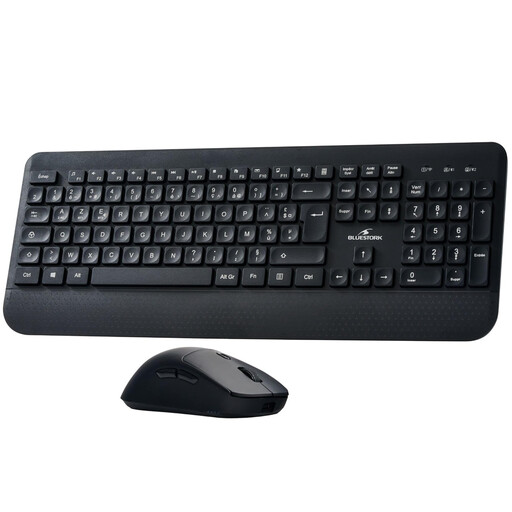
Why this choice suits this profile: This wireless AZERTY pack combines a 2.4 GHz receiver and Bluetooth. It's ideal for students, laptop users and anyone who wants to connect up to three devices.
The AZERTY layout is clearly stated and the connection isn't limited to a single mode. However, this model runs on alkaline batteries – make sure you have spares ready.
Switches between three devices, USB nano-receiver, compatible with Windows, laptops, tablets and smartphones.
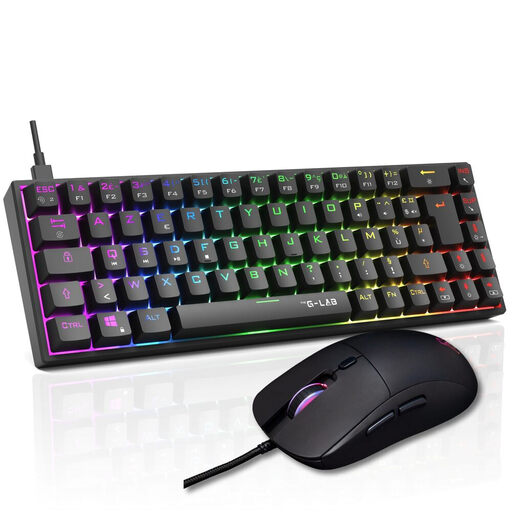
Why this choice suits this profile: This pack is aimed at gamers looking for a compact mechanical keyboard, an adjustable mouse and customisation features in a wired setup.
The USB connection eliminates battery management and the 65% format reduces clutter. The keyboard also features anti-ghosting with claimed 100% NKRO.
Linear red switches, mouse adjustable up to 12,800 DPI with a claimed polling rate of 1,000 Hz, RGB backlighting and macros via dedicated software.
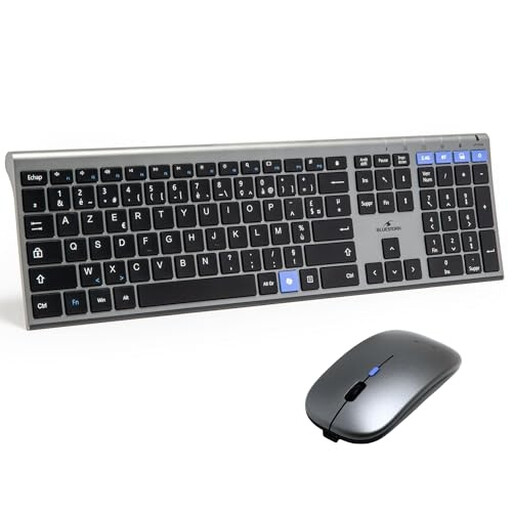
Why this choice suits this profile: Its built-in rechargeable battery and dual connectivity make it ideal for working from home, shared workstations and users who switch between a desktop and laptop.
USB charging reduces reliance on batteries. The choice between the 2.4 GHz receiver and Bluetooth lets you adapt the setup to the ports available.
Rechargeable keyboard and mouse, AZERTY layout, shared USB nano-receiver and compatibility with PCs, laptops and tablets.
To avoid connection issues, plug the receiver directly into your computer rather than into a USB hub that may not be adequately powered. With a wired set, make sure the cables don't get in the way of your mouse movements.
On Windows, select the French layout in the language settings. On macOS, check the input source after the first connection. For a Bluetooth model, start pairing from the device settings and consult the manual for the pairing procedure.
Clean the surfaces with a soft, dry cloth. Never spray liquid directly onto the keys. For devices with a lithium-ion battery, use a certified charger and stop using the device if it swells or becomes abnormally hot. At the end of their life, dispose of batteries, rechargeable batteries and electronic devices at designated collection points, in line with the sorting rules in force in France.
We've put together a comprehensive, real-time updated list of products that meet these demanding selection criteria and European safety regulations.
Most USB models are recognised by Windows without any additional installation. For Bluetooth, your computer must have this feature built in or use a compatible adapter. Also check that you have free USB ports and that the bundle is listed as compatible with your system.
Rechargeable is a good choice for regular users who want to cut down on consumables. A battery-powered set can be more practical for occasional use or in a location where charging isn't easily accessible. In either case, check the stated battery life and follow the safety instructions.
Yes, as long as you're happy with its size and noise level. A compact backlit keyboard can free up space, while a mechanical model may be noisier. For video calls and shared offices, quiet keys and a comfortable mouse will often be more useful than RGB effects.