
Livraison le jour même ou le lendemain

Qualité garantie

Débloquez vos offres de bienvenue: Livraison GRATUITE | Jusqu'à -80 % | 30 jours d'essai gratuits à JoyPlus
Téléchargez l'application
Choosing an AZERTY keyboard seems simple… until you come across a layout that isn’t truly French, keys that don’t match your system, or disappointing battery life. Whether you’re working, studying, filling in spreadsheets or using an iPad on the go, a few key features can make a real difference day to day.
Before you place your order, keep an eye out for three common pitfalls:
Here are the criteria to examine when comparing available models and choosing an AZERTY keyboard that suits your habits.
A French AZERTY keyboard uses the standard layout found in France for letters, accents and common characters. In particular, check for the presence of the A, Z, É, È, Ç keys, as well as the characters accessible via the Alt Gr key.
Compatibility then varies depending on the system you use:
A keyboard with a trackpad or keyboard with touchpad can replace a mouse on a cramped desk. However, be aware that multi-touch gestures are not always supported by all devices.
A Bluetooth keyboard is ideal for keeping a tidy desk and easily switching between devices. Some models have multiple Bluetooth channels, so you can pair several devices and switch between them in seconds.
Remember to check:
A USB keyboard remains a reliable choice for a fixed workstation: no battery to monitor, no pairing required, and it generally works straight after plugging in. The trade-off is that the cable limits mobility and takes up one of your computer’s ports.
On an iPad, a magnetic connection or the Smart Connector avoids the need for pairing and separate charging. However, this solution is only available for certain tablet models.
A compact keyboard frees up desk space and is easier to carry around. Conversely, a full-size model with a numeric keypad is more practical for spreadsheets, accounting and intensive number entry.
Here are the features to compare:
An ergonomic keyboard isn’t just about a curved shape. Height, tilt, wrist position and regular breaks all matter just as much during prolonged use. No keyboard can compensate for a poorly set-up workstation.
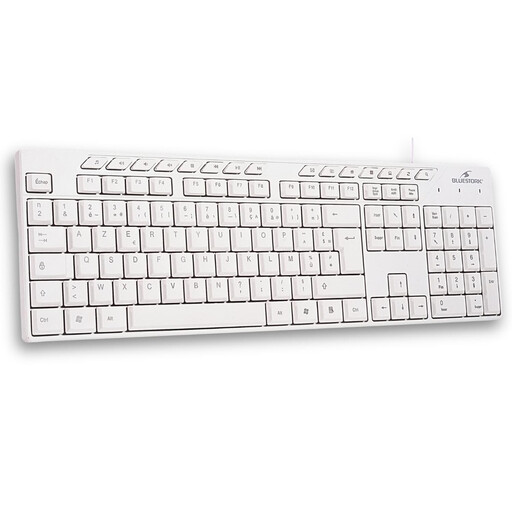
Why this choice suits this profile: This wired keyboard is perfect as a first desktop setup for a Windows PC, with no battery or Bluetooth configuration to worry about.
The USB connection works straight away, eliminating pairing and battery issues. The product listing also clearly states it has a FR AZERTY layout.
15 dedicated multimedia shortcuts, a full-size layout with numeric keypad, and USB power.
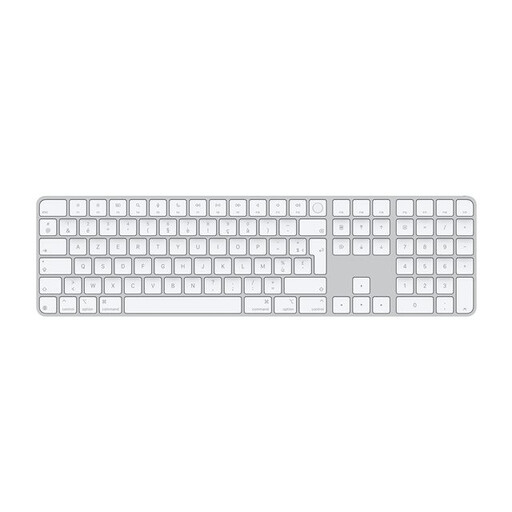
Why this choice suits this profile: It’s aimed at Mac users who want a full-size French keyboard, wireless connectivity and a numeric keypad for professional tasks.
The stated compatibility is for Macs with an Apple chip running macOS 11.4 or later. Check both conditions before purchasing.
Touch ID, numeric keypad, Bluetooth, USB-C charging and a claimed battery life of around one month.
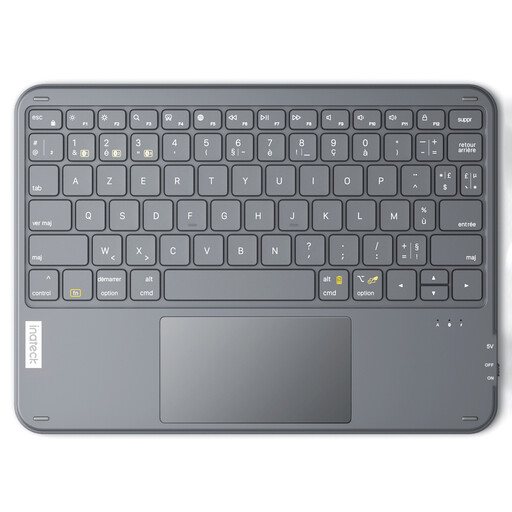
Why this choice suits this profile: Its portable design and built-in touchpad meet the needs of remote workers, students and users who regularly switch between a tablet and a computer.
The listing mentions three Bluetooth channels, a range of up to 10 metres and compatibility with Windows and iPadOS. Check this against the devices you actually use.
A claimed thickness of 0.2 inches (approx. 5 mm), a weight of 228 g, a touchpad and keys designed for over 5 million keystrokes according to the product listing.
We’ve put together a comprehensive, real-time selection of products that meet these demanding criteria and European safety standards.
Turn on Bluetooth on your device, switch on the keyboard, then open the list of available devices. Select its name and confirm the pairing. If the model has multiple channels, first choose the one that corresponds to the device you’re using. If pairing fails, check the battery level, delete an old pairing and try again.
It all depends on the battery, the backlighting and how often you use it. The battery life quoted for standby can be significantly higher than what you’ll see with continuous typing. To space out charges, turn off the backlight when you don’t need it and switch off the keyboard during long periods of inactivity.
No. A USB keyboard is generally recognised by compatible computers, but the function keys may differ between Windows, macOS, Android and iPadOS. For a Mac keyboard or an iPad keyboard with a trackpad, always check the exact model of your device, its operating system version and the connection type specified by the manufacturer.