
Livraison le jour même ou le lendemain

Qualité garantie

Débloquez vos offres de bienvenue: Livraison GRATUITE | Jusqu'à -80 % | 30 jours d'essai gratuits à JoyPlus
Téléchargez l'application
An AZERTY keyboard isn’t chosen on looks alone, or by the number of RGB colours on offer. Between promises of responsiveness, compact formats and multi-device compatibility, certain details can turn an appealing purchase into a real source of frustration.
Before you order, be sure to check the actual French layout, the type of connection and the features sacrificed by a reduced format. An AZERTY gaming keyboard can be perfectly suited to a PC gamer, yet prove less practical on a console or a Mac. The same goes for a wireless AZERTY keyboard: depending on the model, the connection mode and battery life can vary enormously.
Simply seeing “AZERTY” isn’t always enough. Check for the keys specific to a French keyboard, particularly accented characters, the “Enter” key and the layout of symbols. Some imported models may display a different layout, even if they are software-compatible with the French language.
On an Apple computer, also check for dedicated macOS function keys. A keyboard for Mac can work via Bluetooth with several devices, but some system commands may need manual configuration under Windows or iPadOS.
An RGB keyboard offers customisable lighting, but that says nothing about the quality of the keys or the precision of your typing. Instead, look at the number of modes available, whether there is compatible software for your system, and the option to turn the lighting off completely.
The advertised battery life of a rechargeable keyboard often depends on brightness, backlighting and the features activated. For the ASUS ROG Azoth, for example, the spec sheet mentions up to 2,000 hours in 2.4 GHz mode, with RGB and the OLED screen switched off. You can’t assume that figure applies when all effects are active.
A TKL keyboard removes the numeric keypad but keeps the function row and arrow keys. A compact 60% keyboard goes further: several commands require the Fn key. The 65% format usually keeps the arrow keys, while the 75% format packs more keys into a smaller footprint.
These formats free up space for your mouse, but they can slow down number entry or the use of professional shortcuts. Measure your desk and identify the keys you use daily before falling for a compact model.
A mechanical AZERTY keyboard uses a separate switch under each key. Red, linear switches are often appreciated for their consistent pressure and moderate actuation force. Green switches, which are tactile and audible, provide more noticeable feedback but can quickly become annoying in a shared space.
Membrane keyboards are generally quieter and can suit both casual gaming and work. Scissor-switch keys, found on some Mac keyboards and portable models, offer a short travel distance and discreet typing.
Don’t rely solely on a lifespan expressed in millions of keystrokes. Also check whether the switches can be replaced, whether spare parts are available, and whether the cable or battery inspires confidence.
For PC gaming, a wired USB connection avoids battery monitoring and simplifies compatibility. Wireless 2.4 GHz with a USB receiver is handy for keeping a tidy desk and works with some consoles. A Bluetooth AZERTY keyboard is better suited to mobility, tablets and switching between devices.
Three-mode models typically combine 2.4 GHz, Bluetooth and USB-C. This versatility is useful for moving between a computer and a console, but check the restrictions for each platform. The spec sheet for the Keyz Tungsten EX, for example, indicates compatibility with PCs, PS4 and PS5, while Bluetooth connection is noted as unavailable on console.
A rechargeable keyboard should specify the type of port used, the cable supplied and, if possible, the battery life for each usage condition. The Mac Office keyboard shown below has a built-in 280–300 mAh battery, a USB-C port and claims up to 80–90 hours of use.
For a keyboard compatible with PCs and consoles, check whether macros, RGB and software work on console or only under Windows. Finally, a built-in lithium-ion battery must not be dismantled. At the end of its life, the device should be taken to a collection point for waste electrical and electronic equipment.
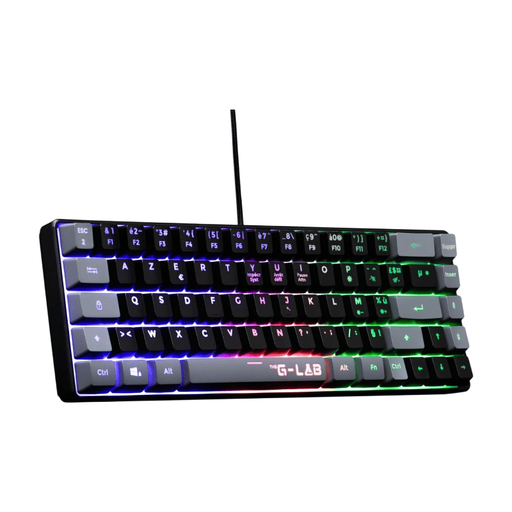
Why this choice suits this profile: its compact format and USB connection make it a good entry point into gaming keyboards on PC, PS4 or PS5.
The wired connection means no recharging. The manual does note, however, that the 60% format requires Fn combinations for some functions.
Fixed multicolour backlighting, 19-key anti-ghosting, reinforced cable and a stated 2-year warranty.
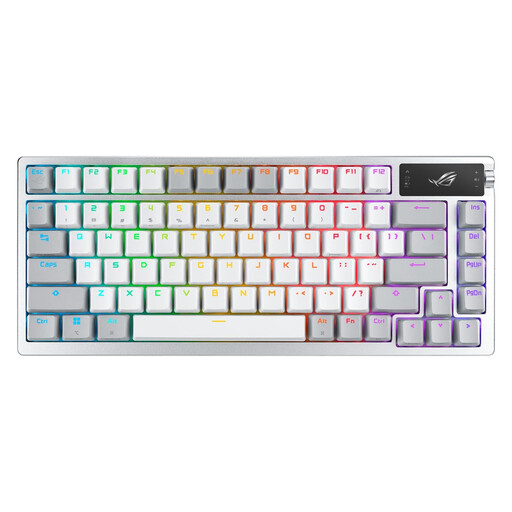
Why this choice suits this profile: its 75% format keeps useful functions while offering several connection modes for a versatile desk setup.
The spec sheet clearly distinguishes between 2.4 GHz, Bluetooth 5.1 and USB modes. The stated battery life is given under precise conditions, with RGB and the OLED screen switched off.
ROG NX mechanical switches, 2-inch OLED screen, multifunction dial, per-key RGB and solder-free replaceable switches.
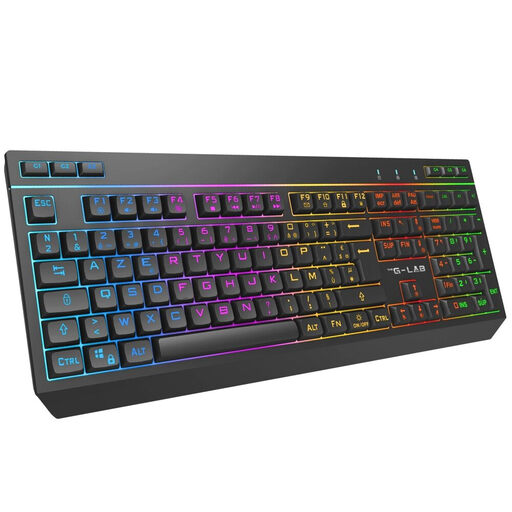
Why this choice suits this profile: this keyboard is aimed at users who switch between computer and console while wanting to keep a full numeric keypad.
The spec sheet distinguishes between 2.4 GHz, Bluetooth and USB-C connections, and notes that Bluetooth is limited on console.
105 AZERTY keys, 2,000 mAh battery, 32 macros, 12 multimedia shortcuts and 19-key anti-ghosting.
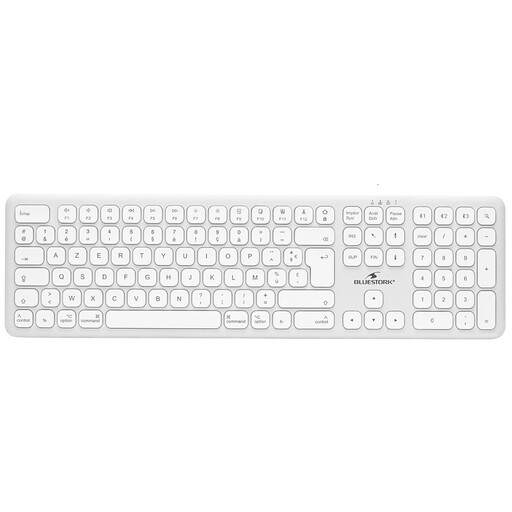
Why this choice suits this profile: its standard-size French keyboard and multi-device pairing are designed for both remote work and mobility.
The spec sheet specifies Bluetooth 5.1, a USB-C port and compatibility with macOS, iPadOS and iPhone. This is not a gaming keyboard.
Quiet scissor-switch mechanism, built-in 280–300 mAh battery, claimed 80–90 hours of battery life and USB-C charging.
We’ve put together an updated selection of AZERTY keyboards that meet these criteria and the safety requirements applicable in France and the European Union.
Yes, provided the device supports Bluetooth and the French layout is correctly selected in the settings. Special functions may vary depending on macOS, iPadOS, Windows or Android. If you often switch between devices, choose a model compatible with multi-device pairing.
It all depends on the switches, usage, maintenance and the overall quality of the model. Manufacturers sometimes claim 12, 30 or more million keystrokes, but these figures are obtained under specific test conditions. A hot-swap keyboard makes it easier to replace switches, without necessarily guaranteeing the lifespan of the electronics or battery.
Yes, if you’re happy to use Fn combinations to access the removed keys. For office work, entering numbers or using arrow keys and shortcuts, a 65%, 75% or TKL format generally requires less adjustment. For gaming, the space saving is welcome, but always compare the number of keys and compatibility with your software.