
Livraison le jour même ou le lendemain

Qualité garantie

Débloquez vos offres de bienvenue: Livraison GRATUITE | Jusqu'à -80 % | 30 jours d'essai gratuits à JoyPlus
Téléchargez l'application
An AZERTY iPad keyboard with trackpad can turn your tablet into a genuine work tool for writing, studying, remote working or browsing on the go. But you need to pick the right model. A case that’s too heavy, compatibility that’s not properly checked, or an imprecise touchpad can quickly ruin the experience.
Here are the criteria to consider before buying an iPad keyboard case, along with a selection of models suited to different needs.
A keyboard advertised as compatible with “all iPads” won’t necessarily work with every generation. Dimensions, magnets, connectors and camera placement can vary between an iPad 10th generation, an iPad A16, an iPad Air 11-inch and an iPad Pro 11-inch.
Before placing an order, check the model number in Settings > General > About, then compare it with the list provided by the seller. This check is especially important for an iPad case with keyboard: a poorly fitted cut-out can prevent the case from closing or block access to the buttons.
The mention “French” or “AZERTY French iPad keyboard” deserves a close look at the photos and the technical specifications. Pay attention to the key layout, the presence of accented characters, and the compatibility of shortcuts with iPadOS.
An international QWERTY model can still be used by changing the system language, but the key markings won’t match your habits. If you regularly write in French, a keyboard with a clearly stated AZERTY layout is far more practical.
Some accessories include a small touch-sensitive area designed mainly for scrolling. A genuine trackpad, on the other hand, lets you move the cursor, click and use multi-finger gestures. So check whether the specification mentions support for Multi-Touch, iPadOS navigation and click functionality.
Backlighting also deserves a careful look. A backlit iPad keyboard makes typing easier on a train or in a dimly lit room, but it drains the battery more. The stated battery life therefore depends directly on the brightness and how often you use the lighting.
Accessories connect mainly in two ways:
A Bluetooth keyboard for iPad is a good choice if you also want to use it with a computer or smartphone. For mainly stationary use with a compatible iPad, a direct connection reduces the hassle.
A keyboard case protects the iPad better than a separate keyboard, but it also adds weight and thickness to your bag. For reference, the Inateck Keyboard Case has a stated thickness of 1.5 cm with the cover and a weight of 427 g. The Belkin model shown later weighs 660 g and is 17 mm thick.
For daily travel, compare the total weight of the set with that of your iPad. For remote working, a heavier base can actually improve stability on a desk.
A sufficiently wide trackpad makes text selection and multi-finger gestures easier. An adjustable hinge lets you switch easily between typing, reading and video calls. Detachable magnetic models also let you use the tablet without removing the protection entirely.
Finally, check the battery capacity, the charging port and the conditions under which the stated battery life is achieved. The standby figures given by manufacturers can vary considerably depending on backlight use, connection frequency and the settings you choose.
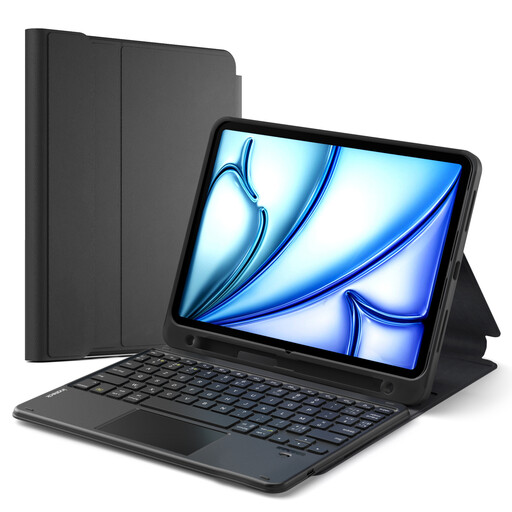
Why this choice suits this profile: Its detachable design is ideal for students and users who switch between note-taking, reading and working on a compatible iPad.
The compatibility list details iPad 10th and 11th generation, iPad Air 11-inch and iPad Pro 11-inch. The AZERTY keyboard and Multi-Touch trackpad are explicitly mentioned.
Detachable case, three-position stand, pencil holder and rear protection with magnetic lock.
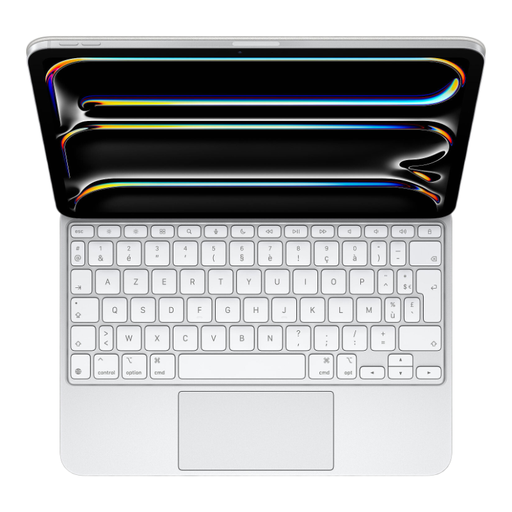
Why this choice suits this profile: This solution is aimed at professionals and creatives who want a direct connection and a perfectly integrated set-up for their compatible iPad Pro.
The Smart Connector eliminates Bluetooth pairing and the need to charge a separate battery. Compatibility must still be confirmed with your exact iPad Pro model.
Glass trackpad with haptic feedback, backlit keys, 14 function keys and iPad charging via USB‑C.
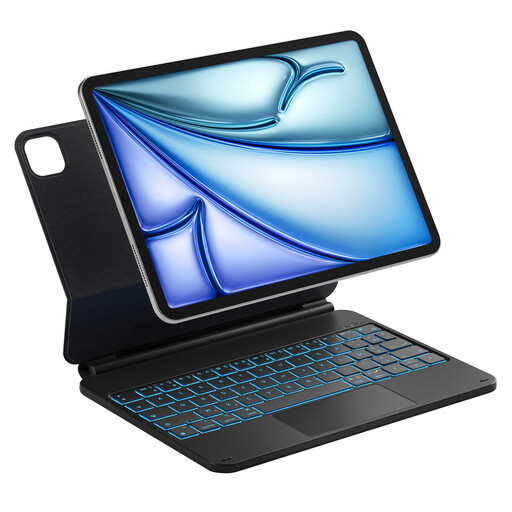
Why this choice suits this profile: People who often work on the move will appreciate the magnetic support, adjustable tilt and customisable lighting.
The specification details compatibility with several iPad Air and iPad Pro 11-inch models. It also distinguishes battery life with and without backlighting, a detail often missing from listings.
Seven-colour backlighting, Multi-Touch trackpad, aluminium alloy hinge and automatic sleep mode when closed.
We’ve put together a complete, real-time updated list of products that fully meet these strict selection criteria and European safety regulations.
Turn on Bluetooth in Settings > Bluetooth, switch on the keyboard, then select its name from the list of available devices. Some models require you to press a dedicated connection key. Once paired, check the keyboard language in the iPadOS settings.
Battery life depends on the battery capacity, how often you use it and the backlighting. Product specifications may state several months on standby, but that figure obviously doesn’t reflect continuous typing use. To reduce the frequency of charging, turn off the lighting when the room is bright enough and switch off the keyboard during long periods of inactivity.
It makes typing, navigation and document management easier, but the experience depends largely on iPadOS and the apps you use. For office work, emails and file browsing, it may be enough for many users. Specialist professional software, advanced file management or certain creative workflows will still require a dedicated computer.