
Livraison le jour même ou le lendemain

Qualité garantie

Débloquez vos offres de bienvenue: Livraison GRATUITE | Jusqu'à -80 % | 30 jours d'essai gratuits à JoyPlus
Téléchargez l'application
Buying an AZERTY gaming keyboard isn’t just about picking RGB lighting or a well-known brand. Between the layout, connectivity and switch technology, two models that look almost identical at first glance can offer a very different experience. Whether you’re gaming on PC, PS5 or Xbox in the UK, a few checks are all it takes to avoid nasty surprises.
A gamer RGB keyboard lets you personalise your setup, but the backlighting says nothing about how fast the switches are or the quality of the connection. Some models only offer a handful of preset effects, while others let you adjust each key individually via dedicated software. So do check the number of modes available, the level of customisation on offer and whether the software is compatible with your system.
With its 105 keys, a full-size keyboard keeps the numeric keypad – very handy for office work, management games or entering numbers. A TKL keyboard, on the other hand, does away with it and frees up space for your mouse. 65%, 75% and 60% layouts reduce the footprint even further, but some functions then require the Fn key.
A compact keyboard can be particularly appealing on a small desk. However, it does take some getting used to for the arrow keys, the F row and certain secondary commands.
A wireless gaming keyboard can communicate via 2.4 GHz, Bluetooth, or both. An AZERTY Bluetooth keyboard is handy with a laptop, tablet or multiple devices. The 2.4 GHz connection, usually paired with a USB receiver, is more geared towards gaming. Also remember to check the advertised battery life with the lighting turned on: RGB can significantly reduce usage time.
A mechanical gaming keyboard uses individual switches. Models fitted with red switches, often linear, typically require an actuation force of 45 g and offer a consistent keystroke. Green switches, like those in the Razer BlackWidow V3, provide a more pronounced tactile and audible feedback.
Membrane keyboards generally offer a softer, quieter keystroke. They may be better suited to a shared space or a mix of gaming and office work. However, the term silent gaming keyboard should be taken with a pinch of salt: the noise level also depends on the keyboard’s construction, the keycaps and your typing force.
Anti-ghosting limits conflicts when several keys are pressed simultaneously. However, you need to distinguish between full coverage, sometimes called NKRO, and a limited number of keys protected against ghosting. For action games, the stated figures – 19 keys, 88 keys or more – provide a concrete indicator.
A programmable keyboard with macros lets you record sequences or reassign certain commands. This feature can be useful for shortcuts, software and certain games, but it often relies on Windows software. On console, advanced functions may not be accessible.
Before ordering a PC and console gaming keyboard, check the precise list of compatible devices. Having a USB port doesn’t guarantee that all functions will work on PS5 or Xbox. Wired models generally connect without issue, while wireless keyboards require a receiver or pairing.
For a rechargeable model, check the cable type, battery capacity and the advertised battery life with or without RGB. In the UK, also remember to look at the warranty conditions, the recycling instructions for electrical and electronic equipment, and the warnings regarding batteries and small parts.
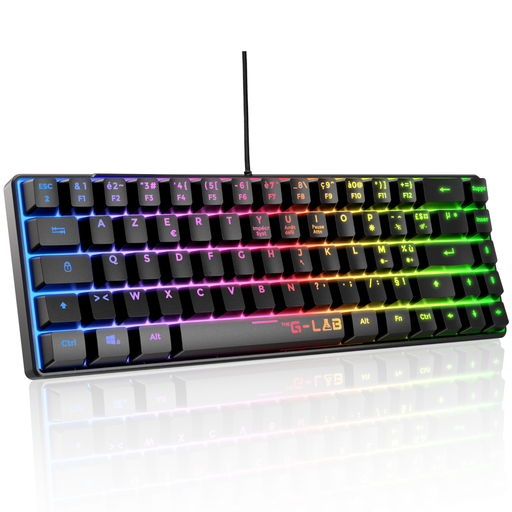
Why this choice suits this profile: its TKL layout is ideal for gamers who want to try a mechanical keyboard without taking up the whole desk. The USB connection makes setup simple on PC and compatible consoles.
The product page clearly states the 87-key layout, red switches, full anti-ghosting and 32 macros, rather than just focusing on the lighting.
Red switches rated at 45 g, 20 lighting modes, 32 macros, braided cable and compatibility with PC, PS4, PS5 and Xbox.
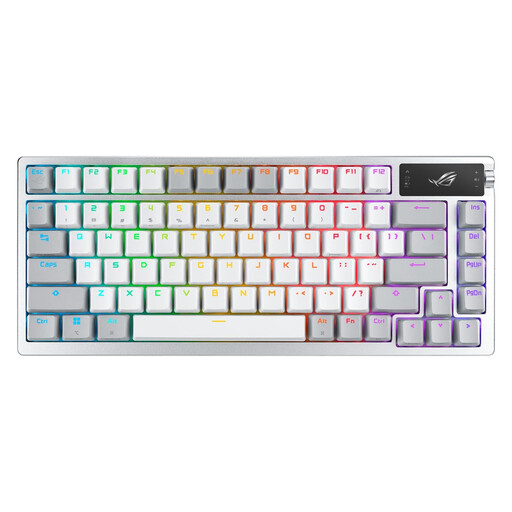
Why this choice suits this profile: this 75% model is aimed at users who want to keep dedicated functions while enjoying versatile connectivity and a high level of customisation.
The connectivity is detailed across three modes: 2.4 GHz, Bluetooth 5.1 and USB. The advertised battery life of up to 2,000 hours applies to a specific scenario: RGB and OLED screen turned off.
2-inch OLED screen, control wheel, hot-swappable switches, per-key RGB and rechargeable battery.
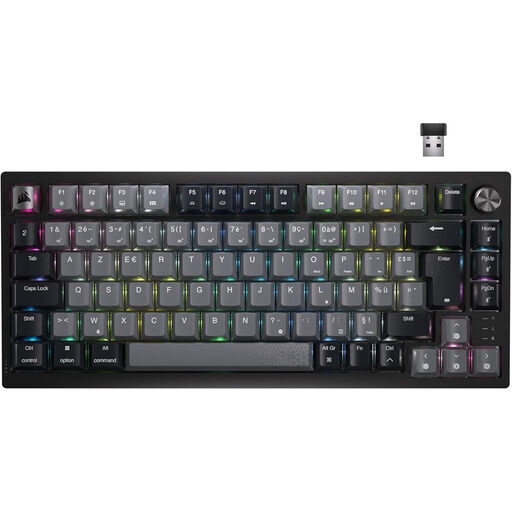
Why this choice suits this profile: its 75% layout and Bluetooth, USB-C and wireless connections are ideal for setups where the keyboard needs to switch between a PC, a laptop or a console.
The product page specifies the three connection modes as well as Windows compatibility. It’s still best to check the exact support for functions on each console.
Linear MLX Red switches, per-key RGB lighting, volume wheel and rechargeable battery.
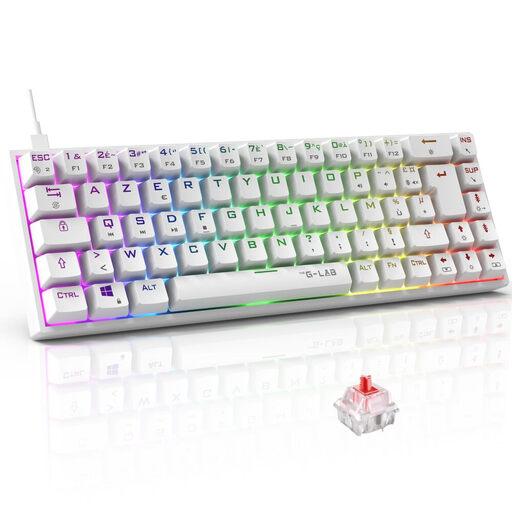
Why this choice suits this profile: the 65% layout frees up space for mouse movements while keeping some navigation keys that are missing from 60% models.
The product page clearly states that some functions require Fn combinations and details the NKRO anti-ghosting as well as the macros.
Outemu red switches at 45 g, 18 RGB modes, programmable macros and compatibility with PC, PS4, PS5 and Xbox.
We’ve put together a comprehensive list, updated in real time, of products that meet these demanding selection criteria and European safety regulations.
Many USB models work with certain consoles, but compatibility varies depending on the device and the game. Check the product page, then plug the keyboard directly into a USB port on the console. However, RGB functions, macros and customisation software may be limited on console.
The advertised lifespan depends on the switches and the manufacturer. The models featured here state, for example, 12 million, 30 million or more keystrokes per key. This figure doesn’t predict wear on the stabilisers, cable or battery. Regular dry cleaning and keeping liquids away will help preserve the device.
Wired avoids the need to recharge and plugs straight in. A rechargeable model frees up your desk and can work with multiple devices, but you need to keep an eye on battery life and have the USB-C cable to hand. For a fixed setup used several hours a day, compare the connection type, range and battery life with RGB turned on.