
Livraison le jour même ou le lendemain

Qualité garantie

Débloquez vos offres de bienvenue: Livraison GRATUITE | Jusqu'à -80 % | 30 jours d'essai gratuits à JoyPlus
Téléchargez l'application
An AZERTY gaming keyboard has to balance two often underestimated constraints: respecting the French layout and fitting your space, your play style and your acoustic environment. Between promises of responsiveness, RGB effects and wireless connectivity, some marketing claims can lead to a purchase that isn't practical for everyday use.
A 60% or 65% keyboard frees up space for your mouse, but certain functions remain accessible via the Fn key. Entering numbers, function keys or secondary commands can then feel less immediate. A compact gaming keyboard is therefore best suited to players who are already comfortable with this type of layout.
The TKL format typically does away with the numeric keypad while keeping the function keys and arrow keys. It offers a compromise that's easier to adopt for both gaming and working. Conversely, a 96% model keeps the numeric keypad in a chassis that's narrower than a standard keyboard.
Red switches are generally linear: the pressure remains consistent, with no pronounced tactile bump. However, their actuation force and travel distance, noise level and total travel can vary significantly from one model to another. A mechanical AZERTY keyboard marketed as fast isn't necessarily comfortable for long typing sessions.
In a shared room or for late-night gaming, also consider the acoustic design. A mechanical keyboard can be noisier than a membrane model, while a quiet gaming keyboard will focus more on comfort and discretion than on a pronounced tactile feel.
A wireless gaming keyboard can communicate via Bluetooth or through a 2.4 GHz receiver. These two solutions don't serve exactly the same needs: the receiver is generally preferred for PC gaming, while Bluetooth makes it easier to connect to multiple devices.
If you plan to use it with a console, check its compatibility with your equipment: PC, PlayStation or Xbox. Also check whether macros, lighting and customisation software work on console or only under Windows.
Before placing an order, make sure the product page clearly states French AZERTY. A few adapted keys aren't enough: the position of the Enter key, accented characters and symbols must match your habits.
A mechanical gaming keyboard relies on an individual mechanism for each key. It's often appreciated for its consistent typing feel and, on some models, for the ability to replace the switches. Membrane keyboards focus more on a soft typing feel and a lower noise level. Semi-mechanical models sit between these two families, but their behaviour depends heavily on their design.
For games that require repeated presses, look at the technical data: actuation force and travel distance, number of simultaneously recognised keys and the presence of anti-ghosting. This information is far more telling than a simple "gaming" label.
An RGB gaming keyboard can offer per-zone or per-key lighting. However, the customisation actually available depends on the software provided. Check whether colours, effects, remapping and profiles can be configured directly from the keyboard or whether they require a Windows program.
Macros can be useful in certain games and applications, but they aren't essential for everyone. Their presence shouldn't make you overlook the things that matter day to day: wrist rest quality, cable length, chassis stability or battery life for a wireless model.
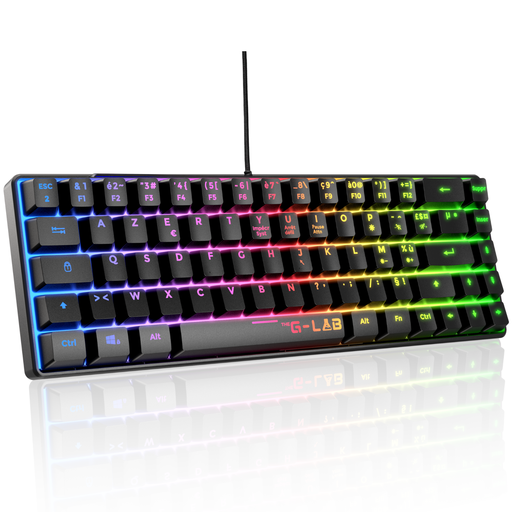
Why this choice suits this profile: This wired 60% gaming keyboard takes up little space and works without installing a driver on PC, PS4 and PS5.
Its compact format is clearly stated and its USB connection avoids the constraints of batteries or pairing.
Semi-mechanical keys claimed to be quiet, fixed multi-colour backlighting and anti-ghosting for up to 19 keys.
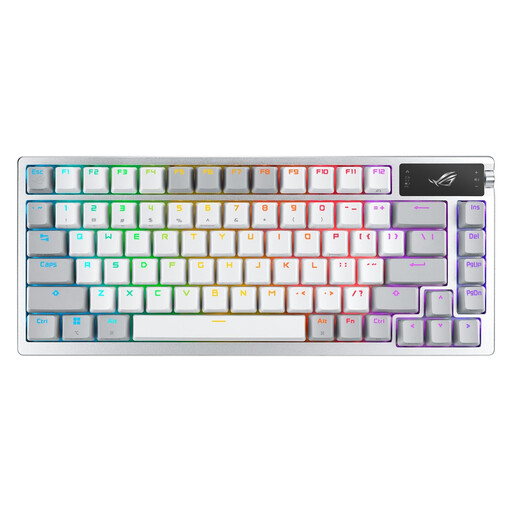
Why this choice suits this profile: Its 75% format and triple-mode connectivity integrate perfectly into a versatile, customisable PC setup.
The three modes — 2.4 GHz, Bluetooth and USB — let you choose between mobility, multi-device connection and wired use.
2-inch OLED screen, control wheel, ROG NX mechanical switches and claimed hot-swap design.
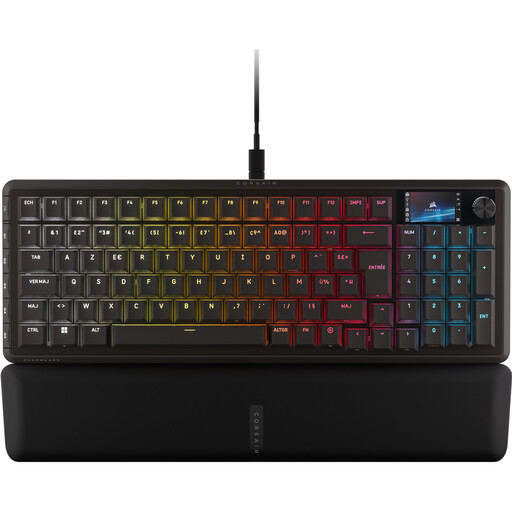
Why this choice suits this profile: The 96% format keeps the numeric keypad and adds dedicated controls, handy for long gaming or work sessions.
The product page confirms the presence of the numeric keypad, six programmable G keys and a wired USB connection.
CORSAIR MGX Hyperdrive magnetic switches, integrated LCD screen, control wheel and per-key RGB backlighting.
Why this choice suits this profile: Its TKL format frees up space for mouse movements while keeping a familiar layout.
The product page details the linear red switches, their 45 g actuation force and 2 mm actuation travel.
87 keys, 32 programmable macros, claimed full anti-ghosting and compatibility with PC, PS4, PS5 and Xbox.
We've put together a comprehensive, real-time updated selection of products that meet these demanding criteria as well as European safety standards.
Yes, some models are advertised as compatible with PCs, PS4, PS5 and Xbox. However, key recognition may vary depending on the game and console. For macros and lighting, check the manufacturer's instructions: advanced functions sometimes require software on a computer.
It depends on the technology used, frequency of use and maintenance. Product pages sometimes indicate an estimate in number of keystrokes, for example 30 million or 50 million per key. This value remains a theoretical figure stated by the manufacturer and doesn't guarantee the same lifespan for all users.
Wireless frees up your desk and makes it easier to move the keyboard. To minimise the risk of disconnection, choose a model with a 2.4 GHz receiver, USB charging and a wired mode. If you always play in the same spot, a USB keyboard remains a simple solution with no battery to worry about.