
Livraison le jour même ou le lendemain

Qualité garantie

Débloquez vos offres de bienvenue: Livraison GRATUITE | Jusqu'à -80 % | 30 jours d'essai gratuits à JoyPlus
Téléchargez l'application
An AZERTY gaming keyboard needs to tick several boxes: offer the right keys for the French layout, provide a reliable connection, and stay comfortable after hours of gaming or work. However, some product listings focus mainly on backlighting and the number of colours, without detailing the features that truly make a difference to your everyday experience.
Before you place an order, it's worth knowing the most common pitfalls and the criteria that deserve your attention.
An RGB keyboard might only offer a fixed lighting scheme, a few preset effects, or the ability to customise each key individually. These are very different capabilities. If you want to create profiles or sync lighting effects with your games, check that compatible software for your operating system is included.
A full-size keyboard with a numeric keypad naturally takes up more desk space. For gamers who use a low mouse sensitivity, this extra width can reduce the room available for movement. A TKL keyboard, on the other hand, typically removes the numeric keypad while keeping the function row and arrow keys.
60% and 65% formats free up even more space, but some commands then require the Fn key. It can take a little time to get used to, especially in games that use the arrow keys, the Delete key, or the F1 to F12 keys.
Noise levels depend on the switch mechanism, the casing, the stabilisers, and even your desk surface. A mechanical gaming keyboard with linear switches won't sound like a membrane model, but no keyboard is completely silent. In a flat or shared space, look for a detailed description of the switch mechanism and favour membrane or linear switches over 'clicky' models.
Make sure the keyboard has a genuine French AZERTY layout, not a QWERTY model simply adapted in your system settings. The legends printed on the keys must match the characters used in France, particularly for accents and symbols.
Compatibility with Windows, PlayStation or Xbox can also vary depending on the connection type. A feature accessible on PC via software may not be available on a console. If you plan to use the keyboard across multiple devices, check the exact list of compatible platforms on the product page.
A wireless gaming keyboard can work with:
Models offering multiple connection modes are particularly practical if you switch between computer, tablet and console. Also check that the USB receiver is included and note the type of port used.
Anti-ghosting reduces the risk of misread commands when several keys are pressed at the same time. However, the stated number should be read carefully: '19-key anti-ghosting' doesn't necessarily mean the entire keyboard is covered.
A programmable keyboard can also support shortcuts, profiles or macros. These features are useful in games as well as in work software, but they often require a program installed on Windows. As for the stated lifespan in number of keystrokes, this remains a manufacturer's estimate: it alone cannot predict the keyboard's real-world longevity, which also depends on maintenance and usage intensity.
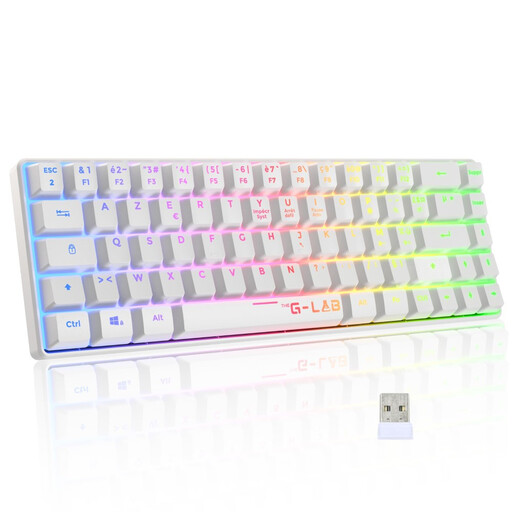
Why this choice suits this profile: Its TKL format, 2.4 GHz connection and membrane keys offer a solid entry point into gaming, without a cable permanently cluttering your desk.
The listing states a wireless range of up to 10 metres and includes a detachable wrist rest. The TKL format also avoids the bulk of a numeric keypad.
2.4 GHz connection, RGB lighting and compatibility with Windows, Xbox One and PlayStation 4.
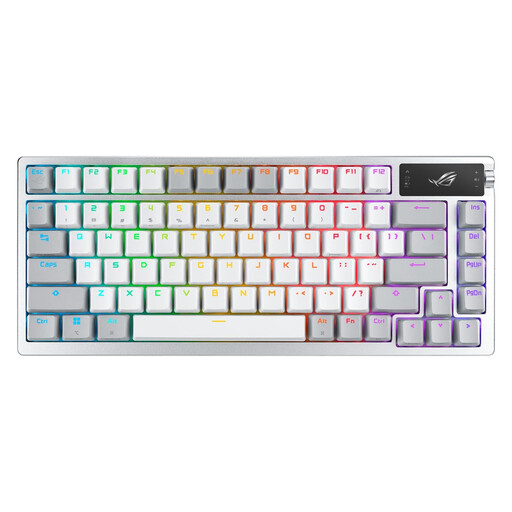
Why this choice suits this profile: Its 75% layout keeps the most useful keys while adding a tri-mode connection, an OLED screen and hot-swappable switches.
The listing clearly distinguishes between 2.4 GHz, Bluetooth 5.1 and USB connections. It also mentions anti-ghosting and hot-swappable switches.
2-inch OLED screen, multi-function control wheel, PBT keycaps and a stated battery life of up to 2,000 hours with RGB and screen turned off.
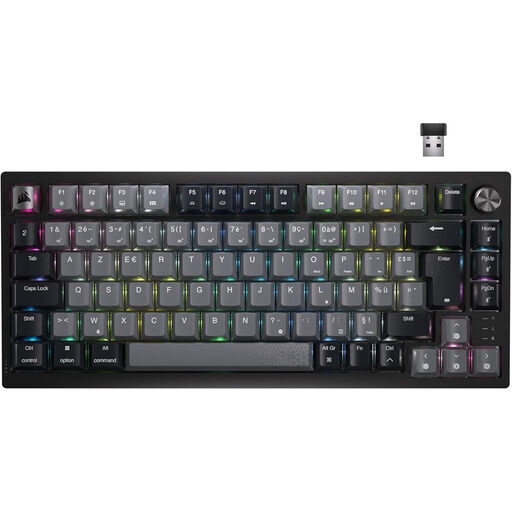
Why this choice suits this profile: Its 75% layout and three connection modes suit those who switch between gaming and work, juggling multiple devices.
The listing specifies Bluetooth, USB-C and a dedicated wireless connection. The model retains 87 keys and offers quick access to volume control.
Corsair MLX linear mechanical switches, per-key customisable RGB and a dedicated volume control wheel.
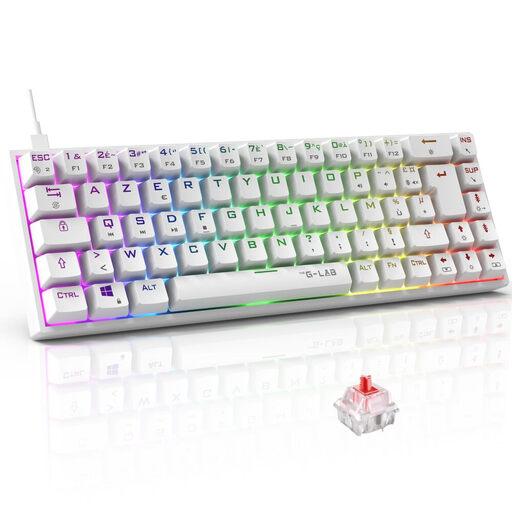
Why this choice suits this profile: Its 65% format reduces the footprint on smaller desks and gives gamers who need more room for their mouse greater freedom of movement.
The manufacturer states NKRO anti-ghosting and specifies that secondary functions are accessed via Fn combinations – a detail worth knowing before purchase.
Red mechanical switches, 18 RGB modes and compatibility with PC, PS4, PS5 and Xbox.
We've put together a comprehensive selection, updated in real time, of products that meet these demanding criteria and European safety standards.
Yes, some models are listed as compatible with PlayStation or Xbox. However, support depends on the console, the game and the connection method used. A USB connection is often the simplest solution. Always check the list of compatible devices stated on the product page.
No. The noise level depends on the switches and the keyboard's design. Red linear switches generally don't produce a pronounced tactile click, whereas 'clicky' models offer a more noticeable sound feedback. For a quiet gaming keyboard, a membrane model or one with linear switches will often be more suitable, though it won't guarantee absolute silence.
Manufacturers often state several million keystrokes, but this figure remains a technical estimate. To extend your keyboard's lifespan, unplug it before cleaning, use a dry cloth, and keep liquids, excessive heat and dust away. On a wireless model, battery life also depends on the RGB brightness, the connection mode and how often you recharge.