
Livraison le jour même ou le lendemain

Qualité garantie

Débloquez vos offres de bienvenue: Livraison GRATUITE | Jusqu'à -80 % | 30 jours d'essai gratuits à JoyPlus
Téléchargez l'application
Choosing an AZERTY gaming keyboard isn't just about picking a model covered in colourful lights. Between promises of "ultra-fast" typing, vague descriptions of anti-ghosting, and the differences between wired, wireless, TKL and full-size keyboards, certain details can quickly turn an appealing purchase into an impractical everyday accessory.
This guide from the Joybuy Product Recommendation Officer helps you compare the features that really matter, without letting marketing claims steer your decision.
A gamer RGB keyboard might offer only pre-set multicolour lighting, or it could provide genuine per-zone adjustments with customisable effects and colours. In everyday use, the experience is worlds apart.
Make sure to check:
Backlighting improves key visibility, but RGB lighting has no direct effect on typing accuracy.
Anti-ghosting means that several keys can be pressed simultaneously and are more likely to be registered correctly. However, the number of supported keys varies from one model to another.
A keyboard with 12-key anti-ghosting doesn't offer the same coverage as a model advertised with 19 or 26 keys. For action, racing or strategy games, check the figure stated in the specifications rather than just looking for the term.
A full-size gaming keyboard keeps the numeric keypad, arrow keys and often several multimedia shortcuts. The trade-off is that it takes up more room on your desk.
A TKL keyboard typically does away with the numeric keypad in favour of a more compact layout. This frees up space for your mouse, but it can be inconvenient for users who regularly enter numbers or work with spreadsheets.
A membrane gaming keyboard uses rubber domes beneath the keys. It is generally quieter than a mechanical keyboard, with a soft typing feel that suits both gaming and office work.
Manufacturers don't all measure noise using the same method. Terms like "silent keys" or "optimised membrane" should therefore be taken as general indications, not as a guarantee of a specific noise level.
In a shared space, for late-night gaming or remote work, a membrane model can be more suitable than a particularly noisy keyboard.
A wired gaming keyboard usually connects via USB. It requires no charging and is simple to set up, often on a "plug and play" basis. Just remember to check the cable length if your computer is far from your desk.
A wireless gaming keyboard can operate on 2.4 GHz with a USB receiver, via Bluetooth, or with multiple connection modes. Check:
Stated battery life figures are based on specific usage conditions. Backlighting, in particular, can significantly reduce the time between charges.
A keyboard with programmable macros lets you assign a command or sequence to a key, depending on what the supplied software allows. This feature can be useful in games, but also for speeding up repetitive tasks.
The number of macros alone isn't enough to judge their usefulness. Check the number of available profiles, which keys are involved, and whether the software is compatible with your system.
A keyboard with a wrist rest can improve comfort by keeping your wrists at a more consistent height. When it's detachable, it's easier to store and allows you to adjust the accessory to your gaming position.
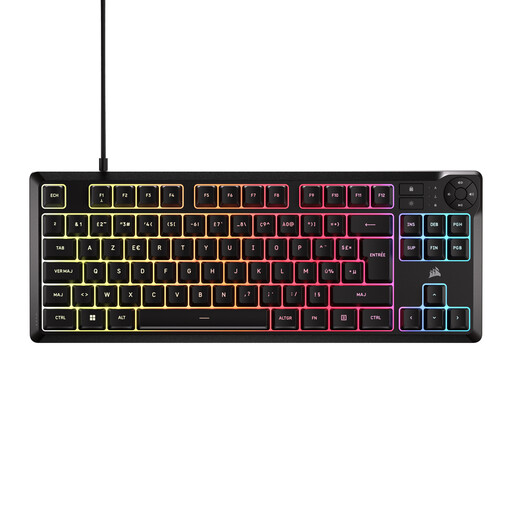
Why this model suits this profile: its 88-key TKL format frees up space on a small desk, while keeping the controls you need for gaming and media.
The spec sheet clearly states the TKL format, USB-A connection and 12-key anti-ghosting, rather than being vague on these points.
Membrane keys, five-zone RGB lighting, 1.8 m braided USB-A cable and dedicated multimedia keys.
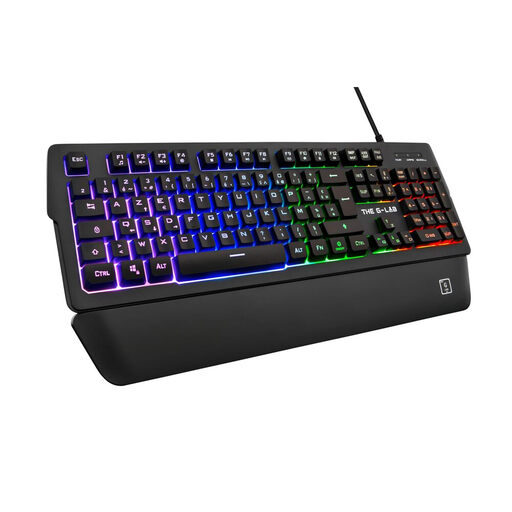
Why this model suits this profile: it's aimed at PC gamers who want to adjust lighting, macros and controls without switching to a mechanical keyboard.
The 15 macros, five profiles and 26-key anti-ghosting are clearly quantified in the description.
Full-size AZERTY layout, 11 RGB modes, detachable magnetic wrist rest and wired USB connection.
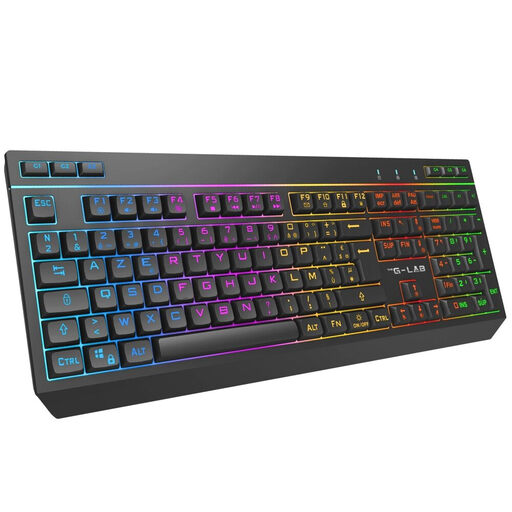
Why this model suits this profile: its three connection modes let you switch between PC and certain compatible consoles, with or without a cable.
The stated compatibility distinguishes between 2.4 GHz, Bluetooth and USB-C connections, rather than presenting wireless as a single solution.
105 keys, 32 macros, 19-key anti-ghosting, 2,000 mAh battery and stated battery life of up to 12 hours with RGB on.
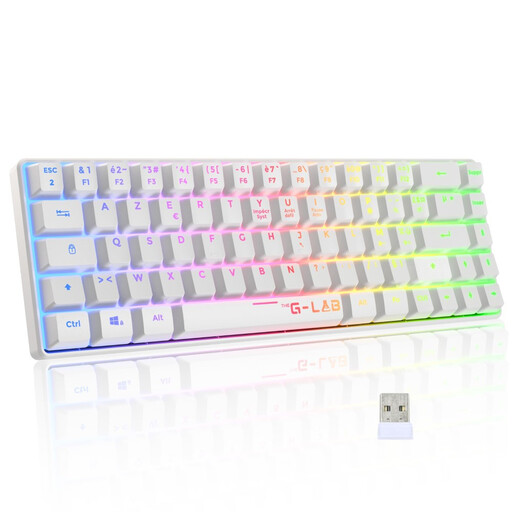
Why this model suits this profile: its compact size, membrane keys described as quiet, and 2.4 GHz wireless connection make it ideal for smaller spaces.
The spec sheet clearly states the absence of a numeric keypad and macro keys, preventing any unpleasant surprises.
TKL format, stated wireless range of 10 metres, detachable wrist rest and compatibility with Windows, Xbox One and PlayStation 4.
We've put together a selection of products so you can compare membrane keyboards, their formats, connectivity and lighting features.
For a stable setup, plug the wired keyboard directly into an available USB port. With a wireless model, keep the receiver as far away from sources of interference as possible and make sure the power switch is turned on.
To extend its lifespan:
Also check that the French AZERTY layout matches the photos and the spec sheet. Some imported keyboards may have a different layout despite being advertised as compatible with French computers.
Searches sometimes linking "0.01 μm ultrafiltration filter" or "P1-UF filter cartridge" refer to a different type of product. The ROUNY P1-UF replacement filter is designed for the ROUNY Pure 1 desktop water purifier. It contains a carbon rod, an ultrafiltration membrane stated at 0.01 μm and a food-grade PP housing.
This is not a keyboard accessory. Before purchasing, be sure to check its compatibility with the Pure 1 model, then follow the rinsing and replacement instructions supplied with the cartridge. View the ROUNY P1-UF cartridge.
It depends on the model and the console. Product listings should specify compatibility with PlayStation or Xbox. A USB connection alone doesn't guarantee that all functions will be supported.
Choose a TKL format if you prioritise space for your mouse and a less cluttered desk. Opt for a full-size keyboard if you frequently use the numeric keypad or want more dedicated keys.
A membrane model can be suitable if you're looking for a soft typing feel and a moderate noise level. Also consider the presence of a wrist rest, the key layout, anti-ghosting and the quality of the cable before ordering.