
Livraison le jour même ou le lendemain

Qualité garantie

Débloquez vos offres de bienvenue: Livraison GRATUITE | Jusqu'à -80 % | 30 jours d'essai gratuits à JoyPlus
Téléchargez l'application
Finding the right AZERTY gaming keyboard can quickly become overwhelming, especially on a tight budget. Between the different key types, features, and aesthetics, it's easy to get lost. This guide is designed to help you see things more clearly. We'll break down the essential features to look for in a first-time purchase or for a young gamer, focusing on accessible models that don't compromise on style or core functions. Our goal: to guide you toward the smartest choice, perfectly suited for casual or beginner-level gaming.
Before diving into our selection, here are the key points to check to ensure your choice meets your needs and those of your family.
For gamers just starting out or for multipurpose use (gaming, homework, office tasks), the membrane gaming keyboard is often an excellent entry point. These keyboards are generally quieter, more affordable, and offer a soft typing feel. They are perfect for late-night gaming sessions without disturbing others.
Semi-mechanical keyboards, on the other hand, offer an excellent compromise: they provide a more tactile typing sensation than membrane keys, while remaining quieter and less expensive than 100% mechanical models.
Anti-ghosting is a technology that allows the keyboard to register multiple simultaneous keystrokes without error. In many games, it's common to press three or more keys at the same time (for example, to run diagonally while jumping). A keyboard without good anti-ghosting might ignore some of these commands, leading to pure frustration. For a smooth gaming experience, check that the model you're eyeing has anti-ghosting that covers at least the strategic key zones (often WASD and the surrounding keys).
A backlit keyboard isn't just for looks. It significantly improves key visibility in a dark room—a common scenario during gaming sessions. For an affordable RGB gaming keyboard, the backlighting often comes in a "rainbow" mode, with fixed colours but adjustable brightness. It's an excellent way to add an immersive touch to your setup without breaking the bank.
Here are two models that tick all the boxes for beginner and casual gamers, combining features, aesthetics, and a controlled budget.
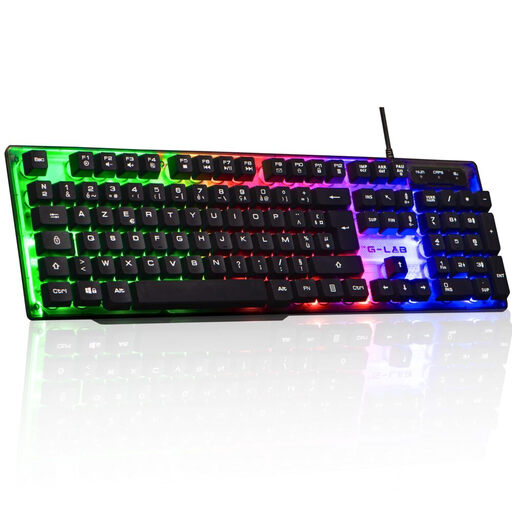
Why it stands out?: The Keyz Neon from THE G-LAB is a wired gaming keyboard that has everything you need for a first setup. It combines quiet membrane typing, fixed RGB backlighting, and essential gaming features, all in a standard full-size format with a numeric keypad.
Its simple and effective design makes it ready to use out of the box (Plug and Play): no driver installation is required. Just plug it in to start playing.
Pros?:
Who is it for?? This keyboard is especially aimed at beginner gamers, teens discovering PC gaming, or as a reliable and affordable second keyboard. Its excellent price-to-performance ratio makes it a very popular choice.
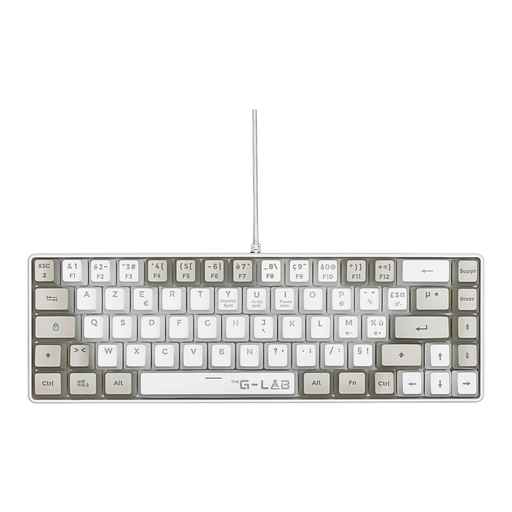
Why it stands out?: The Keyz Hydrogen is distinguished by its compact 60% form factor. By removing the numeric keypad, it frees up valuable desk space, allowing for wider and freer mouse movements. Its semi-mechanical keys offer a more responsive and tactile feel than a classic membrane, while remaining relatively quiet.
Its two-tone design (white and grey) and feather-light weight (433g) also make it an attractive option for mobile gamers.
Pros?:
Who is it for?? Ideal for gamers with limited desk space or who prefer a minimalist setup. It's also suitable for those seeking superior responsiveness compared to a membrane keyboard, without wanting to invest in a mechanical model.
These two models are excellent entry points into the world of gaming. Of course, every gamer is unique. If you want to discover keyboards with different features, such as true mechanical switches or more advanced RGB customisation options, feel free to browse our complete collection of gaming keyboards.
For those who love to perfect the aesthetics of their setup down to the last detail, consider the overall lighting of your space. Using RGB cables for your PC's internal components, for example, can create a beautiful visual harmony with your keyboard and other peripherals.
1. What is the difference between an AZERTY and a QWERTY keyboard?? The difference is the key layout. The AZERTY layout is the standard in France and Belgium, designed to facilitate typing in the French language. The QWERTY layout is the standard in most other countries, particularly English-speaking ones. For gaming and typing in France, an AZERTY keyboard is essential to feel at home.
2. Is a budget-friendly gaming keyboard good enough to start with?? Absolutely. For the vast majority of games and for a beginner, an entry-level membrane gaming keyboard is perfectly adequate. Key features like anti-ghosting and multimedia keys are often already present on these models. Investing in a more expensive mechanical keyboard is mainly justified for competitive players or enthusiasts seeking a very specific typing feel.
3. How do you clean a backlit gaming keyboard?? For regular cleaning, unplug the keyboard and use a can of compressed air to dislodge dust and crumbs from between the keys. Then, wipe the surface of the keys and the chassis with a slightly damp microfiber cloth. Avoid applying any liquid product directly to the keyboard to prevent damage to the backlighting's electronic circuits.