
Livraison le jour même ou le lendemain

Qualité garantie

Débloquez vos offres de bienvenue: Livraison GRATUITE | Jusqu'à -80 % | 30 jours d'essai gratuits à JoyPlus
Téléchargez l'application
Audio headphones may seem simple to choose… until the first compromises make themselves felt: pressure on your ears, battery life that is barely sufficient, a barely audible microphone or a connection that is incompatible with your TV. Product listings often highlight the number of decibels, the Bluetooth version or maximum battery life, but these figures do not always reflect the real experience for your intended use.
Before buying Bluetooth headphones, wireless headphones or wireless earbuds, three pitfalls deserve your full attention.
The phrase ‘up to’ generally applies to specific volume and connection conditions. Activating ANC, making frequent calls or using certain audio codecs can significantly reduce battery life. Long-lasting headphones are practical, but also remember to check the charging time, whether fast charging is available and whether you can use them with a cable.
Active noise cancellation reduces ambient sounds, but it does not turn every environment into a silent cocoon. Its effectiveness depends on the type of noise: continuous sounds are generally easier to reduce than voices or irregular noises. When walking, cycling or staying alert to traffic, ANC should be used with caution.
Wireless TV headphones may require an optical output or a 3.5 mm auxiliary socket. Some TVs disable their speakers when this output is used. On a computer, headphones with a USB microphone may be easier to set up than a model with two separate audio sockets. Before placing your order, check which ports are available on your device.
Bluetooth headphones are particularly well suited to smartphones, tablets and laptops. A multipoint connection can sometimes link two devices, allowing you to switch between them without pairing again. However, the stated range does not guarantee the same performance through thick walls.
TV headphones with a dedicated transmitter often use 2.4 GHz radio transmission. This solution can reduce the delay between picture and sound, while allowing you to place the headphones on a charging base. For online meetings, headphones with a USB microphone provide a direct connection and do not require a battery.
A supra-aural model rests directly on your ears and is generally compact. A circumaural model surrounds your ears more fully, which can improve passive isolation but may also make them feel warmer. For extended wear, consider:
In-ear Bluetooth earbuds are discreet and easy to carry. The trade-off is that you need to choose the right-sized tips for a comfortable, secure fit.
For working from home, having an adjustable microphone or dedicated microphones matters more than a simple promise of sound quality. Wired headphones work without recharging, while a wireless model needs to be recharged regularly. An auxiliary input is a useful backup when the battery is flat.
The CE marking, the manufacturer’s details or those of the responsible person in the European Union, as well as instructions concerning the battery and recycling of electrical equipment, are also worth checking. These details do not replace verifying compatibility with your setup.
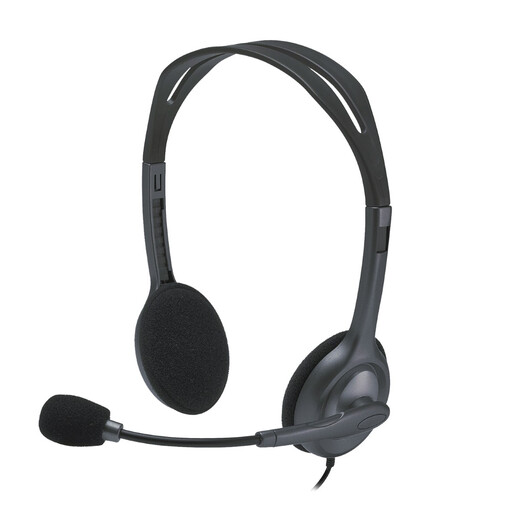
Why this choice suits this profile : These wired stereo headphones are suitable for calls, music and everyday use on a computer with two 3.5 mm jack sockets.
It does not rely on a battery and requires no additional software.
2.35 m cable, 180° adjustable microphone and stated weight of 74 g.
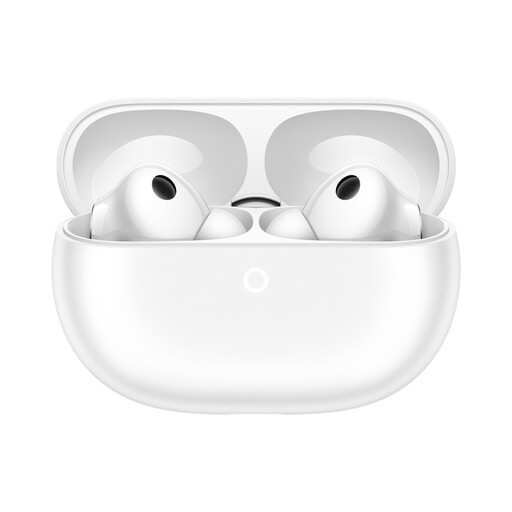
Why this choice suits this profile : These wireless earbuds are designed for people looking for a compact design, ANC and a connection to two devices.
The different audio modes and several sizes of ear tips let you adapt use to the situation.
Bluetooth 6, active noise cancellation, IP57 protection for the earbuds and stated battery life of up to 38 hours with the case, depending on the mode used.
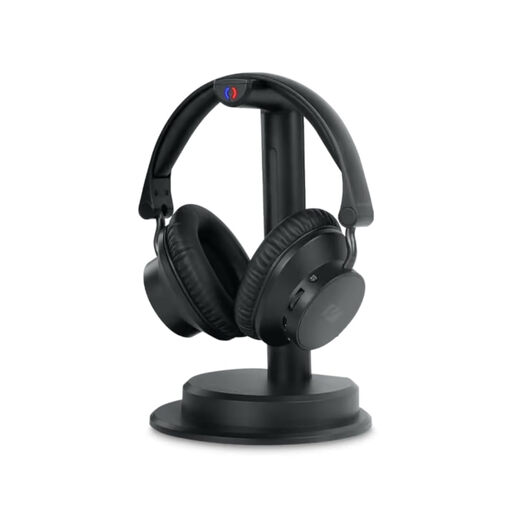
Why this choice suits this profile : These wireless TV headphones let you watch your programmes without taking over the TV’s sound. The base also acts as a transmitter.
Optical and auxiliary inputs make it easier to connect to TVs with different outputs.
Stated 2.4 GHz transmission range of up to 30 m, Bluetooth 5.3, voice amplification and stated battery life of up to 20 hours.
We have put together a complete, real-time updated list of products that meet these demanding selection criteria and European safety requirements.
For listening to music or travelling, wireless headphones offer greater freedom, provided you are happy to recharge them. For sedentary home working, a USB headset with microphone or wired headphones avoids battery and pairing issues. For gaming, check compatibility with your console: some USB models work with PC and PlayStation, but not necessarily with Xbox.
The Sony WH-CH720N combines Bluetooth, a 3.5 mm input, ANC and stated battery life of up to 50 hours with active noise cancellation switched off. The JBL Tune 530BT offers stated battery life of up to 76 hours, a multipoint connection and two microphones. Compare these features with your genuine priorities: comfort, call quality, portability or extended listening.
Start by connecting the transmitter base to the TV’s optical or auxiliary output, then place the headphones on their base for pairing or charging. Next, open the TV’s audio settings and select the appropriate output.
It all depends on the battery, hinges, ear cushions and maintenance. On wireless headphones, the built-in battery is a consumable component. Wired headphones avoid this issue, but their cable and connectors may eventually suffer from repeated twisting.
Choose headphones with an adjustable microphone, a connection compatible with your computer and easily accessible controls. A USB model with a ‘plug-and-play’ function minimises the set-up process. However, check that your computer has a USB-A port or the appropriate adapter.