
Livraison le jour même ou le lendemain

Qualité garantie

Débloquez vos offres de bienvenue: Livraison GRATUITE | Jusqu'à -80 % | 30 jours d'essai gratuits à JoyPlus
Téléchargez l'application
By our product experts, July 20, 2026
Your MacBook Pro, MacBook Air, or iPad is a productivity powerhouse, but its connectivity is often limited to a handful of USB-C ports. While elegant, this minimalism presents a real daily challenge: how do you connect your Mac to an external display via HDMI to project a presentation, extend your desktop, or simply enjoy a more comfortable view?
Faced with a jungle of adapters, it's hard to know where to start. Our guide is here to cut through the noise and help you choose the right USB-C to HDMI adapter for your needs, without the marketing fluff. We've selected reliable models that are perfectly compatible with the Apple ecosystem, so you can connect your Mac or iPad with complete peace of mind.
Before diving into our selection, let's review the essential points to check to ensure you make the right choice.
Not all HDMI adapters are created equal. For a fluid visual experience, whether for video editing or simply for the comfort of your eyes on an extended desktop, performance is the name of the game.
So, make sure the adapter you choose matches your hardware's capabilities.
Do you just need a video output, or will you take the opportunity to connect other peripherals?
In the Apple ecosystem, compatibility is not an option. Official accessories guarantee seamless, hassle-free integration. Third-party products may offer more features, but caution is advised: scrupulously check their compatibility with your version of macOS or iPadOS. This is especially true if you're relying on an HDMI adapter for iPad Pro or an Apple USB-C dock in a professional setting.
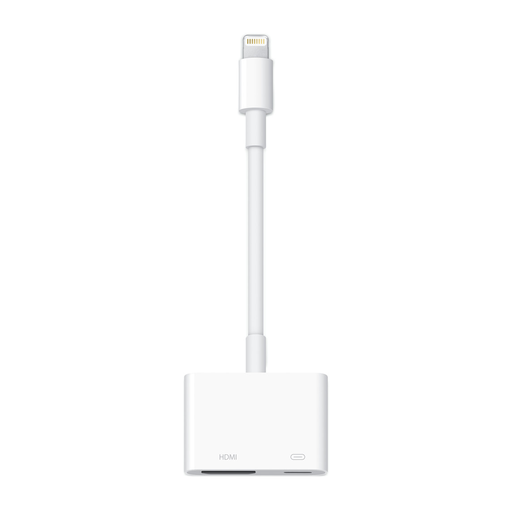
Why we recommend it: It's the official solution from Apple. Translation: rock-solid compatibility and reliability with your devices. Its design fits perfectly into the ecosystem, and it's incredibly simple to use: plug and play.
The pros:
Who is it for? For all Apple device owners looking for the simplest and most reliable solution to connect an HDMI display, a USB peripheral, and charge their machine at the same time. Whether at the office or on the go, it's the gold standard.
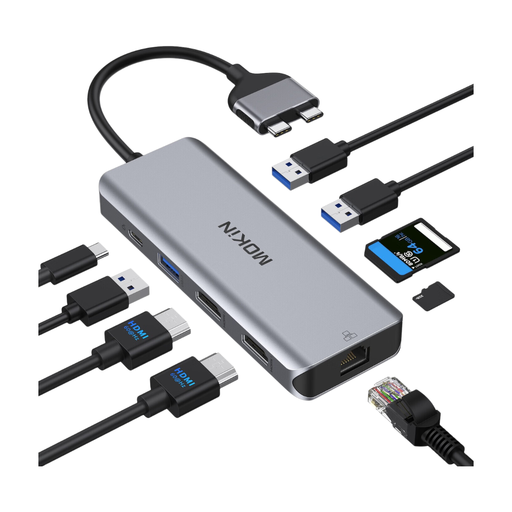
Why we recommend it: This hub plugs into two USB-C ports on your MacBook Pro or Air to transform it into a true workstation. It massively expands your connectivity to meet the most demanding needs.
The pros:
Who is it for? For professionals and creatives on MacBook Pro/Air (compatible models) who juggle multiple screens, a wired Ethernet connection, and need to connect numerous peripherals and memory cards simultaneously. A true productivity hub.
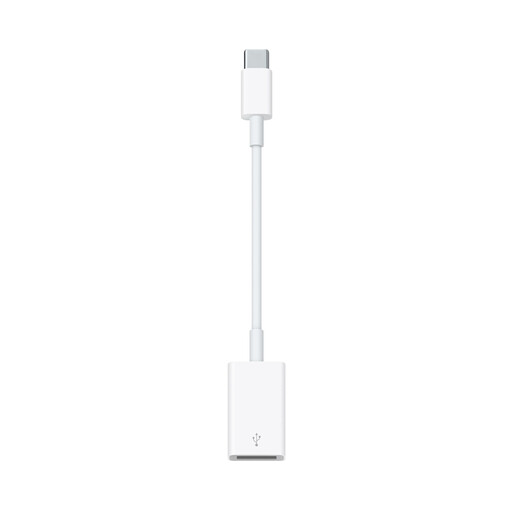
Why we recommend it: This is the little adapter that's a lifesaver. Its mission is simple and clear: to let you connect any USB-A device (flash drive, hard drive, camera, etc.) to a USB-C port.
The pros:
Who is it for? For anyone with a recent Apple device who wants to continue using their USB-A peripherals without any hassle. Note that this is not a video adapter, but it is an essential for managing the transition to USB-C.
If our suggestions don't check all the boxes or if you simply want to explore other options, take a look at our full selection.
? Discover our full selection of USB to USB Converters on Joybuy
1. What's the difference between 4K video output at 30 Hz and 60 Hz? The refresh rate (in Hertz, or Hz) is the number of times the image is displayed per second. A 60 Hz output updates the image 60 times per second, compared to only 30 times for 30 Hz. In practice, 60 Hz provides a visibly smoother and more responsive image. The visual comfort is much better, especially for fast on-screen motion (scrolling a page, video games, action movies), and eye strain is reduced.
2. Is the Apple Digital AV Multiport Adapter compatible with an iPad Pro? Absolutely. This adapter is 100% compatible with all iPad Pro, iPad Air, and iPad mini models that have a USB-C port. It will allow you to mirror your iPad's screen to an HDMI TV or monitor, while also connecting a USB-A accessory and charging your tablet simultaneously.
3. Can I use any USB-C adapter with my MacBook? In theory, yes. Most USB-C adapters on the market will work with a MacBook. In practice, quality, reliability, and performance vary enormously. For critical functions like 4K 60 Hz video output or Power Delivery charging, we strongly advise you to stick with reputable brands or the official Apple solution. This guarantees flawless compatibility and optimal safety for your hardware. Always take the time to check the specifications and compatibility with your exact model.