
Livraison le jour même ou le lendemain

Qualité garantie

Débloquez vos offres de bienvenue: Livraison GRATUITE | Jusqu'à -80 % | 30 jours d'essai gratuits à JoyPlus
Téléchargez l'application
Finding the perfect versatile tablet that won't break the bank can be a real challenge. The idea is to find an all-in-one device capable of juggling work, studies, and leisure. While premium models from Samsung or Apple often monopolise the conversation, plenty of more affordable hidden gems are out there. An Android tablet with an included keyboard and stylus stands out as a credible alternative to the market's heavyweights, without compromising on the essentials.
We've broken down a selection of tablets designed for productivity and creativity, which come with their accessories right out of the box. Our goal is to help you make the right choice, whether you're a student, a mobile professional, or simply looking for a versatile device for the whole family.
Before diving into our selection, let's review the key criteria to ensure you make the right choice.
Screen size and quality are paramount. An 11-inch tablet or larger offers much more comfortable viewing for multitasking and content consumption. A 2K resolution (around 2000 x 1200 pixels) has become an accessible standard, ensuring a sharp and detailed image.
On the performance side, a powerful yet affordable tablet must have a balanced configuration. Aim for at least 8 GB of RAM for smooth navigation between apps. Most recent models offer virtual RAM expansion, a technology that uses part of the storage to increase the available active memory. An octa-core (eight-core) processor ensures the necessary responsiveness for daily tasks and casual gaming.
A tablet's main advantage is, of course, its mobility. Wi-Fi 5 (or Wi-Fi ac) is now the bare minimum for enjoying a stable connection at home or in the office. For those who travel frequently, a 4G tablet with a keyboard offers complete freedom, allowing you to stay connected wherever mobile coverage is available.
Battery life is the name of the game. A long-lasting tablet will save you from constantly searching for an outlet. Rely on the battery capacity, expressed in milliampere-hours (mAh). A value above 8000 mAh is a good indicator for lasting a full day of mixed use.
The major advantage of the models in our selection is that they include a keyboard and stylus right from the start. This instantly transforms the tablet into a true productivity tool—a 2-in-1 Android tablet ready to go out of the box. The keyboard makes typing long texts easy, while the stylus is perfect for taking handwritten notes, annotating documents, or unleashing your creativity on a drawing tablet.
Here are three models that stand out thanks to their comprehensive spec sheets and competitive price points.
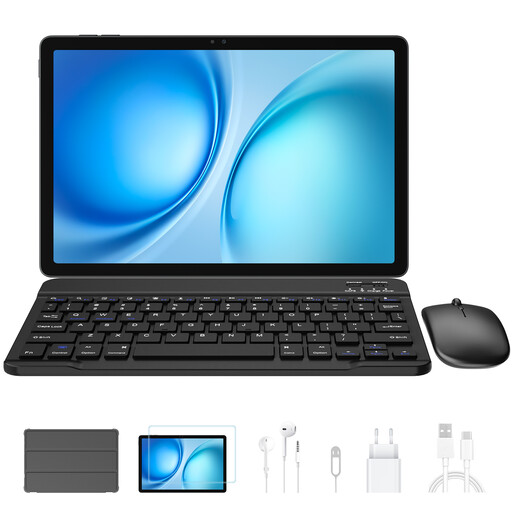
Why it stands out: The Blackview Zeno 10 focuses on raw power for multitasking. With an impressive amount of RAM and a dedicated PC mode, it transforms into a true mobile workstation.
Pros:
Who is it for? Professionals and students who juggle numerous applications and need a high-performance solution to occasionally replace a laptop.
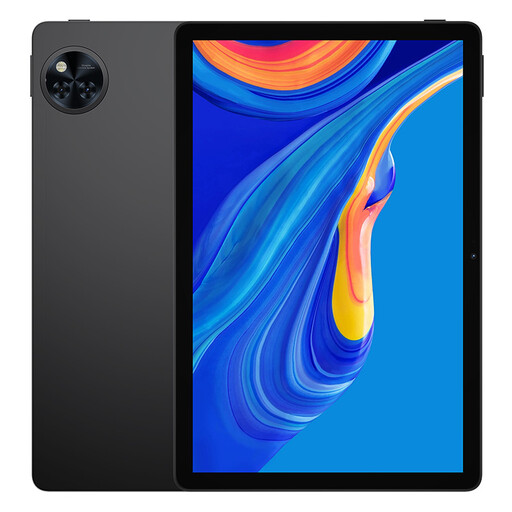
Why it stands out: The DOOGEE U11 distinguishes itself by integrating Android 15, the latest version of the operating system, offering improvements in security and user experience. It's a solid choice for entertainment and family use.
Pros:
Who is it for? Users looking for a high-performance multimedia tablet for streaming, web browsing, and gaming, while enjoying the latest Android features.

Why it stands out: With its huge screen and pressure-sensitive stylus, the Teclast ArtPad Pro is clearly built for creation. It's the ideal tool for those who love to draw, annotate, and take notes naturally.
Pros:
Who is it for? Creatives, digital artists, and students in art or architecture who need a large screen and a high-performance stylus for their projects.
If your daily use demands an even faster internet connection for 4K streaming, online gaming, or transferring large files on the go, a 5G-compatible tablet might be a better fit. Explore our full range of 5G tablets to find the model that meets your need for ultra-high speeds.
A stylus transforms how you interact with the tablet. It allows for handwritten note-taking that feels almost as natural as on paper, which is very practical for a student in class. For creatives, it's essential for drawing, photo editing, or modelling. Finally, it offers far greater precision than a finger for navigating menus or editing documents.
For many tasks, the answer is yes. An Android tablet with a keyboard and stylus is perfectly capable of handling web browsing, email management, light office work (word processing, spreadsheets), video conferencing, and media consumption. It offers superior portability and flexibility. However, for very specific software or tasks requiring significant computing power (professional video editing, advanced programming), a dedicated laptop remains unbeatable.