
Livraison le jour même ou le lendemain

Qualité garantie

Débloquez vos offres de bienvenue: Livraison GRATUITE | Jusqu'à -80 % | 30 jours d'essai gratuits à JoyPlus
Téléchargez l'application
Buying an AJAZZ AK980 V2 wireless mechanical keyboard can tick several boxes: gaming on PC, remote working, swapping switches, or simply freeing up desk space. The trouble is, product listings often mix up claimed battery life, key layout and actual compatibility. A few checks are all it takes to avoid ending up with a disappointing setup after a few weeks.
A 98% keyboard generally keeps the numeric keypad while bringing the different key blocks closer together. This format is handy for spreadsheets and office work, but it doesn't automatically mean "French AZERTY".
The AJAZZ AK980 V2 is presented with a QWERTY 98% layout. If you're used to French keyboards, it's best to check:
A QWERTY keyboard can work perfectly well with a French software layout. However, the markings on the keys won't necessarily match the characters you type.
An 8,000 mAh or 4,000 mAh battery alone won't tell you the real battery life. This varies depending on RGB backlighting usage, its brightness, the connection type and how often you recharge.
The AJAZZ AK980 V2 spec sheet states a capacity of 8,000 mAh with screen and 4,000 mAh without screen, while some marketing titles mention 10,000 mAh. The most reliable approach is to check the variant selected on the product page, rather than relying on a single figure in the title.
A hot-swap mechanical keyboard lets you replace switches without soldering. However, compatibility isn't universal: you need to check the socket type, the switch format and their compatibility with the plate used.
The gasket mount structure can make typing feel softer than with a rigid mount. But the sound and feel also depend on the switches, keycaps and the various damping layers. So this term doesn't guarantee a particular sound or a consistent feel for everyone.
Bluetooth and 2.4 GHz are two different wireless technologies. So it's worth distinguishing between the operating modes:
The AJAZZ AK980 V2 supports all three advertised modes: wired, Bluetooth and 2.4 GHz wireless. For gaming, wired mode or the supplied receiver will generally be preferable to avoid battery-related constraints.
The model has 97 keys and includes a metal knob. This can be used to adjust volume, scroll through pages or trigger shortcuts, depending on how you configure it. It's a practical addition for gaming, video calls or controlling media playback, but you'll need to check which functions are accessible via the software or built-in settings.
The integrated TFT screen distinguishes the version with a display from the version without one. So before ordering, carefully check the presentation, battery capacity and accessories included in the variant you choose.
South-facing RGB LED backlighting can improve visibility, depending on the profile of the keycaps used. The spec sheet also mentions an FR4 or PC plate depending on the version, along with a damping system made up of several layers, including Poron foam, IXPE and PET.
These elements can reduce some resonance, but they won't completely eliminate mechanical noise. In a flat or shared space, the choice of switches remains key. A linear or silent model will generally offer a very different experience from a tactile or "clicky" switch.
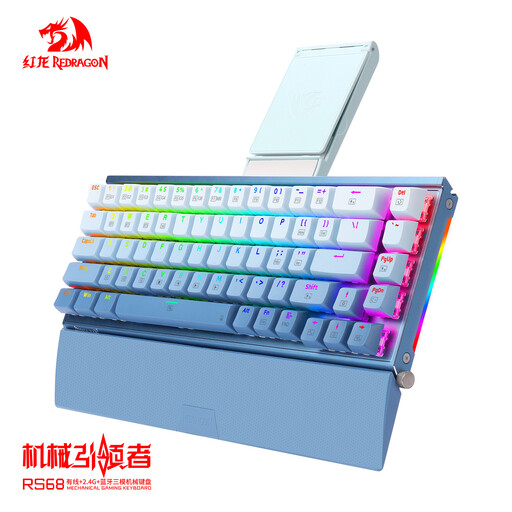
Why this choice suits this profile: This configuration is ideal for anyone wanting to discover a mechanical gaming keyboard with RGB backlighting, wired connection and replaceable switches, without needing a screen or multifunction knob.
The listing highlights a wired connection and a hot-swap PCB. So there's no need to rely on a wireless battery life that isn't specified.
Redragon switches advertised as lubricated, RGB backlighting, aluminium casing and detachable wrist rest.

Why this choice suits this profile: Customisation enthusiasts and users who switch between gaming, office work and mobile devices will find a set of advanced features and full connectivity here.
The listing distinguishes between variants with or without a screen and specifies the corresponding battery capacities – a useful check to avoid ordering a different version from the one you expected.
97 keys, metal knob, TFT screen depending on variant, gasket mount structure, hot-swap PCB and three connection modes.
Why this choice suits this profile: For a daily-use remote working or gaming setup, the numeric keypad, knob and the ability to switch to USB offer real flexibility.
The three connection modes let you continue using the keyboard in wired mode while it charges, without relying solely on wireless.
Rechargeable battery advertised at 8,000 mAh with screen or 4,000 mAh without screen, south-facing RGB LED lighting and five layers of sound damping according to the spec sheet.
We've put together a comprehensive, real-time updated selection of products that meet these strict criteria, while complying with European safety regulations.
Yes, a computer set to French will recognise the keyboard, but the model is listed as QWERTY 98%. So the software layout and physical markings may not match. Check this point before buying if you use accented characters or AZERTY shortcuts on a daily basis.
The spec sheet mentions a hot-swap PCB, designed to allow switch replacement without soldering. However, you still need to check the compatibility of the switches and the socket before making any changes. Use a suitable puller and never force the pins.
Use a certified 5 V USB-C charger, protect the keyboard from moisture and never disassemble the built-in battery. Charging in wired mode can also be handy during long gaming or work sessions. If you notice unusual heat, odour, swelling or smoke, stop using the keyboard immediately.