
Livraison le jour même ou le lendemain

Qualité garantie

Débloquez vos offres de bienvenue: Livraison GRATUITE | Jusqu'à -80 % | 30 jours d'essai gratuits à JoyPlus
Téléchargez l'application
An AIO CPU liquid cooler can improve the thermal management of a gaming processor while giving your build a polished finish. However, product listings sometimes focus more on lighting or displays than on essential considerations. Before buying a water cooling kit for your processor, check the available space, socket compatibility and the actual specifications of the pump and fans.
The mention of Intel LGA 1851/1700 or AMD AM5/AM4 does not guarantee that the radiator will fit inside your case. A 360 mm model is generally almost 394 mm long, not including the thickness of the radiator and fans. Be sure to check:
A 240 mm CPU cooler offers greater flexibility in compact cases. A 360 mm CPU cooler requires a roomier chassis, but theoretically benefits from a larger heat-dissipation surface.
An integrated LCD or digital display on the pump head can show statistics, images or animations. However, it may require an internal USB 2.0 connection as well as dedicated software. Also check whether full customisation depends on a motherboard from a particular brand.
A display cannot compensate for the radiator’s thermal performance. It is primarily a display and customisation feature.
A pump with a high stated speed is not automatically quieter or better suited to your processor. Noise also depends on the control profile, fans, case and PWM curve configured in the BIOS. Manufacturer figures should therefore be compared carefully: they are not always measured under the same conditions.
For a recent build, look specifically for support for Intel LGA 1851 liquid cooling and AMD AM5 liquid cooling. LGA 1700 and AM4 compatibility may also be useful if you are upgrading an existing machine.
Do not stop at the socket name: check that the appropriate mounting kit is included and consult the supplied manual. Incorrect installation can affect the contact between the copper base and the processor.
The 240 mm format uses two 120 mm fans, while the 360 mm format generally accommodates three. Before buying, compare the exact dimensions with those specified by the case manufacturer.
You should also plan a consistent airflow setup:
An ARGB pump generally combines pump power and addressable lighting, but connectors can vary from one model to another. Check for PWM, 3-pin ARGB and, on some products, internal USB connectors.
Specifications such as airflow in CFM, static pressure in mmH₂O and noise level in dBA are useful for comparing technical data sheets. However, they are not enough to predict performance in every case. Good PWM control allows the cooling to adapt to the processor’s workload and helps minimise noise when idle.
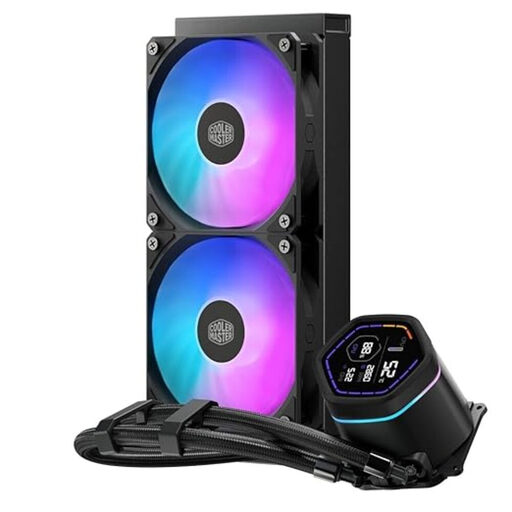
Why this choice suits this profile: Its 240 mm format is suitable for users building their first PC and working with a relatively compact case. The fans, mounting brackets and thermal paste are pre-installed, making assembly easier.
The radiator dimensions are listed as 277 × 119,6 × 27,2 mm, and compatibility covers Intel LGA 1851/1700 and AMD AM5/AM4 sockets. However, remember that the USB 2.0 connector required for the display must be connected.
Digital display on the pump, two 120 mm ARGB fans, 400 mm tubes and a stated five-year warranty.
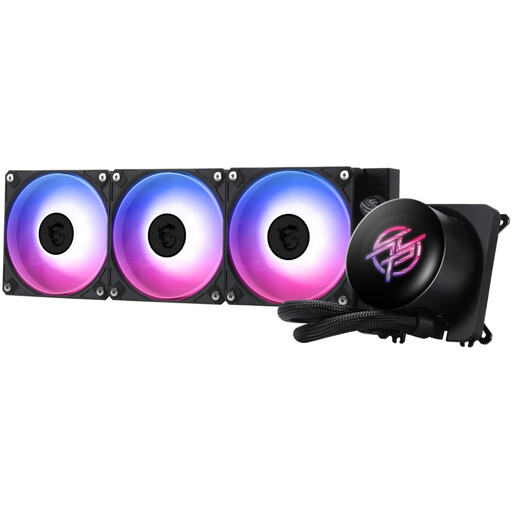
Why this choice suits this profile: This 360 mm CPU cooler is designed for high-end builds with a compatible case, offering a refined finish and visual temperature monitoring.
The product listing specifies the radiator dimensions, the fans’ PWM range and the various connectors. However, the 2.1-inch LCD requires the software support specified by MSI.
Pump speed of up to 3 400 rpm, 480 × 480-pixel LCD, pre-installed fans and compatibility with Intel LGA 1700/1851 and AMD AM4/AM5.
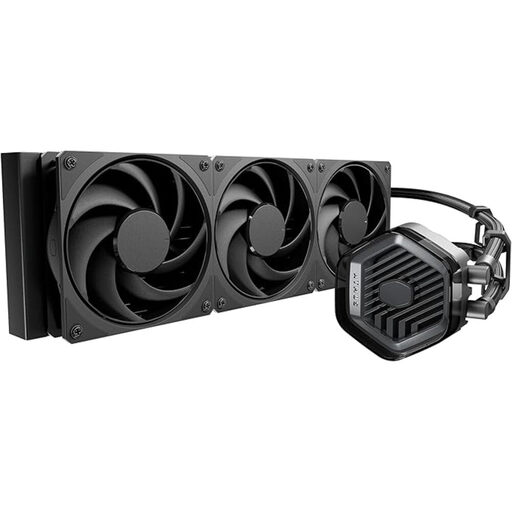
Why this choice suits this profile: Its all-black, lighting-free design suits understated builds, while its 360 mm radiator meets the needs of heavily used processors.
The technical specifications detail the 394 × 119,2 × 27,2 mm radiator, the three pre-installed fans and their PWM connection. The absence of ARGB means you do not pay for a feature you will not use.
Three Mobius 120 fans, pump speed listed as 3 400 ± 300 rpm, compatibility with LGA 1851/1700 and AM5/AM4, plus a stated five-year warranty.
We have put together a complete, real-time updated selection of products that meet these demanding criteria as well as European safety standards.
Before handling anything, switch off the computer and unplug it from the mains. If necessary, clean the processor surface with a suitable product, then secure the block, applying even pressure. Never dismantle a sealed circuit or pierce the tubes.
Once installation is complete, check that:
Regularly remove dust from the filters and radiator. If you notice any trace of liquid, immediately switch off the power and stop using the system.
A 240 mm model can be suitable for many gaming builds, depending on the processor used, its power limits and the airflow inside the case. For sustained workloads or a more power-hungry processor, a 360 mm radiator provides a larger heat-exchange surface but requires a compatible case.
It depends on the pump, fans, frequency of use and case maintenance. Check the warranty and the operating-life information provided by the manufacturer. As an AIO is sealed, it is generally not designed to be refilled by the user.
No. ARGB fans and an ARGB pump are purely visual features. Cooling performance mainly depends on the radiator, pump, base in contact with the processor, fans and airflow inside the case.