
Livraison le jour même ou le lendemain

Qualité garantie

Débloquez vos offres de bienvenue: Livraison GRATUITE | Jusqu'à -80 % | 30 jours d'essai gratuits à JoyPlus
Téléchargez l'application
Choosing a CPU AIO liquid cooler can transform your PC's performance and aesthetics. But be warned: the market is a jungle of marketing promises that too often lead to buyer's remorse. ARGB lighting that refuses to sync, a pump that gets noisy after six months, or disappointing performance despite a massive radiator are all common pitfalls.
As a product expert at Joybuy, my role is to help you cut through the noise. This guide gets straight to the point: we'll focus on the essential criteria for making an informed decision, helping you avoid design flaws and useless gimmicks that only drive up the price.
Before you even start comparing models, it's crucial to know the most common issues that frustrate buyers.
To avoid these pitfalls, focus on three fundamental technical aspects.
This is the non-negotiable starting point. Ensure the kit is explicitly compatible with your CPU socket. The most common current standards are LGA 1700 for Intel and AM5 for AMD. Most recent models include mounting kits for both platforms, but it's crucial to double-check.
Next, measure the available space in your case. A 360mm radiator (requiring three 120mm fan slots) won't fit in a compact case designed for a 240mm radiator (two 120mm fan slots). Check your case's specifications for radiator mounting locations (top, front, side) and the maximum supported thickness.
The performance of a CPU liquid cooler relies on the perfect balance between the pump and the fans.
For an ARGB water-cooling kit or a model with a screen, the software is paramount. Find out about the connection method:
Here are a few options that cater to different needs, keeping our objective selection criteria in mind.
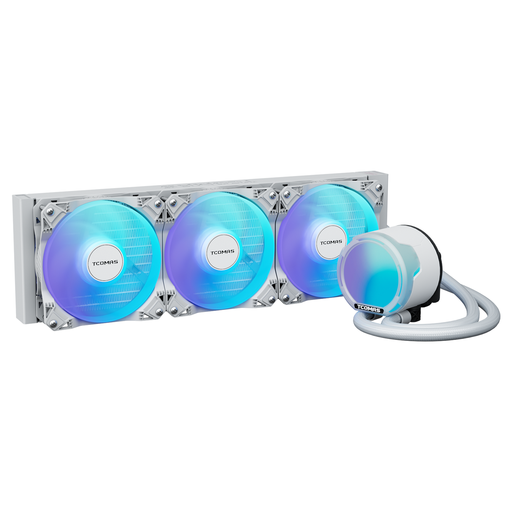
Why we recommend it: Perfect for those who want a clean build with a white AIO cooler without breaking the bank. It offers the aesthetics and performance of a 360mm radiator, ideal for a modern ATX case, while remaining at an accessible price point.
This model uses ARGB lighting on the pump and fans, designed for compatibility with major motherboard software, thus avoiding the proprietary software trap.
Its FOC three-phase pump and PWM fans with an advertised static pressure of 3.2 mmAq—an excellent indicator of effective heat dissipation through the radiator.
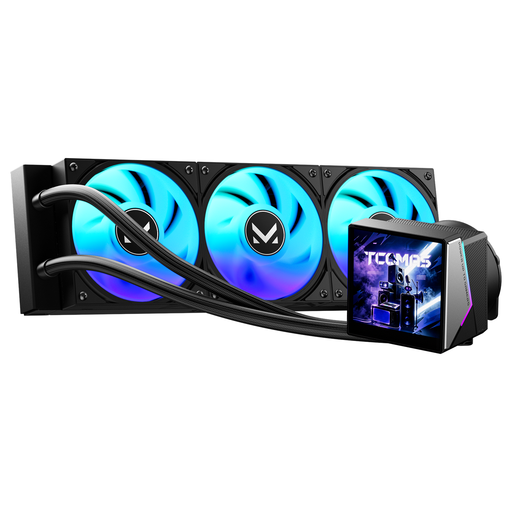
Why we recommend it: For those who want to turn their PC into a true tech showpiece. This AIO with a 3.95-inch LCD screen on the pump can display system stats, images, or GIFs, offering an advanced level of visual customisation.
The IPS screen and ARGB lighting are managed via dedicated software, but compatibility is clearly stated for recent sockets like the AM5 CPU cooler and LGA 1700, minimising the risk of unpleasant surprises.
Its large, customisable IPS screen, which doesn't sacrifice cooling performance thanks to a 360mm radiator, ensuring that aesthetics match performance.
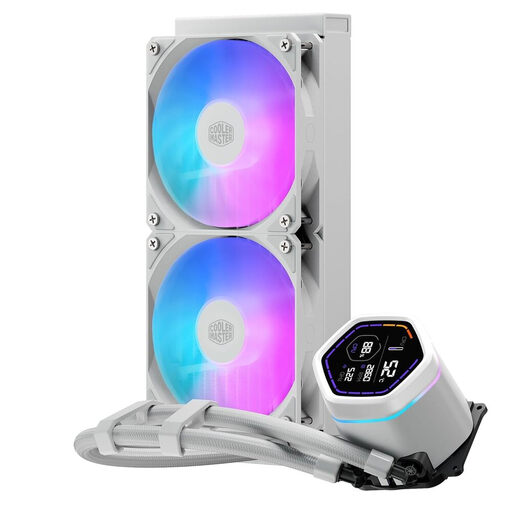
Why we recommend it: The sensible choice for those who prioritise efficiency and low noise levels. The 240mm size is versatile, and the pump design makes a strong case for durability and acoustic performance.
It neutralises the risk of a noisy pump with its patented dual-chamber design, which aims to optimise flow and pressure while reducing turbulence and noise.
The pump design and pre-installed fans simplify installation. The 5-year warranty offered by Cooler Master is a true vote of confidence in the product's durability.
Explore our full selection of products that meet our selection criteria and the strictest safety standards.
An AIO (All-In-One) liquid cooler is a sealed system and requires no refilling. Its lifespan is generally limited by the pump, which is the only moving mechanical part (besides the fans). Most manufacturers offer warranties ranging from 3 to 6 years, which is a good indicator of its expected longevity. Over time, a small amount of liquid can evaporate through permeation in the tubing, which may slightly reduce performance after several years.
No. Unlike custom water-cooling loops, AIOs are factory-sealed closed loops. The only recommended maintenance is to regularly dust the radiator and fans (every 6 to 12 months) to maintain optimal airflow and ensure good cooling performance.
In theory, a larger radiator surface area allows for more heat dissipation. In practice, a 360mm AIO cooler will generally offer better performance than a 240mm AIO coolerfrom the same product line. However, a high-end 240mm model with excellent high-static-pressure fans and an efficient pump can easily match, or even outperform, an entry-level 360mm model. The final choice also depends on your CPU and your use case (overclocking, gaming, etc.).