
Livraison le jour même ou le lendemain

Qualité garantie

Débloquez vos offres de bienvenue: Livraison GRATUITE | Jusqu'à -80 % | 30 jours d'essai gratuits à JoyPlus
Téléchargez l'application
Buying affordable computer hardware isn’t just about picking the lowest price. A cheap setup can quickly become a false economy if it’s not compatible with your computer, too limited for your needs, or lacking the ports you actually require.
For individuals, students, remote workers and small businesses, three mistakes crop up time and again:
For office work, video calls, web browsing and professional documents, a laptop with 8 GB RAM and a 512 GB SSD provides a solid foundation. Compared with a mechanical hard drive, an SSD typically speeds up system boot times and file opening.
The processor, however, remains a key factor. An AMD Ryzen 3 laptop can be perfectly adequate for everyday use, as long as you don’t expect it to run demanding software or modern games comfortably. If you often work with several applications open at once, also check whether the RAM can be upgraded or replaced.
A low profile graphics card is designed for compact cases. But that label doesn’t let you off measuring the available space. Check the following:
A PCIe 3.0 graphics card needs to be installed in a compatible PCI Express 16x slot. This interface describes the connection to the motherboard, not the overall performance level. An older card with a large amount of video memory can still be held back by the capabilities of its graphics processor.
A Full HD laptop typically offers a resolution of 1,920 × 1,080 pixels, which is well suited to documents, videos and most everyday tasks. Don’t forget to check the keyboard too – particularly whether it has a UK layout if you’re based in the UK.
For a graphics card, the HDMI, DVI or VGA outputs must match your monitor or adapters. A low-power model can be a good choice for breathing new life into an older desktop PC. A more powerful card, on the other hand, will need a suitable power supply and adequate cooling.
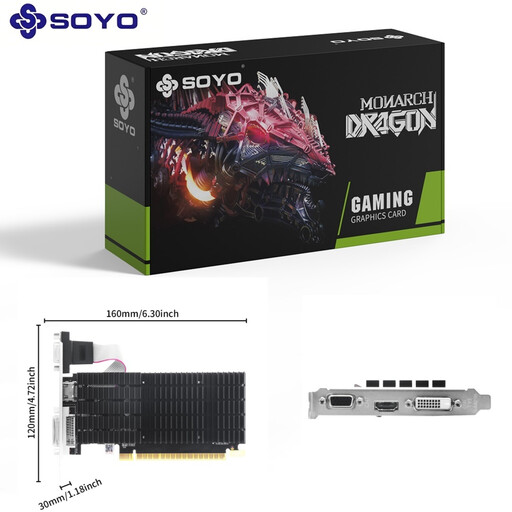
Why this choice suits this profile: this card is aimed at those who want to upgrade a desktop PC used for office work, multimedia playback and a few undemanding games. Its compact size may fit narrower cases, but you should still check its dimensions.
The spec sheet states a power consumption of 19 W, a recommended 300 W power supply and three video outputs: DVI, HDMI and CRT. That gives you concrete information to check compatibility before you order.
2 GB of DDR3 memory, a 64-bit memory interface, claimed support for DirectX 12 and OpenGL 4.6, all in a compact 160 × 120 × 30 mm form factor.
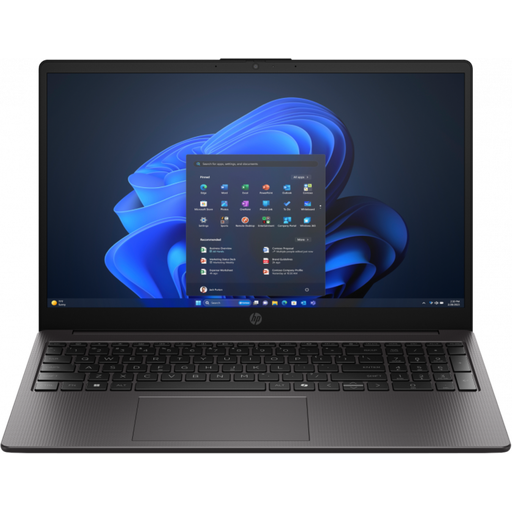
Why this choice suits this profile: this model is aimed at users who want a cohesive package, with a Full HD screen, an SSD, modern connectivity and an operating system already installed.
The spec sheet lists the 1,920 × 1,080 resolution, 8 GB of DDR5 memory, the 512 GB SSD and the UK keyboard layout. That means you can compare concrete features rather than relying on a vague promise of versatility.
AMD Ryzen 3 7335U processor, AMD Radeon 660M graphics, Wi-Fi 6, Bluetooth 5.4, USB-C, two USB-A ports and HDMI.
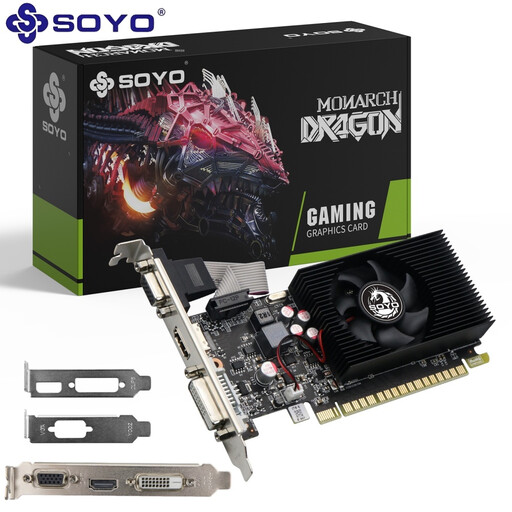
Why this choice suits this profile: this card may appeal to users who want more video memory for multimedia and some undemanding games, in a compatible older system.
The spec sheet states a PCI Express 3.0 16x interface, power consumption of 74 W and a recommended 205 W power supply. That encourages you to check the motherboard, case and power supply before buying.
4 GB of DDR3 memory on a 128-bit bus, 384 shader units, VGA, HDMI and DVI outputs, cooling via fan and heat pipe.
We’ve put together a comprehensive, real-time updated selection of products that meet these strict criteria and European safety standards.
A laptop with 8 GB of RAM, a 512 GB SSD, a webcam suited to your needs and an HDMI or USB-C output provides a sensible starting point. The HP 255R G10 also offers Wi-Fi 6, Bluetooth 5.4 and a UK keyboard layout. For demanding professional software, though, do check the minimum system requirements.
It can be sufficient for office display, multimedia playback and some undemanding games. However, DDR3 memory alone isn’t a reliable indicator of performance. Check PCIe compatibility, the video outputs, the power supply wattage and the available space inside your case.
Choose a power level that matches your needs, avoid overspecifying the graphics card, and make sure the cooling is adequate. Regular dusting, keeping the system up to date and using a compatible charger will also help to prolong the life of your equipment.