
Livraison le jour même ou le lendemain

Qualité garantie

Débloquez vos offres de bienvenue: Livraison GRATUITE | Jusqu'à -80 % | 30 jours d'essai gratuits à JoyPlus
Téléchargez l'application
Choosing a keyboard is often a matter of compromise. On one hand, you have full-size models that devour desk space. On the other, there are ultra-compact layouts (TKL, 60%) that ditch the number pad, which is essential for many people's work or gaming. This is where the 96% mechanical keyboard, a layout that's rapidly gaining popularity, comes into play.
Its secret? A clever design that preserves all the keys of a standard keyboard, including the number pad, in a frame barely wider than a TKL model. It's a compelling option for gamers, developers, and creatives looking to optimize their workspace without sacrificing a single feature.
In this guide, we'll break down the key points to consider before you buy and present our selection of the top models on the market to help you find the perfect 96% keyboard for your needs.
Before you pull the trigger, let's review the technical details that will make all the difference in your daily use.
How your keyboard communicates with your devices is a critical factor.
If there's one thing that defines the mechanical keyboard world, it's customization. The cornerstone of this modularity is the hot-swap feature. A hot-swappable gaming keyboard allows you to change its switches on the fly, without needing a soldering iron.
This gives you the freedom to experiment with different types of switches to sculpt your ideal custom keyboard:
Don't let the numbers confuse you: the terms 96% keyboard and 98% keyboard refer to the same family of compact keyboards with a number pad. The difference, often subtle, comes down to the spacing between key clusters or the presence of one or two extra function keys. But the goal remains the same: to offer the maximum number of keys in the minimum amount of space.
Let's get to the specifics with a few iconic models that perfectly embody the strengths of this layout.
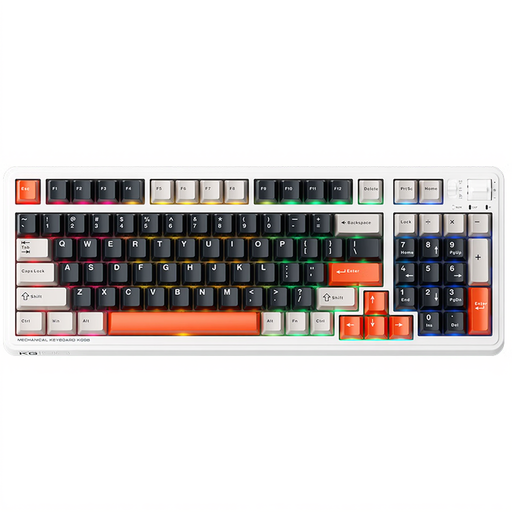
Why we love it: The Machenike KG98 is a turnkey solution that's incredibly effective right out of the box. Its tri-mode connectivity makes it ultra-versatile, while its pre-lubed linear switches (Ice Cream Pro Max) ensure a velvety-smooth and pleasant typing experience, no tinkering required.
Pros:
Who is it for? Anyone looking for a high-performance, versatile, and ready-to-use keyboard with a bold aesthetic.
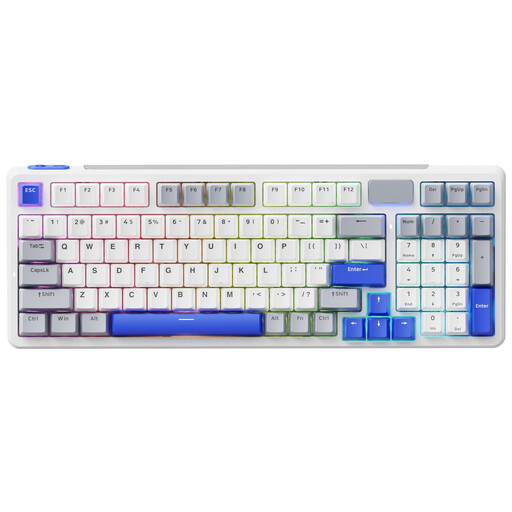
Why we love it: The RAPOO V700DIY is clearly aimed at purists and customization enthusiasts searching for the perfect typing feel. Its Gasket Mount structure, which suspends the plate on silicone gaskets, and its multiple layers of sound-dampening foam deliver the muted acoustics and typing flexibility highly sought after by connoisseurs.
Pros:
Who is it for? Enthusiasts who want to fine-tune their experience, swap out switches at will, and achieve that signature "creamy" sound of custom keyboards.

Why we love it: The AJAZZ AK980 V2 packs refinements usually found on much pricier models. Its metal control knob is a real bonus for managing volume or scrolling, and the version with a TFT screen lets you display system info or GIFs. Its enormous battery is another one of its key strengths.
Pros:
Who is it for? Tech enthusiasts who appreciate extra features and want a 98% keyboard that combines performance, record-breaking battery life, and advanced customization.
Not completely sold on the 96% layout? Or maybe you're just curious to explore other options? Take a look at our full selection of peripherals to find the hidden gem that will complete your setup.
? Explore our selection of Bluetooth keyboards and mice
A 96% keyboard is a layout that manages to fit nearly all the keys of a standard keyboard, including the number pad, into a much more compact frame. The trick is to eliminate the empty space between the different key clusters (main typing area, arrows, numpad) and reorganize the navigation block (Insert, Delete, etc.).
A hot-swappable keyboard allows you to change the mechanical switches without any soldering. This is a major advantage for anyone who loves to customize their gear: you can freely test different types of switches (linear, tactile, clicky) to find the typing feel that's right for you, or simply replace a faulty switch in seconds.
A 2.4?GHz connection uses a dedicated USB dongle. It provides an ultra-responsive wireless connection with virtually imperceptible latency, making it the preferred mode for online gaming. Bluetooth, on the other hand, is more universal and doesn't require a dongle. It allows you to connect the keyboard to a multitude of devices (PC, tablet, etc.) and easily switch between them, making it a great ally for productivity. A tri-mode keyboard offers you the best of both worlds, in addition to a wired option.