
Livraison le jour même ou le lendemain

Qualité garantie

Débloquez vos offres de bienvenue: Livraison GRATUITE | Jusqu'à -80 % | 30 jours d'essai gratuits à JoyPlus
Téléchargez l'application
A 750 W PC power supply is suitable for many gaming, content creation and general-purpose builds. However, the wattage alone doesn’t guarantee that it will be compatible with your PC or keep it running stably.
There are three common pitfalls to watch out for when buying:
To avoid any unwelcome surprises, compare the electrical standard, connectors, efficiency, cooling and cable design.
For a recent build, an ATX 3.1 power supply is designed to handle the load variations of modern components more effectively. The 12V-2x6 connector, associated with the PCIe 5.1 standard, lets you connect some recent graphics cards using a native cable rather than several adapters.
However, always check your graphics card’s specifications. A 12V-2x6 connector on the power supply doesn’t mean every graphics card needs one. Older models may use 6+2-pin PCIe connectors.
A power supply for an RTX graphics card must also deliver enough power on the 12 V rail. For a particularly power-hungry build, add up the power consumption of the processor, graphics card, fans, drives and accessories, then leave a reasonable margin.
An 80 PLUS Gold PC power supply limits energy lost as heat compared with less efficient models, under the conditions set out by the certification. It can therefore help reduce electricity consumption and the load on the fan.
However, certification shouldn’t be your only consideration. Also check:
The figures in this article are based on the specifications provided for each product. They may vary depending on the revision, region of sale or conditions of use.
A 750 W ATX power supply is generally between 140 and 150 mm deep, but always check the space available in your case. For a compact PC, you may need a 750 W SFX power supply. An SFX-to-ATX adapter may be included, but this depends on the model.
Modularity is primarily a practical consideration:
If you’re looking for a quiet PC power supply, check the fan diameter, bearing type and whether it has a fan-stop mode at low loads. Noise levels also depend on the temperature inside the case, the load and the overall airflow.
The following models suit a range of needs: a typical gaming build, a recent graphics card, a compact case or a quieter PC. Always check their dimensions against your case before placing your order.
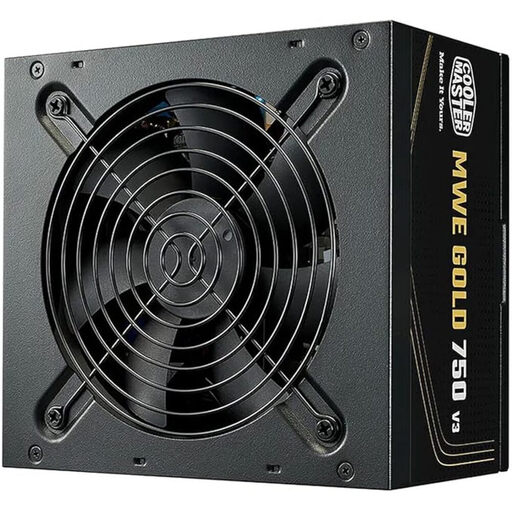
Why it suits this type of user: This 750 W ATX power supply is designed for everyday gaming builds where simple installation and 80 PLUS Gold certification are priorities.
ATX 3.1 compatibility and the native 12V-2x6 cable mean you can avoid using adapters with some recent graphics cards.
750 W output, 80 PLUS Gold certification, 120 mm HDB fan and manufacturer-listed electrical protections.
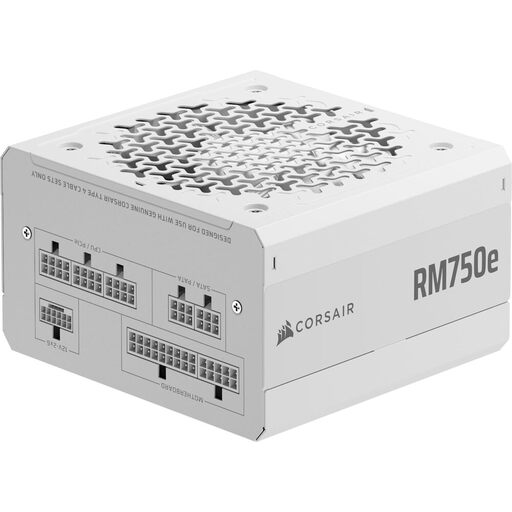
Why it suits this type of user: Its fully modular design, white cables and compact ATX form factor make it a good fit for a neat, personalised build.
The native 12V-2x6 connector and ATX 3.1 compliance meet the needs of some recent graphics cards without adding multiple connections.
Fully modular cabling, Cybenetics Gold certification and a Zero RPM mode listed for low loads.
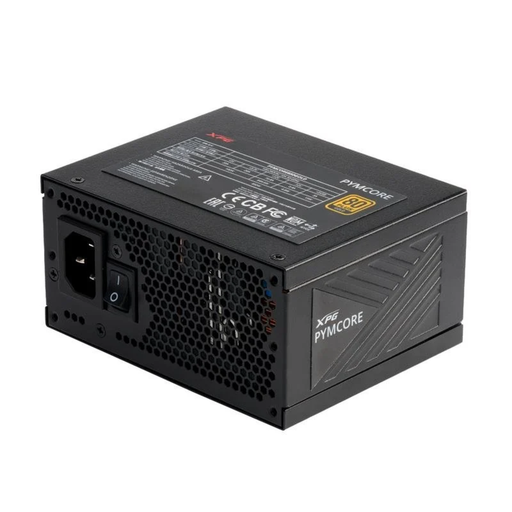
Why it suits this type of user: Its SFX form factor is designed for compact cases that need to fit high output into a limited space.
The SFX form factor avoids the need to fit an oversized ATX power supply, provided your case and its mounting bracket are compatible.
Fully modular design, ATX 3.1 standard, and 80 PLUS Gold and Cybenetics Platinum certifications listed in the specifications.
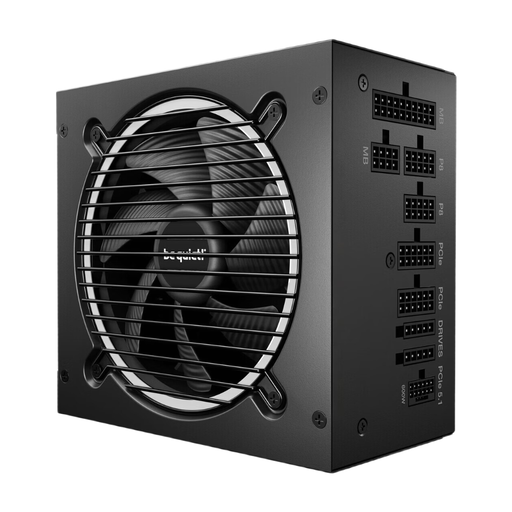
Why it suits this type of user: This model combines 750 W output and a modular design with a 120 mm fan whose thermal management is billed as quiet.
Modularity reduces the number of unused cables inside the case and helps keep airflow clear.
80 PLUS Gold certification, fully modular cables and a 120 mm fan with thermal control.
We’ve put together a comprehensive, real-time updated list of products that meet these strict selection criteria and European safety regulations.
Before installing your 750 W PC power supply:
Never open the power supply: its capacitors may retain an electrical charge after it has been unplugged. Clean only the grilles and fan, with the unit switched off.
It can suit many builds, but it depends on the exact graphics card and processor models, as well as their power spikes. Check the graphics card manufacturer’s recommendations and make sure the necessary connectors are available, including 12V-2x6 or 6+2-pin PCIe connectors.
Its lifespan depends on the quality of its components, temperature, dust and daily workload. A long warranty is a useful contractual indicator, but it can’t predict exactly how long the power supply will last. Make sure there’s good airflow and avoid exceeding its rated output.
It can reduce energy losses compared with a less efficient power supply, but the actual savings depend on your computer’s power consumption, how many hours you use it and its load level. Certification won’t turn a power-hungry build into a low-energy system.