
Livraison le jour même ou le lendemain

Qualité garantie

Débloquez vos offres de bienvenue: Livraison GRATUITE | Jusqu'à -80 % | 30 jours d'essai gratuits à JoyPlus
Téléchargez l'application
By Joybuy, Product Recommendation Manager
The 75% keyboard layout is becoming increasingly popular, and for good reason. It's the perfect compromise between the compactness of a 60% keyboard and the functionality of a TKL (Tenkeyless) model. You keep the precious function keys (F1-F12), arrow keys, and some navigation commands, all while freeing up vital space on your desk.
Whether you're a gamer looking to maximise mouse space, a developer, or a writer seeking efficiency, finding the right model can quickly become a headache with the overwhelming number of options available. This guide is here to help you make sense of it all, breaking down the essential criteria and showcasing the models that stand out from the crowd.
Before jumping on the first model you see, it's crucial to understand what truly sets one 75% mechanical keyboard apart from another. Here are three key points to watch for.
The connection method directly impacts your experience and the organisation of your setup.
One of the biggest draws of mechanical keyboards is the typing feel. The hot-swappable feature has become a must-have criterion for many enthusiasts. It allows you to change the switches under each key without any soldering.
This means you can experiment with different types of switches (linear for a smooth keystroke, tactile for a noticeable bump, or clicky for an assertive sound) to craft a custom keyboard perfectly suited to your preferences.
Build quality affects the keyboard's durability, sound, and overall feel.
Here are a few models that stand out for their performance and cater to different needs and budgets.
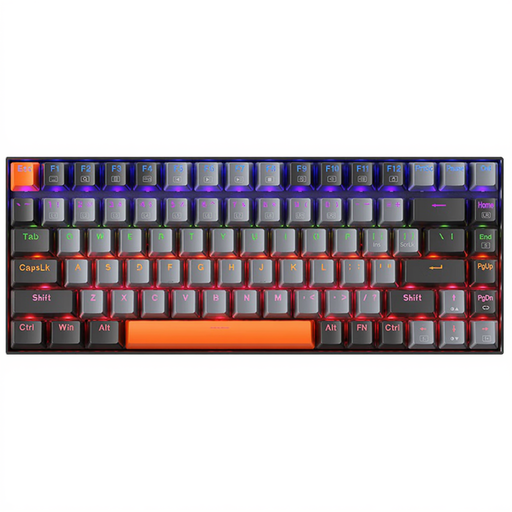
What sets it apart
The Machenike K500A-B84 is an 84-key keyboard that gets straight to the point. It offers a reliable, no-frills mechanical experience in a compact form factor. Its wired connection ensures rock-solid responsiveness, making it an excellent tool for work and gaming.
Highlights
Who is it for?
Ideal for those looking for their first 75% mechanical keyboard or a simple, reliable, and affordable wired option for daily use or casual gaming.
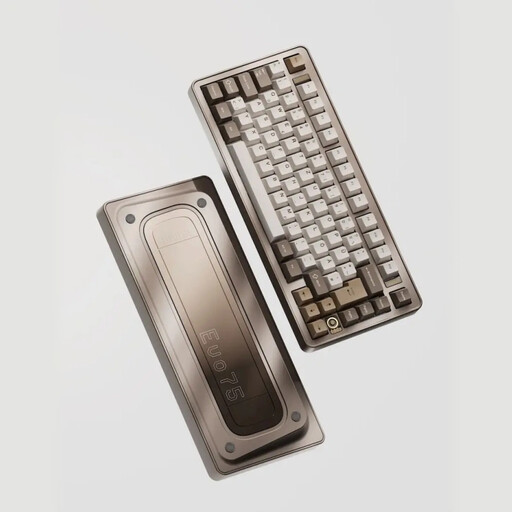
What sets it apart
The Ticktype EVO75 is aimed at enthusiasts and purists seeking top-tier build quality and extreme customisation. Its full aluminium case, tri-mode connectivity, and VIA compatibility make it an exceptional foundation for building a custom keyboard.
Highlights
Who is it for?
For developers, creatives, and avid gamers who want to invest in a high-end, fully customisable, and compact gaming keyboard that's built to last.
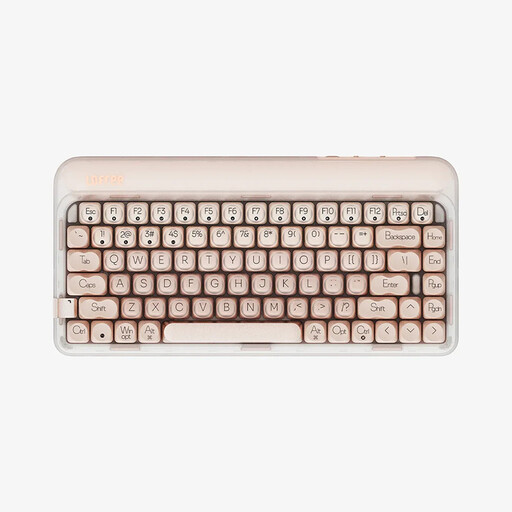
What sets it apart
The Lofree OE914 stands out with its sleek design and finely-tuned acoustics. It incorporates multiple dampening layers for a softer, more muted sound. Its tri-mode versatility and unique aesthetic make it a first-rate choice for those who value style as much as performance.
Highlights
Who is it for?
For users looking for a versatile keyboard for work and play, with a polished aesthetic and a particularly satisfying typing experience.
Our selection is just a taste of the vast world of mechanical keyboards. Every user has unique needs when it comes to typing feel, design, and features.
If these models don't exactly match what you're looking for, we invite you to browse our wider collection to find the peripheral that will fit perfectly into your setup.
Discover Our Full Range of USB Keyboards and Mice
Both a TKL (80%) and a 75% keyboard have function keys (F1-F12) and arrow keys. The main difference lies in the layout: a 75% keyboard condenses the navigation keys (Insert, Delete, Page Up/Down) into a single column on the right and removes the gaps between key clusters. The result is a significant space saving in width, ideal for smaller desks or for gamers who want maximum room for their mouse.
Absolutely. The keyboards featured here have a QWERTY (US) layout. However, your operating system (Windows, macOS) is what manages the key mapping. By simply configuring your OS to your preferred language layout (e.g., "French (AZERTY)"), the keys will produce the correct characters, even if the letters printed on them differ. You'll get used to it very quickly, especially if you are a touch typist.
A hot-swappable keyboard is a mechanical keyboard whose switches (the mechanisms under the keys) can be removed and replaced without any soldering. This offers complete customisation freedom: if you don't like the typing feel, you can simply buy another type of compatible switch (usually 3-pin or 5-pin) and install them yourself in minutes with the tools that are typically included.